Hello Gtzpower,
To help us get a better understanding of the issue, we’d like to ask a few questions.
1. Does this happen with all messages, or only ones from certain contacts?
2. Were any changes made to your device before this started? If so, what changes were made?
3. Which iOS version is your device running at this time? This link explains how to check, and may help: Find the software version on your iPhone, iPad, or iPod
The above details will help us plan how to proceed.
If you haven't done so already, please try restarting your device so we can determine if that improves the issue at all. Restarting can help correct several issues. This link will guide you through how to restart: Restart your iPhone
Restart your iPhone
Learn how to turn your iPhone off, then back on.
How to restart your iPhone X, 11, 12, 13, or later
1. Press and hold either volume button and the side button until the power-off slider appears.

2. Drag the slider, then wait 30 seconds for your device to turn off. If your device is frozen or unresponsive, force restart your device.
3. To turn your device back on, press and hold the side button (on the right side of your iPhone) until you see the Apple logo.
How to restart your iPhone 6, 7, 8, or SE (2nd or 3rd generation)
1. Press and hold the side button until the power-off slider appears.

2. Drag the slider, then wait 30 seconds for your device to turn off. If your device is frozen or unresponsive, force restart your device.
3. To turn your device back on, press and hold the side button until you see the Apple logo.
How to restart your iPhone SE (1st generation), 5, or earlier
1. Press and hold the top button until the power-off slider appears.
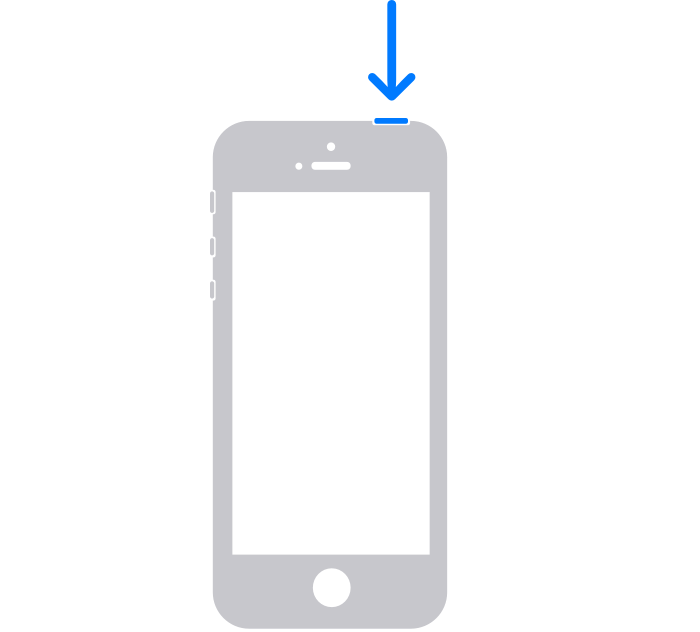
2. Drag the slider, then wait 30 seconds for your device to turn off. If your device is frozen or unresponsive, force restart your device.
3. To turn your device back on, press and hold the top button until you see the Apple logo.
Thanks!

