How to add credit card in Apple wallet
How I start Apple Pay
iPhone X
How I start Apple Pay
iPhone X
Hello GurmilanSingh,
For help with setting up Apple Pay, check out the steps on this page: Set up Apple Pay. To use Apple Pay, you need the following:
• A compatible device1 with the latest version of iOS or iPadOS, watchOS, or macOS.
• A supported card from a participating card issuer.
• An Apple ID signed in to your Apple device.
• To be in a region that supports Apple Pay: Countries and regions that support Apple Pay
Since it looks like you're using an iPhone X, you can follow these steps:
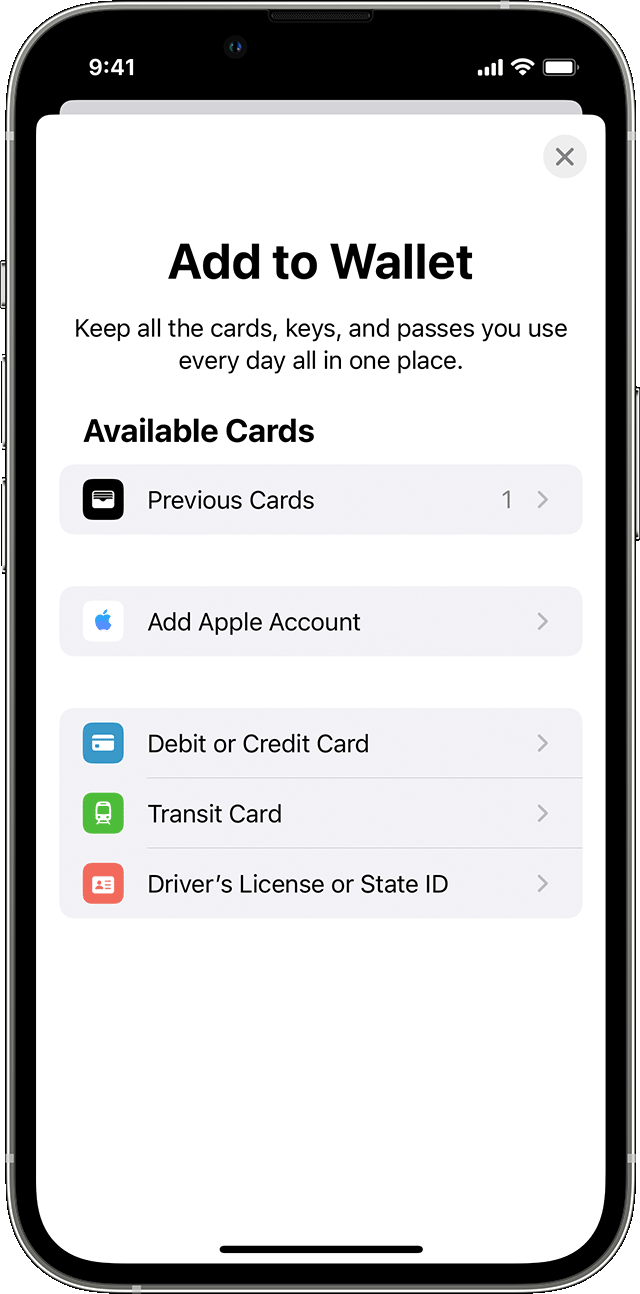
How to add a debit or credit card on your iPhone
1. In the Wallet app, tap the Add button.
• Tap Debit or Credit Card to add a new card.
• Tap Previous Cards to add a card that you used previously.
2. Tap Continue.
3. Follow the steps on the screen to add a new card.
4. Verify your information with your bank or card issuer. They might ask you to provide more information or to download an app before approving your card for use with Apple Pay.
5. If you have a paired Apple Watch, you have the option to also add the card to your watch.
Best wishes!
Hello GurmilanSingh,
For help with setting up Apple Pay, check out the steps on this page: Set up Apple Pay. To use Apple Pay, you need the following:
• A compatible device1 with the latest version of iOS or iPadOS, watchOS, or macOS.
• A supported card from a participating card issuer.
• An Apple ID signed in to your Apple device.
• To be in a region that supports Apple Pay: Countries and regions that support Apple Pay
Since it looks like you're using an iPhone X, you can follow these steps:
How to add a debit or credit card on your iPhone
1. In the Wallet app, tap the Add button
• Tap Debit or Credit Card to add a new card.
• Tap Previous Cards to add a card that you used previously.
2. Tap Continue.
3. Follow the steps on the screen to add a new card.
4. Verify your information with your bank or card issuer. They might ask you to provide more information or to download an app before approving your card for use with Apple Pay.
5. If you have a paired Apple Watch, you have the option to also add the card to your watch.
Best wishes!
How to add credit card in Apple wallet