Can I use my iPod pro to help my h sting of normal conversations, like using a hearing aid?
Can I use my AirPod pros to help my hearing normal conversations, similar to hearing aids?
Can I use my AirPod pros to help my hearing normal conversations, similar to hearing aids?
Hello Dudchock1977,
That's a great question, and we'd like to provide some information to help answer it.
You can use Live Listen with your AirPods Pro. "Live Listen can help you hear a conversation in a noisy area or even hear someone speaking across the room."
Please check out the information in the following link, which outlines the requirements for Live Listen, and how to use it, which may help: Use Live Listen with AirPods or Beats
Use Live Listen with AirPods or Beats
With Live Listen, your iPhone, iPad, or iPod touch can act like a microphone that sends sound to your AirPods or Beats.
Live Listen can help you hear a conversation in a noisy area or even hear someone speaking across the room.
To use Live Listen with your AirPods, AirPods Pro, AirPods Max, Powerbeats Pro, or Beats Fit Pro, your iOS or iPadOS device needs iOS or iPadOS 14.3 or later. You also need to connect your AirPods, AirPods Pro, AirPods Max, Powerbeats Pro, or Beats Fit Pro to your device.
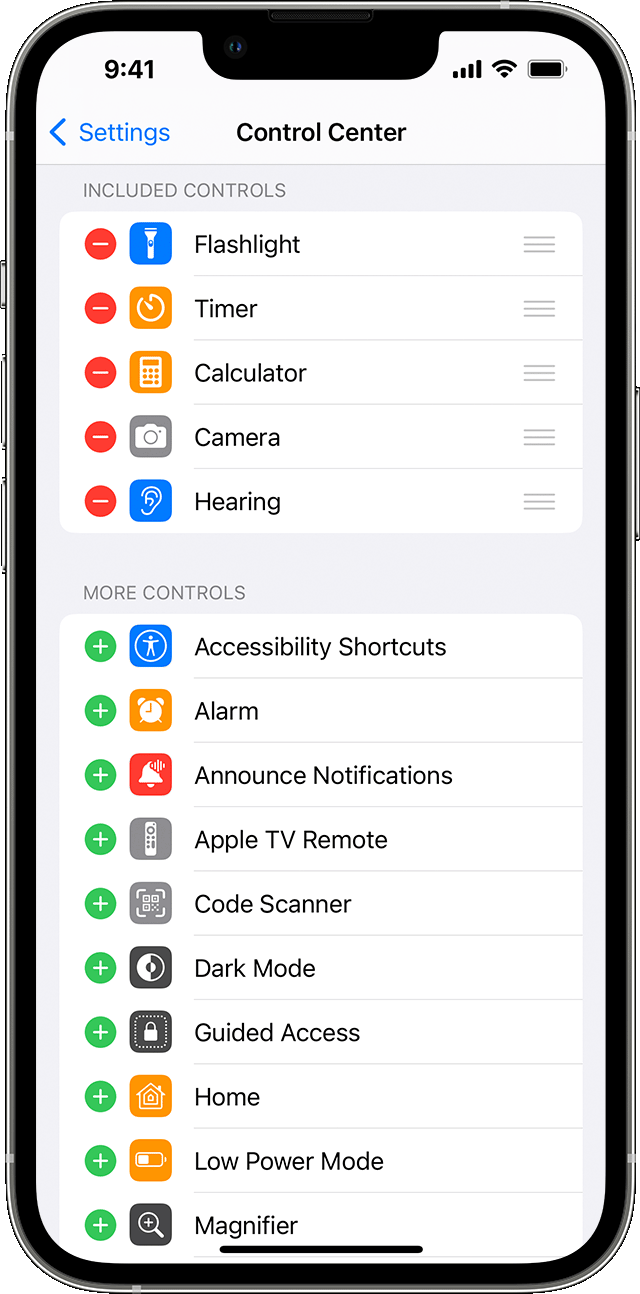
Add Live Listen to Control Center
To use Live Listen, you need to add it to Control Center:
1. Go to Settings > Control Center.
2. Scroll down and tap the Add buttonnext to the Hearing button
.
3. Tap Settings to save the changes.
Thanks!
Hello Dudchock1977,
That's a great question, and we'd like to provide some information to help answer it.
You can use Live Listen with your AirPods Pro. "Live Listen can help you hear a conversation in a noisy area or even hear someone speaking across the room."
Please check out the information in the following link, which outlines the requirements for Live Listen, and how to use it, which may help: Use Live Listen with AirPods or Beats
Use Live Listen with AirPods or Beats
With Live Listen, your iPhone, iPad, or iPod touch can act like a microphone that sends sound to your AirPods or Beats.
Live Listen can help you hear a conversation in a noisy area or even hear someone speaking across the room.
To use Live Listen with your AirPods, AirPods Pro, AirPods Max, Powerbeats Pro, or Beats Fit Pro, your iOS or iPadOS device needs iOS or iPadOS 14.3 or later. You also need to connect your AirPods, AirPods Pro, AirPods Max, Powerbeats Pro, or Beats Fit Pro to your device.
Add Live Listen to Control Center
To use Live Listen, you need to add it to Control Center:
1. Go to Settings > Control Center.
2. Scroll down and tap the Add button
3. Tap Settings to save the changes.
Thanks!
Thank You!
Dudchock1977,
You're very welcome!
Please feel free to reach back out to the Apple Support Communities if you have any other questions or concerns.
Take care!
Can I use my iPod pro to help my h sting of normal conversations, like using a hearing aid?