Apple Music not working

I have Apple Music on my iPad. I am trying out the new sing feature and it doesn’t look different. I can’t edit the volume for different singers and it is not showing when I should say the lyrics. I am using the sing playlist that Apple created. I am using iPad (9th Generation) on the latest iOS.

Thanks in advance,

Sameera

iPad, iPadOS 16

Posted on Dec 17, 2022 1:54 PM

Reply
Question marked as Top-ranking reply

Posted on Dec 19, 2022 6:17 PM

Hey there, and welcome to Apple Support Communities IcedCoffee_Corgi_Queen,


We can certainly understand your concern and can help provide some insight.


We recommend checking out these steps on how to see lyrics and sing in Apple Music in order to verify if it matches up with your procedures.


" Follow along as you listen to your favorite songs with perfectly timed lyrics that appear line-by-line and beat-by-beat. Adjust the vocals so that you can sing along to the music you love. All with your Apple Music subscription.


iPhone showing the Lyrics button 

How to see lyrics on your iPhone or iPad

  1. Open the Apple Music app. 
  2. Play a song from the Apple Music catalog.
  3. At the bottom of the screen, tap the song that's playing.

4.To show or hide lyrics, tap Lyrics the Lyrics button at the bottom of your screen. If available, time-synced lyrics will automatically appear on your screen.

    • If time-synced lyrics aren’t available, then you might see the full lyrics for the song instead.


If you don't see lyrics on your iPhone or iPad

If the Lyrics button the Lyrics button is grayed out, you’re playing a song that's not from the Apple Music catalog, lyrics aren’t available for that song, or you're not connected to the internet.
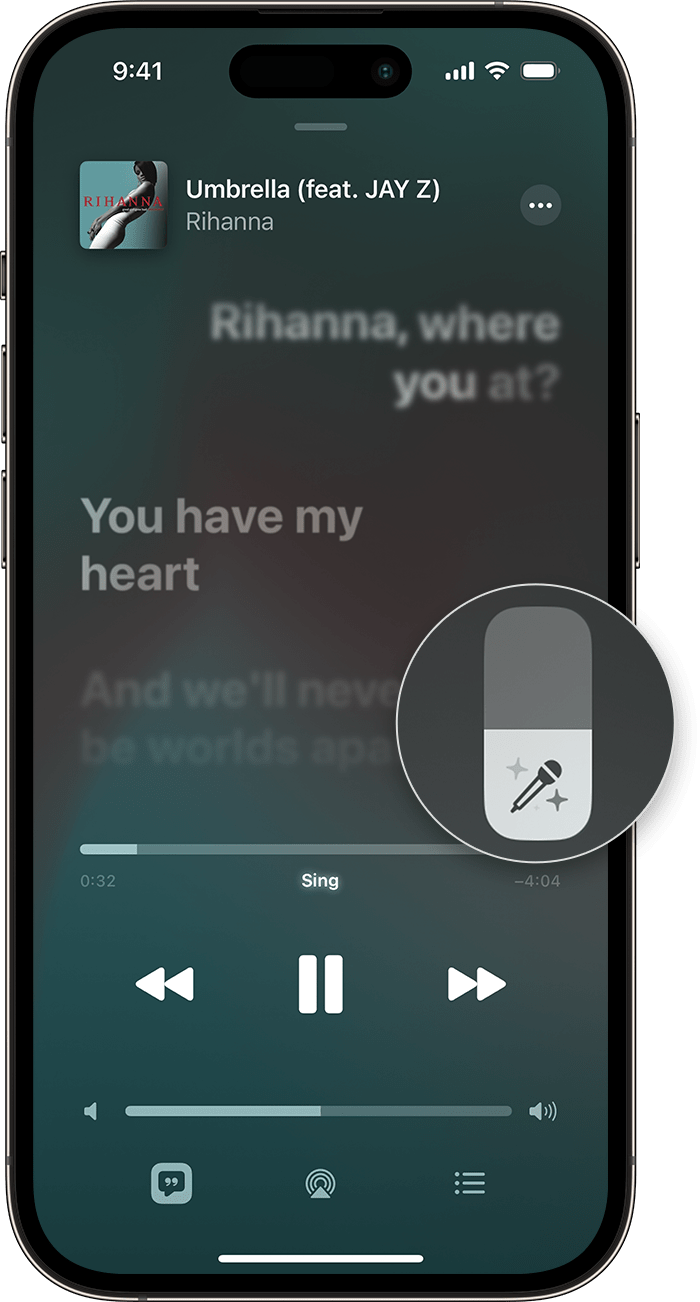
iPhone showing the slider to adjust the vocals

How to use Apple Music Sing on your iPhone or iPad

  1. Open the Apple Music app.
  2. Play a song from the Apple Music catalog.
  3. Tap the song that’s playing.
  4. At the bottom of your screen, tap Lyrics the Lyrics button.
  5. Tap the Mic Vocal Volume buttonDon’t see the Mic button?
  6. To adjust the vocals, drag the slider up or down. "


For additional information, check out this link: See lyrics and sing in Apple Music on your iPhone or iPad - Apple Support


These steps will help ensure your device is working with ease and can fix common issues like the ones you’re experiencing.


Kindest regards!

1 reply
Question marked as Top-ranking reply

Dec 19, 2022 6:17 PM in response to IcedCoffee_Corgi_Queen

Hey there, and welcome to Apple Support Communities IcedCoffee_Corgi_Queen,


We can certainly understand your concern and can help provide some insight.


We recommend checking out these steps on how to see lyrics and sing in Apple Music in order to verify if it matches up with your procedures.


" Follow along as you listen to your favorite songs with perfectly timed lyrics that appear line-by-line and beat-by-beat. Adjust the vocals so that you can sing along to the music you love. All with your Apple Music subscription.


iPhone showing the Lyrics button 

How to see lyrics on your iPhone or iPad

  1. Open the Apple Music app. 
  2. Play a song from the Apple Music catalog.
  3. At the bottom of the screen, tap the song that's playing.

4.To show or hide lyrics, tap Lyrics the Lyrics button at the bottom of your screen. If available, time-synced lyrics will automatically appear on your screen.

    • If time-synced lyrics aren’t available, then you might see the full lyrics for the song instead.


If you don't see lyrics on your iPhone or iPad

If the Lyrics button the Lyrics button is grayed out, you’re playing a song that's not from the Apple Music catalog, lyrics aren’t available for that song, or you're not connected to the internet.

iPhone showing the slider to adjust the vocals

How to use Apple Music Sing on your iPhone or iPad

  1. Open the Apple Music app.
  2. Play a song from the Apple Music catalog.
  3. Tap the song that’s playing.
  4. At the bottom of your screen, tap Lyrics the Lyrics button.
  5. Tap the Mic Vocal Volume buttonDon’t see the Mic button?
  6. To adjust the vocals, drag the slider up or down. "


For additional information, check out this link: See lyrics and sing in Apple Music on your iPhone or iPad - Apple Support


These steps will help ensure your device is working with ease and can fix common issues like the ones you’re experiencing.


Kindest regards!

This thread has been closed by the system or the community team. You may vote for any posts you find helpful, or search the Community for additional answers.

Apple Music not working

Welcome to Apple Support Community
A forum where Apple customers help each other with their products. Get started with your Apple Account.