
I have already pay 75₹ for storage but my apple storage is not updated yet
I have already pay 75₹ for storage but my apple storage is not updated yet
iPhone SE, iOS 14
I have already pay 75₹ for storage but my apple storage is not updated yet
iPhone SE, iOS 14
when you say your storage is not updated yet.. where are you looking?
If you are expecting your iPhone storage space to increase, that's not how it works. You cannot expand the storage capacity of your iPhone.
If you go to Settings > [your name] > iCloud, you should see at the very top x of x used.. That should reflect what you're paying for
What's the difference between device storage and iCloud storage? - Apple Support
when you say your storage is not updated yet.. where are you looking?
If you are expecting your iPhone storage space to increase, that's not how it works. You cannot expand the storage capacity of your iPhone.
If you go to Settings > [your name] > iCloud, you should see at the very top x of x used.. That should reflect what you're paying for
What's the difference between device storage and iCloud storage? - Apple Support
Phone storage cannot be increased, it is a fixed size You bought iCloud storage.
What's the difference between device storage and iCloud storage? - Apple Support
Where are you backing up your device? Is it on iCloud? Have you purchased iCloud Storage?
When you get a popup message on your iPhone or iPad that the storage is full.
Look closely into the storage of the iPhone and iCloud.
iCloud storage is primarily for keeping a copy of your iPhone data safely on the cloud. If you delete data on iPhone, data on iCloud is gone too.
Turn iCloud features on or off
Turn iCloud features on or off - Apple Support
iPhone Storage (Setting > General > iPhone Storage)
iCloud Storage (Settings > [Tap your name] > iCloud)
You cannot increase the storage of an iPhone.

Settings > [your name] > iCloud Tap Photos > Choose Optimize [device] Storage --> Set up and use iCloud Photos - Apple Support
You may buy iCloud Storage. --> Buy more iCloud storage - Apple Support
Before you buy more iCloud storage see if you can manage your existing storage --> Manage your photo and video storage - Apple Support
Your photos are always available for both iPhone and iCloud. You delete it on the iPhone it is gone from iCloud and vice-versa.
To save space on your iPhone use optimized iPhone storage. Remember, if you delete in one it is deleted everywhere.
Get started with iCloud Photos:
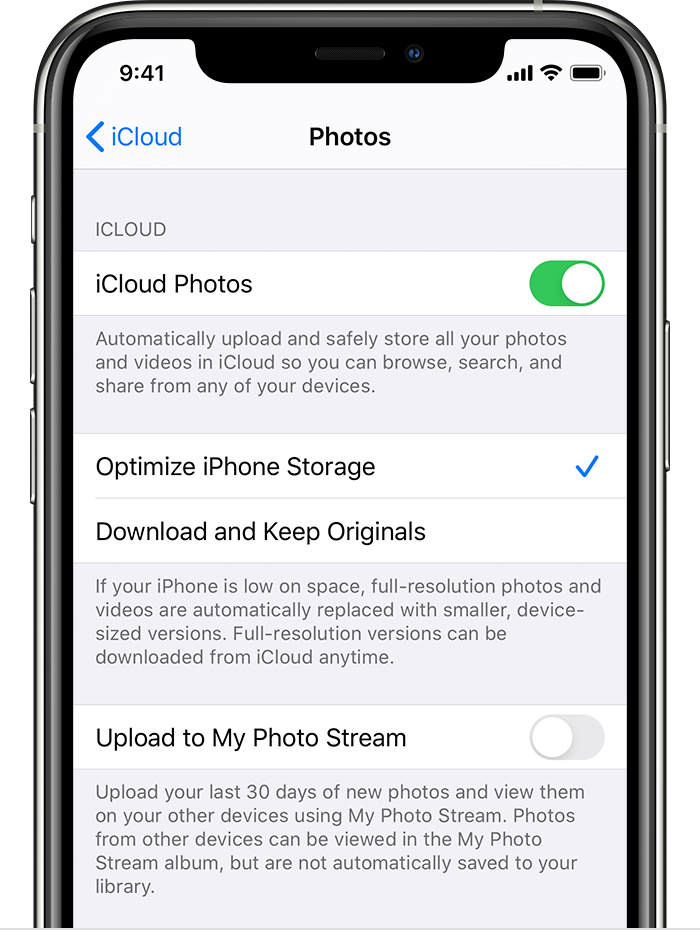
With Optimize Storage, smaller, space-saving photos and videos are kept on your device while all of your original, full-resolution versions are stored in iCloud. And as long as you have enough space in iCloud, you can store as many photos and videos as you want.
How to check the storage on your iPhone, iPad, and iPod touch
The Apple Video below may help you understand better.
I have already pay 75₹ for storage but my apple storage is not updated yet


