My iTunes Radio station
How do I upload from iTunes to my radio station.
How do I upload from iTunes to my radio station.
Hi scottfromhuntington beachv,
Thanks for posting in Apple Support Communities.
It sounds like you may be trying to upload your personal music from your music library to a radio station. That isn't possible. If you have Apple Music, you can listen to radio stations and create custom radio stations by what you're currently listening to and it will play similar songs.
"If you subscribe to Apple Music, you can create your very own station from the music that you love. You can also save songs that you hear on a custom station and live radio station on Apple Music. And see your recently played stations.
 or click More
  , then choose Create Station. Or say "Hey Siri, start a station from," then say the name of a song, artist, or genre. or click More , then choose Add to Library. Or say "Hey Siri, add this song to my library."
You can find this information in Listen to the radio in the Apple Music app.
If you wan to create a "station" based on your music library, then you would create a playlist. Below are steps on creating a playlist.
Create a playlist on your iPhone, iPod touch, or Android device
1. Open the Apple Music app.
2. At the bottom of your screen, tap Library.
3. Tap Playlists.
4. Tap New Playlist.
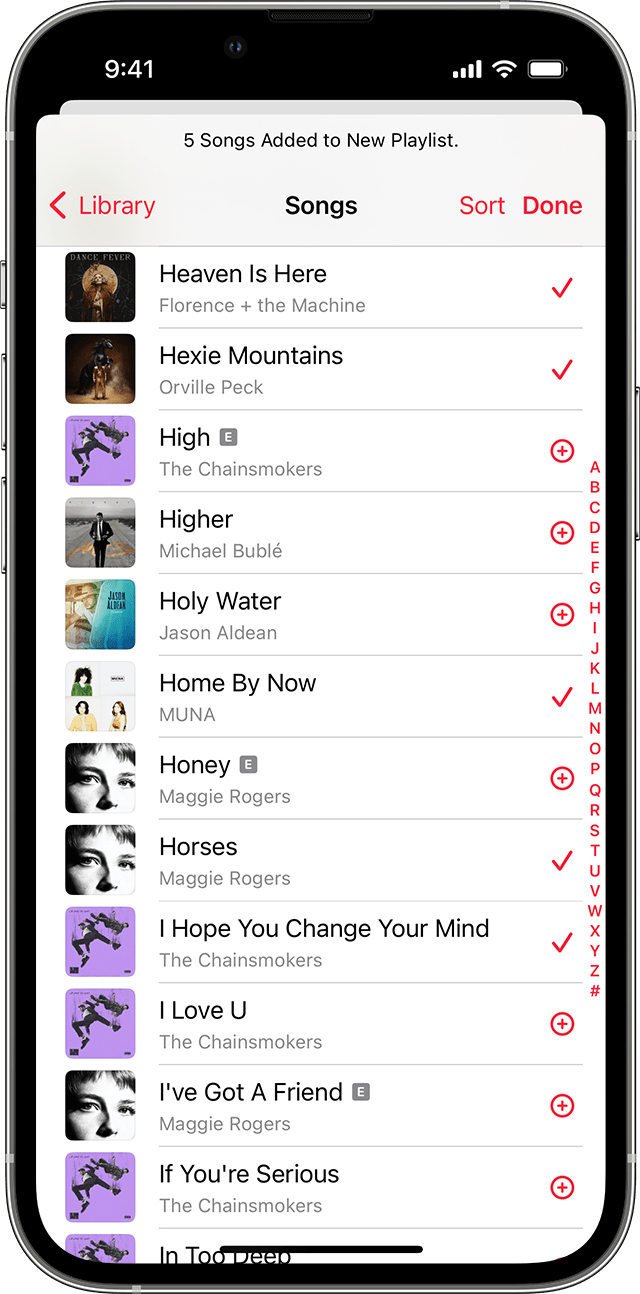
5. Give your playlist a name, then tap Add Music.
6. Find the music that you want to add.
*On iPhone or iPod touch, tap the music you want, then tap Done. If you add music directly from the search box, tap Cancel, then tap Done.
*On Android, tap the music you want to add, then tap Done.
You can also touch and hold a song, album, or playlist. Then tap Add to a Playlist to add the music to an existing one, or tap New Playlist. Or you can touch and hold on a playlist to download, share, or delete it.
How to make a playlist in the Apple Music app
Please provide more details if this doesn't apply.
Regards.
Hi scottfromhuntington beachv,
Thanks for posting in Apple Support Communities.
It sounds like you may be trying to upload your personal music from your music library to a radio station. That isn't possible. If you have Apple Music, you can listen to radio stations and create custom radio stations by what you're currently listening to and it will play similar songs.
"If you subscribe to Apple Music, you can create your very own station from the music that you love. You can also save songs that you hear on a custom station and live radio station on Apple Music. And see your recently played stations.
or click More , then choose Create Station. Or say "Hey Siri, start a station from," then say the name of a song, artist, or genre. or click More , then choose Add to Library. Or say "Hey Siri, add this song to my library."You can find this information in Listen to the radio in the Apple Music app.
If you wan to create a "station" based on your music library, then you would create a playlist. Below are steps on creating a playlist.
Create a playlist on your iPhone, iPod touch, or Android device
1. Open the Apple Music app.
2. At the bottom of your screen, tap Library.
3. Tap Playlists.
4. Tap New Playlist.
5. Give your playlist a name, then tap Add Music.
6. Find the music that you want to add.
*On iPhone or iPod touch, tap the music you want, then tap Done. If you add music directly from the search box, tap Cancel, then tap Done.
*On Android, tap the music you want to add, then tap Done
You can also touch and hold a song, album, or playlist. Then tap Add to a Playlist to add the music to an existing one, or tap New Playlist. Or you can touch and hold on a playlist to download, share, or delete it.
How to make a playlist in the Apple Music app
Please provide more details if this doesn't apply.
Regards.
My iTunes Radio station