Question re: Pages revert to

I cannot find any previous versions of Pages documents when I click on “revert to”. The only ones shown are the current days. What am I doing wrong? Why can’t I see previous day versions of the document on my iMac?


So frustrating.


🤷‍♂️

iMac 21.5″, macOS 13.0

Posted on Dec 21, 2022 6:58 PM

Reply
Question marked as Top-ranking reply

Posted on Dec 22, 2022 5:29 PM

Hi Gordon7799,


Thanks for posting here in Apple Support Communities. You should have the option to Browse Versions once you choose "Revert". Following the steps in this article should resolve the issue you're facing: Restore an earlier document version in Pages on Mac


Restore an earlier document version in Pages on Mac
Every time you save a document, Pages saves it as a new version. As a result, you can browse earlier versions, save a copy of an earlier version, or restore a document to an earlier version.
You can also copy and paste text and objects from an earlier version to the current version.

View, copy, and restore an earlier version
With the document open, choose File > Revert To (from the File menu at the top of your screen), then choose Browse All Versions.
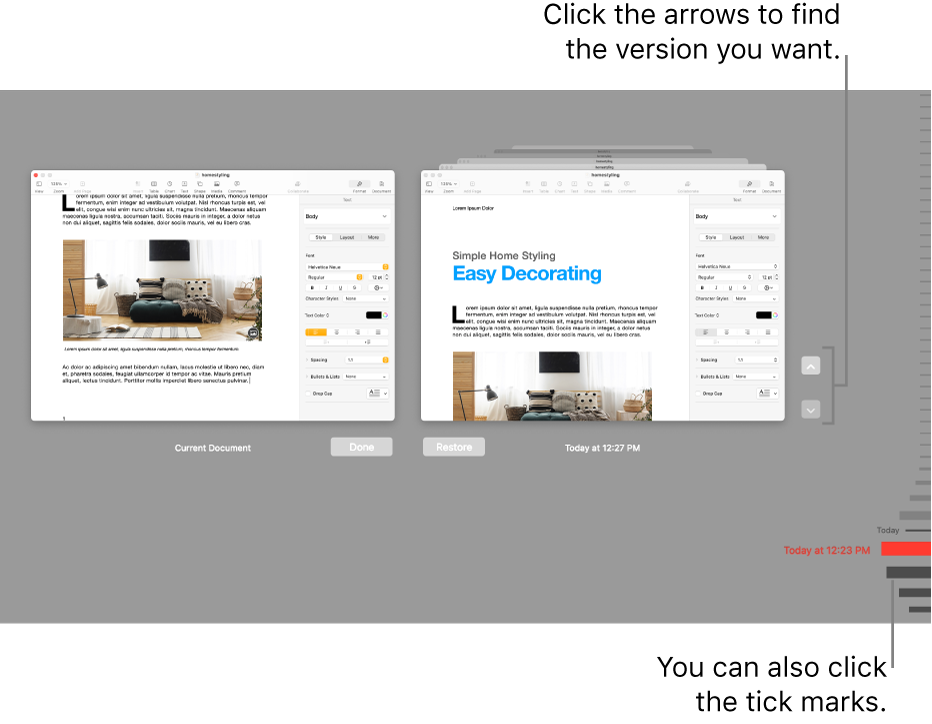
The window refreshes to show a thumbnail of your current version on the left and a stack of thumbnails of the previous versions on the right. A vertical timeline appears on the right side of the screen.
2. To view earlier versions, click tick marks along the timeline, or click the arrows next to the stack of document thumbnails, then click a thumbnail to view the version full size.
The versions timeline showing the current document on the left and a recent version on the right.
3. Do one of the following:
Edit the current versionClick the thumbnail on the left, make your changes, then click Done.
Restore a previous versionClick Restore below its thumbnail. A restored version replaces the current version.
Save a copy of a previous version as a new documentHold down the Option key on the keyboard, then click Restore a Copy. Pages opens the copy in a new window, where you can edit it and save it with a new name. The original version also remains open in its own window.
Close this view and return to your documentClick Done.
Revert to your last opened or last saved version

Kind regards.

5 replies
Question marked as Top-ranking reply

Dec 22, 2022 5:29 PM in response to Gordon7799

Hi Gordon7799,


Thanks for posting here in Apple Support Communities. You should have the option to Browse Versions once you choose "Revert". Following the steps in this article should resolve the issue you're facing: Restore an earlier document version in Pages on Mac


Restore an earlier document version in Pages on Mac
Every time you save a document, Pages saves it as a new version. As a result, you can browse earlier versions, save a copy of an earlier version, or restore a document to an earlier version.
You can also copy and paste text and objects from an earlier version to the current version.

View, copy, and restore an earlier version
With the document open, choose File > Revert To (from the File menu at the top of your screen), then choose Browse All Versions.
The window refreshes to show a thumbnail of your current version on the left and a stack of thumbnails of the previous versions on the right. A vertical timeline appears on the right side of the screen.
2. To view earlier versions, click tick marks along the timeline, or click the arrows next to the stack of document thumbnails, then click a thumbnail to view the version full size.
The versions timeline showing the current document on the left and a recent version on the right.
3. Do one of the following:
Edit the current versionClick the thumbnail on the left, make your changes, then click Done.
Restore a previous versionClick Restore below its thumbnail. A restored version replaces the current version.
Save a copy of a previous version as a new documentHold down the Option key on the keyboard, then click Restore a Copy. Pages opens the copy in a new window, where you can edit it and save it with a new name. The original version also remains open in its own window.
Close this view and return to your documentClick Done.
Revert to your last opened or last saved version

Kind regards.

This thread has been closed by the system or the community team. You may vote for any posts you find helpful, or search the Community for additional answers.

Question re: Pages revert to

Welcome to Apple Support Community
A forum where Apple customers help each other with their products. Get started with your Apple Account.