I have had to reset watch every morning for past 4 days.
I have had to reset watch every morning for past 4 days.
Apple Watch Series 7
I have had to reset watch every morning for past 4 days.
Apple Watch Series 7
Hello gran_pau,
Thank you for reaching out in Apple Support Communities. What is the exact issue that you're experiencing, in which you're resetting the Apple Watch? By resetting, do you mean restarting the Apple Watch or restoring it to factory settings and re-pairing it to your iPhone?
Just in case, we recommend making sure that your Apple Watch is updated to the latest version of watchOS 9.2. Having the latest version provides software improvements and optimal performance. If needed, here's how:
Update your Apple Watch using your iPhone
You can wait until Apple Watch notifies you when a new update is available. Tap Update Tonight in the notification, then go to your iPhone to confirm that you want to update overnight. At the end of the day, leave your Apple Watch and iPhone charging overnight so the update can complete.
Or you can update your Apple Watch with your iPhone manually:
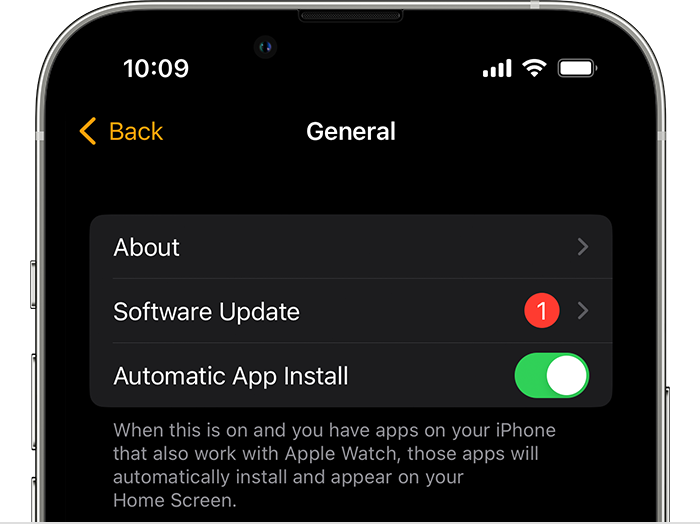
1. On your iPhone, open the Apple Watch app, then tap the My Watch tab.
2. Tap General > Software Update.
3. Download the update. If asked for your iPhone passcode or Apple Watch passcode, enter it.
4. Wait for the progress wheel to appear on your Apple Watch. It could take from several minutes to an hour for the update to complete.
Leave your Apple Watch on its charger while the update completes. Don't restart your iPhone or Apple Watch, and don't quit the Apple Watch app. When the update completes, your Apple Watch restarts on its own.
Update directly on your Apple Watch
If your Apple Watch has watchOS 6 or later, you can install updates without your iPhone:
1. Make sure that your watch is connected to Wi-Fi.
2. On your watch, open the Settings app.
3. Tap General > Software Update.
4. Tap Install if a software update is available, then follow the onscreen instructions.
Leave your Apple Watch on its charger while the update completes, and don't restart your Apple Watch. When the update completes, your Apple Watch restarts on its own.
These steps are outlined here and can help: Update your Apple Watch
We look forward hearing back from you with an update.
Kind regards.
Hello gran_paul,
To clarify, is it now working as expected since you did not have to reset it? Has it continued to work since updating?
If not, what do you mean by resetting it? Can you explain to us why you're needing to reset it exactly? For instance, is the device frozen/unresponsive? What steps are you taking to reset it? This will help us determine the next best step to take.
Thanks.
Good afternoon gran_paul,
Thanks for the clarification about what you were experiencing. If the issue returns, reach out to Apple to investigate this further.
Contact Apple for support and service
Take care.
Thank you for the feed back. My watch was updated as soon as the update was available. That is the first step that comes up on the screen, to update. Night before last, couldn't sleep so got up and put watch on while doing some work on my laptop. The next morning (3 hours later) I did not have to reset the watch.
Perhaps resetting is not the correct description, I have to pair the watch again. The screen has the visual instruction to hold the watch close to the iPhone to pair. Then go through the set up again, i.e. Apple Pay, emergency settings, etc. It then syncs with my iPhone again. I also get a message on my MacBook Pro, new device added.
I have had to reset watch every morning for past 4 days.