How to change AirPods Pro owner
How do you change AirPods pro to a different owner
The Apple Support Community will permanently close on November 20, 2026. Starting today, the site will no longer accept new posts and is available in a read-only state.
You can continue to find trusted guidance and support on the official Apple Support site.
We want to thank the community members who have contributed their time and expertise to help others with their Apple products.
The Apple Support Community will permanently close on November 20, 2026. Starting today, the site will no longer accept new posts and is available in a read-only state.
You can continue to find trusted guidance and support on the official Apple Support site.
We want to thank the community members who have contributed their time and expertise to help others with their Apple products.
How do you change AirPods pro to a different owner
Hello Hiwyd20,
You can use the steps below to remove AirPods from the current Apple ID:
How to remove AirPods, AirTag, or another Find My network item or device from an Apple ID on iPhone, iPad, or iPod touch
1. Make sure that the device or item is connected via Bluetooth to your iPhone, iPad, or iPod touch, and is within Bluetooth range.
2. Open the Find My app, then tap the Items tab or Devices tab.
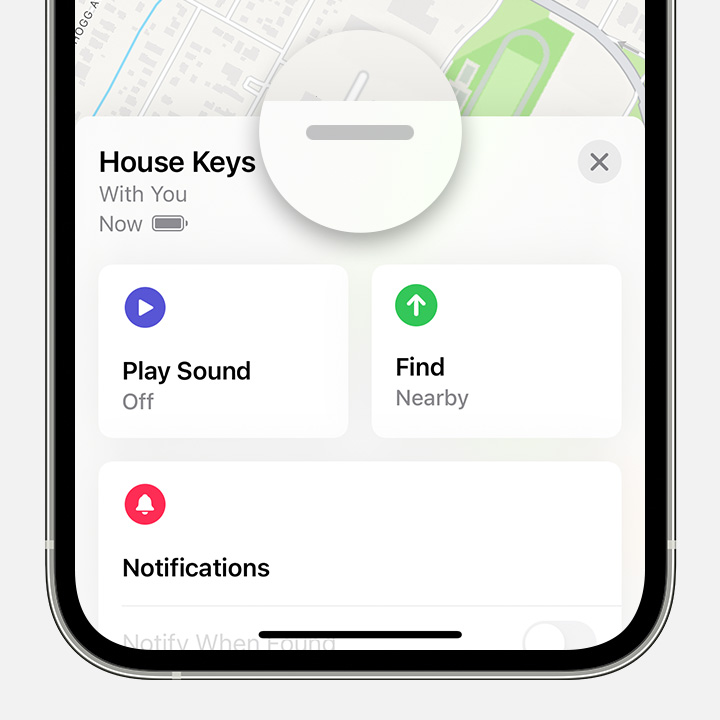
3. Tap the item or device you want to remove, then swipe up on the handle.
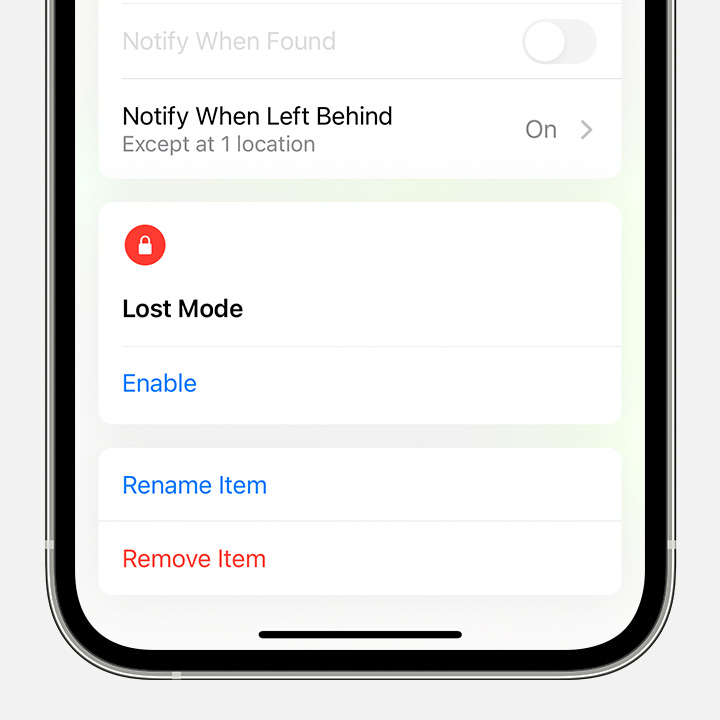
4. Tap Remove Item or Remove This Device, then tap Remove to confirm.
How to remove AirPods or another Find My network device from an Apple ID on Mac
1. Make sure that the device is connected via Bluetooth to your Mac, and is within Bluetooth range.
2. Open the Find My app.
3. Select the Devices tab.
4. Select the device that you want to remove.
5. On the map, click the More Info button.
6. Click Remove This Device.
You can also find those steps in this resource: If an item or device is connected to another Apple ID
Afterwards, you can pair AirPods with a device signed into the desired Apple ID to associate them with that account.
Hopefully that addresses your inquiry.
Take care.
Hello Hiwyd20,
You can use the steps below to remove AirPods from the current Apple ID:
How to remove AirPods, AirTag, or another Find My network item or device from an Apple ID on iPhone, iPad, or iPod touch
1. Make sure that the device or item is connected via Bluetooth to your iPhone, iPad, or iPod touch, and is within Bluetooth range.
2. Open the Find My app, then tap the Items tab or Devices tab.
3. Tap the item or device you want to remove, then swipe up on the handle.
4. Tap Remove Item or Remove This Device, then tap Remove to confirm.
How to remove AirPods or another Find My network device from an Apple ID on Mac
1. Make sure that the device is connected via Bluetooth to your Mac, and is within Bluetooth range.
2. Open the Find My app.
3. Select the Devices tab.
4. Select the device that you want to remove.
5. On the map, click the More Info button
6. Click Remove This Device.
You can also find those steps in this resource: If an item or device is connected to another Apple ID
Afterwards, you can pair AirPods with a device signed into the desired Apple ID to associate them with that account.
Hopefully that addresses your inquiry.
Take care.
How to change AirPods Pro owner