
Why won’t my iPhone 13 use cutout
I have an iPhone 13Pro and my cutout feature won’t work, while my friends can easily use this feature on iPhone 12 Pro.
iPhone 13 Pro, iOS 15
I have an iPhone 13Pro and my cutout feature won’t work, while my friends can easily use this feature on iPhone 12 Pro.
iPhone 13 Pro, iOS 15
Hello Campeóndelmundo,
Thank you for reaching out to Apple Support Communities, and we'll be happy to help in any way we can. We understand you're having issues with using the cut out feature on your iPhone. You would need iOS 16 or later to use it as described here: Create and share photo cutouts on your iPhone
"In iOS 16 and later, you can isolate the subject of a photo — like a person or a building — from the rest of the photo and then copy or share it.
Separate the subject of your photo from the background and then share it
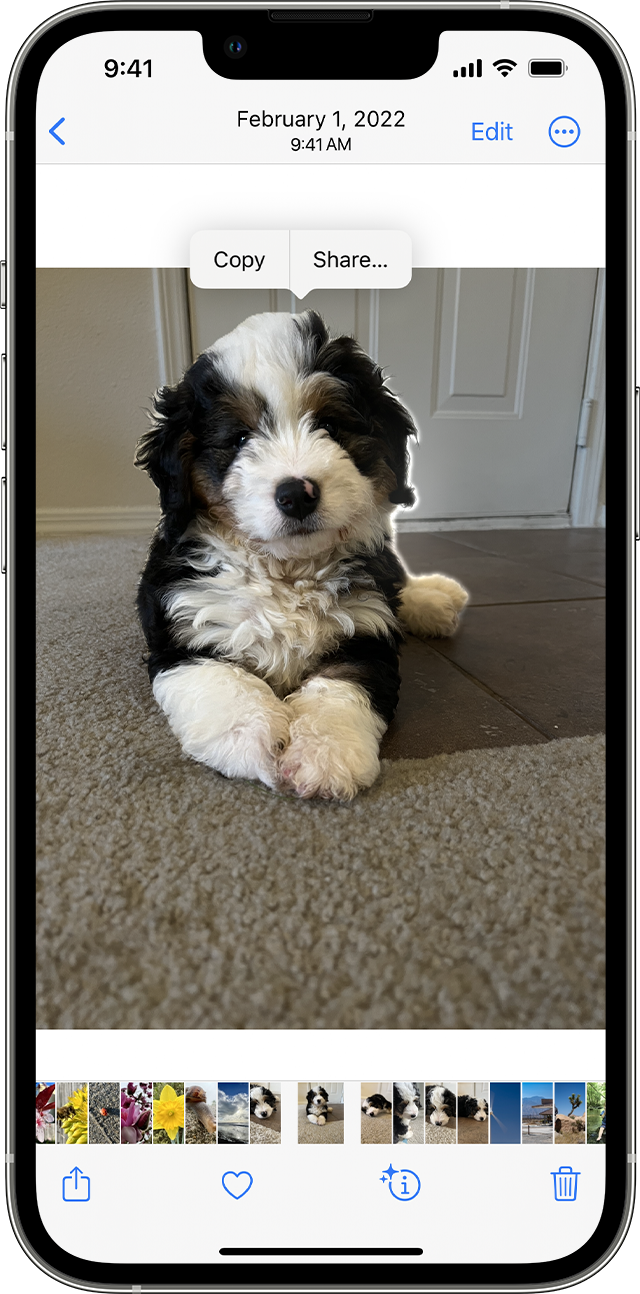
Once you copy the subject of a photo, you can share it through apps like Messages or Mail or use AirDrop. You can also copy and paste it in other apps like Notes.
Photo cutouts are available in iOS 16 and later on iPhone XS, iPhone XR, and later."
Does your iPhone need updating to iOS 16.2? Do you have a recent backup for the data in your iPhone in iCloud or your computer? If not, we recommend that you create one as described here: How to back up your iPhone, iPad, and iPod touch
Then update your iOS as outlined here: Update your iPhone or iPad
We hope this helps.
Cheers!
Hello Campeóndelmundo,
Thank you for reaching out to Apple Support Communities, and we'll be happy to help in any way we can. We understand you're having issues with using the cut out feature on your iPhone. You would need iOS 16 or later to use it as described here: Create and share photo cutouts on your iPhone
"In iOS 16 and later, you can isolate the subject of a photo — like a person or a building — from the rest of the photo and then copy or share it.
Separate the subject of your photo from the background and then share it
Once you copy the subject of a photo, you can share it through apps like Messages or Mail or use AirDrop. You can also copy and paste it in other apps like Notes.
Photo cutouts are available in iOS 16 and later on iPhone XS, iPhone XR, and later."
Does your iPhone need updating to iOS 16.2? Do you have a recent backup for the data in your iPhone in iCloud or your computer? If not, we recommend that you create one as described here: How to back up your iPhone, iPad, and iPod touch
Then update your iOS as outlined here: Update your iPhone or iPad
We hope this helps.
Cheers!
Why won’t my iPhone 13 use cutout

