Hello Diego_-147,
Thank you for reaching out to Apple Support Communities, and we'll be happy to help in any way we can. We understand you're having issues with charging your iPhone with your MagSafe charger. Try the steps listed here to see if they resolve the issue: MagSafe chargers and battery packs for iPhone
"Charge iPhone or AirPods with MagSafe Charger
- Connect MagSafe Charger to power using the Apple 20W USB-C power adapter or another compatible power adapter (sold separately).
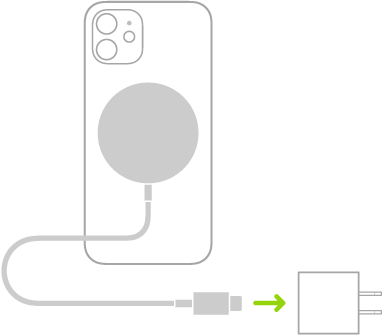
- Do one of the following:
- iPhone: (supported models) Place MagSafe Charger on the back of iPhone or its MagSafe case or sleeve. The charging symbol appears when iPhone starts charging.
- Note: If iPhone Leather Wallet is attached, remove it before placing MagSafe Charger on the back of iPhone.
- Other iPhone models: Place iPhone face up on the center of MagSafe Charger. When iPhone is aligned properly with the charger,
 appears in the status bar.
 - AirPods (2nd generation) with Wireless Charging Case, AirPods (3rd generation), and AirPods Pro:Place your AirPods in the charging case, close the lid, then place the case with the status light facing up on the center of MagSafe Charger. When the case is aligned properly with the charger, the status light turns on for several seconds, then turns off while continuing to charge.
See the Apple Support article How to use your MagSafe Charger.
Charge iPhone or AirPods and Apple Watch with MagSafe Duo Charger
With MagSafe Duo Charger, you can charge your iPhone or AirPods at the same time you charge your Apple Watch. (MagSafe Duo Charger, Apple Watch, and AirPods are sold separately.)
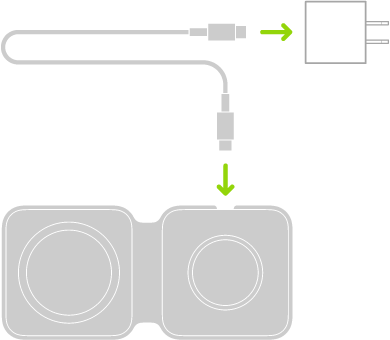
- Connect MagSafe Duo Charger to power using the Apple 20W USB-C power adapter or another compatible power adapter (sold separately).
- To charge iPhone or AirPods, do one of the following:
- iPhone: Place iPhone face up on the center of the iPhone charging surface. Supported models help you align iPhone with the charger, and the charging symbol appears when iPhone starts charging. On other models, the battery charging indicator appears when you properly align iPhone with the charging surface. Unless your iPhone is in silent mode, you hear a chime when charging begins.
- Note: If iPhone Leather Wallet is attached, remove it before placing iPhone on MagSafe Duo Charger.
- AirPods (2nd generation) with Wireless Charging Case, AirPods (3rd generation), and AirPods Pro:Place your AirPods in the charging case, close the lid, then place the case with the status light facing up on the center of the iPhone charging surface. When the case is aligned properly with the charger, the status light turns on for several seconds, then turns off while continuing to charge.
- To charge Apple Watch, do one of the following:
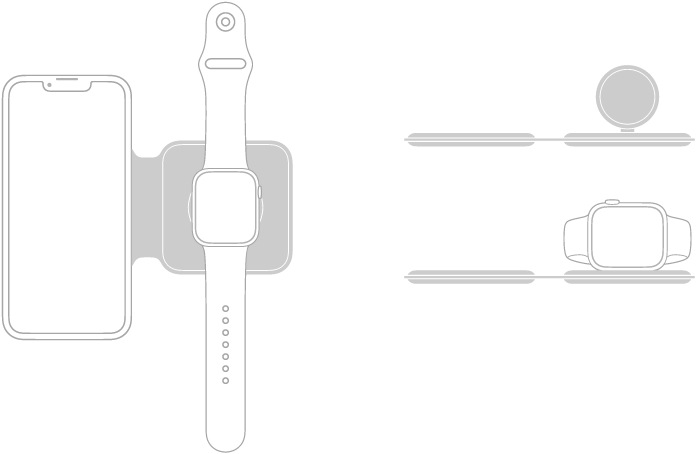
- With the Apple Watch charging surface lying flat and the Apple Watch band open, place Apple Watch face up on the charging surface.
- With the Apple Watch charging surface raised, place Apple Watch on its side with its back against the charging surface. Apple Watch automatically goes into Nightstand mode, so you can also use it as an alarm clock.
- The concave charging surface magnetically snaps to the back of your Apple Watch and aligns it properly. When charging begins, a charging symbol appears on the watch face.
Charge iPhone with MagSafe Battery Pack
MagSafe Battery Pack magnetically attaches to supported models and extends the battery life.
Note: If iPhone Leather Wallet is attached, remove it before placing MagSafe Battery Pack.
- Charge your iPhone on the go: Place MagSafe Battery Pack on the back of iPhone or its MagSafe case or sleeve. The charging symbol appears when iPhone starts charging.
- See the battery status of MagSafe Battery Pack and iPhone: Check the Batteries widget in Today View or on the Home Screen. See Add a Batteries widget to your Home Screen.
- Charge MagSafe Battery Pack and iPhone: With MagSafe Battery Pack on iPhone, connect either device to power using the USB-C to Lightning Cable and Apple 20W USB-C power adapter or another compatible power adapter (minimum power output of 20 watts; sold separately). The status indicator on MagSafe Battery Pack is amber while charging, then turns green when charging is complete.
- Note: By default, charging is limited to 90 percent to optimize the lifespan of MagSafe Battery Pack. To remove the charging limit, open Control Center, tap Low Power Mode, then tap Charge past 90%.
- You can also charge MagSafe Battery Pack without iPhone.
See the Apple Support article How to use your MagSafe Battery Pack."
We hope this helps.
Cheers!


