Apple ID management
hello my apple ID runs well on my iPhone but it refuses to sign to my mac. please help and advice me
[Personal Information Edited by Moderator]
MacBook Air 13″, OS X 10.10
hello my apple ID runs well on my iPhone but it refuses to sign to my mac. please help and advice me
[Personal Information Edited by Moderator]
MacBook Air 13″, OS X 10.10
Hello snow132,
Thanks for posting in the Apple Support Communities.
It sounds like you're able to log in with your Apple ID on your iPhone, but not your Mac, right?
If we have that correct, let's first confirm that you have the latest macOS version installed on your Mac. If an update is available, this may clear up the connection with the Apple ID servers to allow you to sign in. Be sure you have a backup of your information before installing any updates, and check out the steps below for assistance: Update macOS on Mac - Apple Support
Use Software Update
Before installing new software, it's a good idea to back up your Mac.
1. From the Apple menu in the corner of your screen:
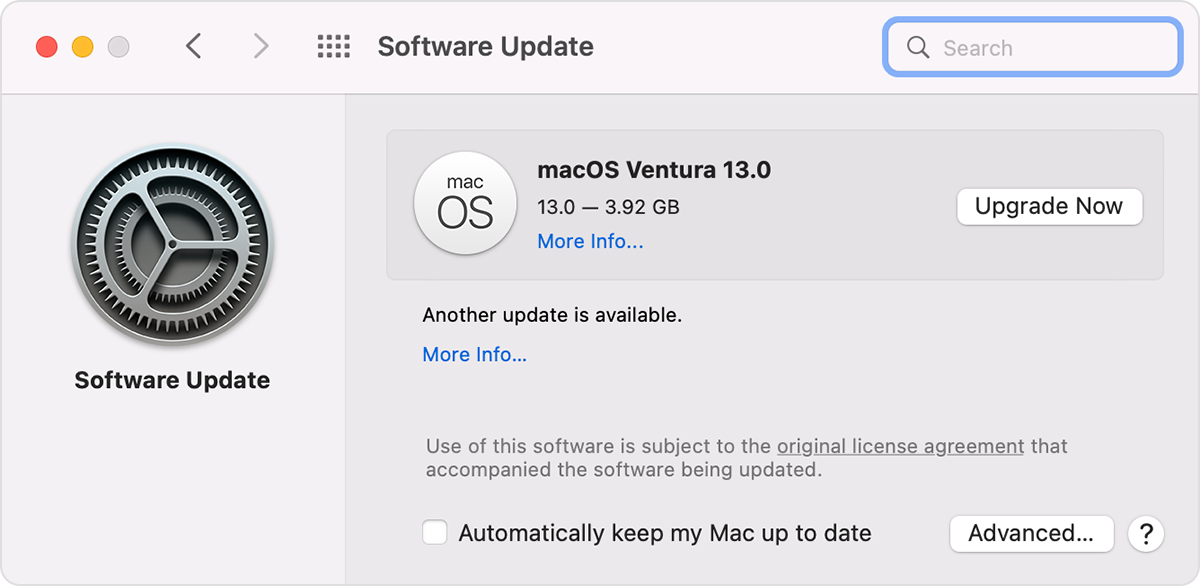
• Choose System Settings. Then click General in the sidebar, and Software Update on the right.
• Or choose System Preferences. Then click Software Update.
2. If Software Update finds new software, click the Update Now or Upgrade Now button to install it.
3. Enter your administrator password, if asked. During installation, your Mac might restart, and you might see a progress bar or blank screen several times.
If Software Update says that your Mac is up to date, then no new software is currently available for your Mac model. Software Update shows only updates and upgrades that are compatible with your Mac.
If you have the latest macOS version, try connecting with a different Wi-Fi network to see if that will provide different results. If VPN is in use with your Mac, this could cause interruptions with the connection to the Apple ID server. Be sure to review the following resource to confirm you're using the same steps to sign in with your Apple ID: Sign in or out of your Apple ID on Mac - Apple Support
We hope that's able to help. If not, provide more details on the steps you've taken along with your macOS version. Let us know if you're seeing a specific error message when you try to log in, as well. We'll use these details to gain a better understanding of what's occurring to provide the best next steps to take.
Have a great day!
Hello snow132,
Thanks for posting in the Apple Support Communities.
It sounds like you're able to log in with your Apple ID on your iPhone, but not your Mac, right?
If we have that correct, let's first confirm that you have the latest macOS version installed on your Mac. If an update is available, this may clear up the connection with the Apple ID servers to allow you to sign in. Be sure you have a backup of your information before installing any updates, and check out the steps below for assistance: Update macOS on Mac - Apple Support
Use Software Update
Before installing new software, it's a good idea to back up your Mac.
1. From the Apple menu in the corner of your screen:
• Choose System Settings. Then click General in the sidebar, and Software Update on the right.
• Or choose System Preferences. Then click Software Update.
2. If Software Update finds new software, click the Update Now or Upgrade Now button to install it.
3. Enter your administrator password, if asked. During installation, your Mac might restart, and you might see a progress bar or blank screen several times.
If Software Update says that your Mac is up to date, then no new software is currently available for your Mac model. Software Update shows only updates and upgrades that are compatible with your Mac.
If you have the latest macOS version, try connecting with a different Wi-Fi network to see if that will provide different results. If VPN is in use with your Mac, this could cause interruptions with the connection to the Apple ID server. Be sure to review the following resource to confirm you're using the same steps to sign in with your Apple ID: Sign in or out of your Apple ID on Mac - Apple Support
We hope that's able to help. If not, provide more details on the steps you've taken along with your macOS version. Let us know if you're seeing a specific error message when you try to log in, as well. We'll use these details to gain a better understanding of what's occurring to provide the best next steps to take.
Have a great day!
snow132 Said:
"Apple ID management: hello my apple ID runs well on my iPhone but it refuses to sign to my mac. please help and advice me"
-------
Entering a Password Correctly:
Disable caps lock:
Is caps lock enabled? If so disable it while entering the password.
snow132,
Please share additional information about what you see when you attempt to log in with your Apple ID on your Mac. If you see an error or alert share the exact text. These details, along with any you believe are relevant, can help facilitate additional replies from the community.
Cheers.
The computer is showing me that the system is up to date and has no updates available currently. It is running Yosemite 10.10.5 and cannot install any application please advise on my email
[Personal Information Edited by Moderator]
Hey, when I try to log in with my apple ID password, it tells me that it's an incorrect password yet this same password works on my iPhone.
I enter the password correctly and it works well on my phone, even on the web page when signing in, but refuses to sign in on my mac.
Apple ID management