I just put in my serial number in and it is saying it is invalid my iPhone will not restart it won’t let me slide the power off
Screen is frozen it won’t let me slide on the screen to power off
Screen is frozen it won’t let me slide on the screen to power off
Hey kittie257,
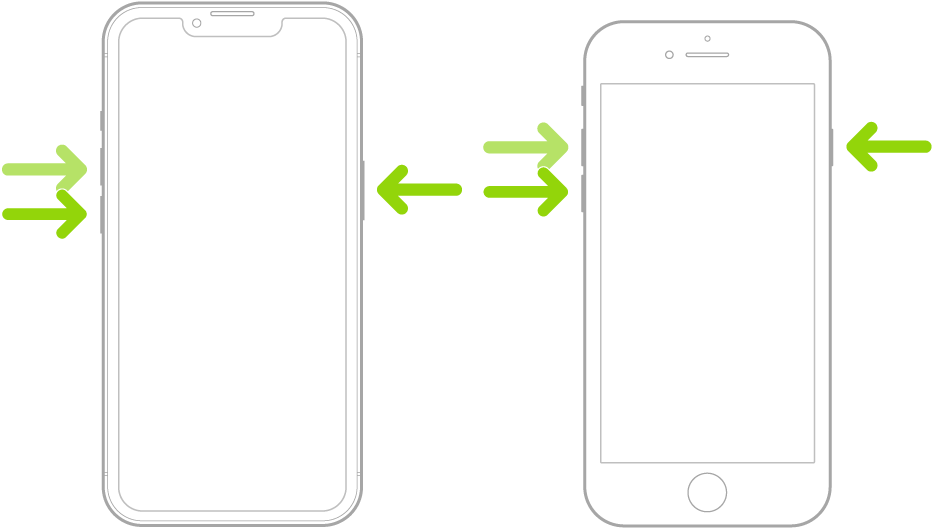
Welcome to Apple Support Communities. If you haven't already, try to force restart your iPhone to see if that lets you regain control. Here's how: Force restart iPhone - Apple Support
1. Press and quickly release the volume up button.
2. Press and quickly release the volume down button.
3. Press and hold the side button.
4. When the Apple logo appears, release the side button.
Note: For force restart instructions for iPhone 7, iPhone 6s, or iPhone SE (1st generation)—models that don’t support iOS 16—see the iOS 15 version of this page.
Let us know how it goes.
Take care!
Hey kittie257,
Welcome to Apple Support Communities. If you haven't already, try to force restart your iPhone to see if that lets you regain control. Here's how: Force restart iPhone - Apple Support
1. Press and quickly release the volume up button.
2. Press and quickly release the volume down button.
3. Press and hold the side button.
4. When the Apple logo appears, release the side button.
Note: For force restart instructions for iPhone 7, iPhone 6s, or iPhone SE (1st generation)—models that don’t support iOS 16—see the iOS 15 version of this page.
Let us know how it goes.
Take care!
Put your serial number in what?
I just put in my serial number in and it is saying it is invalid my iPhone will not restart it won’t let me slide the power off