Unable to "approve a family purchase request from notification screen"

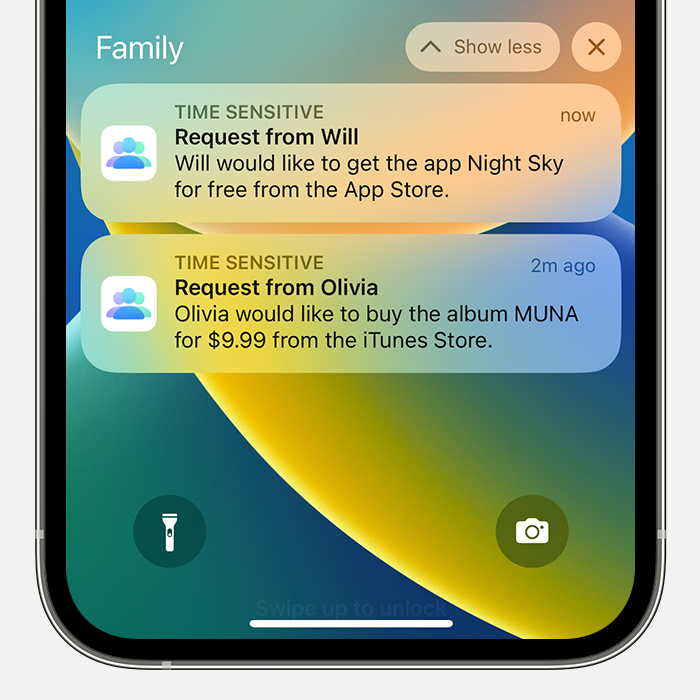
So I am able to see the Ask to Buy request notifications on my Mac mini M1 with Ventura, but not on my iPhone or iPad, or watch.

However nothing happens when I click on "view details".

If I click on the notification the Mac App Store opens which is good, and then the separate Approve window opens so I can click Approve, but then nothing. The Approve window just sits there, with the button in the down state.

I restarted the Mac and got the same behavior. Restarted the requesting iPhone and got the same behavior.

I have reviewed the settings for the request capability and all seems like it should be.

Any ideas?

Mac mini, macOS 13.1

Posted on Jan 2, 2023 2:37 PM

Reply
Question marked as Top-ranking reply

Posted on Jan 3, 2023 4:20 PM

Hello Chris von Simson,


This page can help out with Ask to Buy not working as expected: If Ask to Buy isn't working


For issues with the iOS devices not getting notifications, try these steps from the "If your Ask to Buy requests are missing" section:


If you miss an Ask to Buy notification, you can find the request in Notification Center on your iPhone, iPad, iPod touch, or Mac. If you still don't see your Ask to Buy requests, check your Family Sharing settings, check which Apple ID you're signed in with, and make sure that you're on a supported device.

Open Notification Center on your iPhone, iPad, or iPod touch
Look for Ask to Buy requests in the Family section of Notification Center. 
•From the Lock Screen, swipe up from the middle of the screen.
•From any other screen, swipe down from the center of the top of your screen.


On the Mac, try setting up an additional admin account, and then test it out there. That can help to see if the issue is specific to something in the user account or if it's system-wide. This page can help with that process if needed: Add a user or group on Mac


Cheers.

2 replies
Question marked as Top-ranking reply

Jan 3, 2023 4:20 PM in response to Chris von Simson

Hello Chris von Simson,


This page can help out with Ask to Buy not working as expected: If Ask to Buy isn't working


For issues with the iOS devices not getting notifications, try these steps from the "If your Ask to Buy requests are missing" section:


If you miss an Ask to Buy notification, you can find the request in Notification Center on your iPhone, iPad, iPod touch, or Mac. If you still don't see your Ask to Buy requests, check your Family Sharing settings, check which Apple ID you're signed in with, and make sure that you're on a supported device.

Open Notification Center on your iPhone, iPad, or iPod touch
Look for Ask to Buy requests in the Family section of Notification Center. 
•From the Lock Screen, swipe up from the middle of the screen.
•From any other screen, swipe down from the center of the top of your screen.


On the Mac, try setting up an additional admin account, and then test it out there. That can help to see if the issue is specific to something in the user account or if it's system-wide. This page can help with that process if needed: Add a user or group on Mac


Cheers.

This thread has been closed by the system or the community team. You may vote for any posts you find helpful, or search the Community for additional answers.

Unable to "approve a family purchase request from notification screen"

Welcome to Apple Support Community
A forum where Apple customers help each other with their products. Get started with your Apple Account.