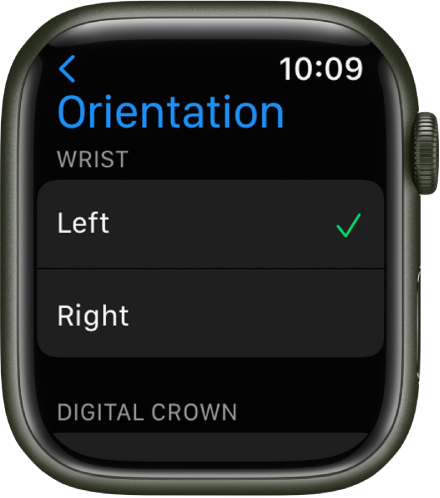
face upside down
I watch series 5 the face is upside down
Apple Watch Series 5
I watch series 5 the face is upside down
Apple Watch Series 5
Hi there nadicks,
If the face of your Apple Watch is upside down, these steps from Change language and orientation on Apple Watch show how to change the orientation of the screen:
Switch wrists or Digital Crown orientation
If you want to move your Apple Watch to your other wrist or prefer the Digital Crown on the other side, adjust your orientation settings so that raising your wrist wakes your Apple Watch, and turning the Digital Crown moves things in the direction you expect.
1. Open the Settings appon your Apple Watch.
2. Go to General > Orientation.
You can also open the Apple Watch app on your iPhone, tap My Watch, then go to General > Watch Orientation.
If something else is happening, please provide more details so that we can assist further.
Cheers!
Hi there nadicks,
If the face of your Apple Watch is upside down, these steps from Change language and orientation on Apple Watch show how to change the orientation of the screen:
Switch wrists or Digital Crown orientation
If you want to move your Apple Watch to your other wrist or prefer the Digital Crown on the other side, adjust your orientation settings so that raising your wrist wakes your Apple Watch, and turning the Digital Crown moves things in the direction you expect.
1. Open the Settings app
2. Go to General > Orientation.
You can also open the Apple Watch app on your iPhone, tap My Watch, then go to General > Watch Orientation.
If something else is happening, please provide more details so that we can assist further.
Cheers!
face upside down