Cannot download Facebook app

Anyone have issues with deleting the Facebook app and trying to re-install it? The iOS is up to date, cleared history, turned off and on multiple times and reset network settings. When I click the “get “ app button in App Store, it spins like it’s going to start loading for about 5-10 seconds and then stops and the “get” app button reappears. Have opened a ticket with Apple.

iPhone 12 Pro Max

Posted on Jan 5, 2023 5:20 PM

Reply
1 reply

Jan 8, 2023 12:50 PM in response to mstrsbmw

Hello mstrsbmw,


Thank you for reaching out in Apple Support Communities. If you haven't tried yet, we recommend to follow these steps as it may help:


1. Manually update the app
Learn how to manually update an app
 
2. Add a payment method
You might need to have a valid payment method on file, even if the app that you want to download is free.
Add a payment method
 
3. Resolve a problem with your payment method
If your payment method is expired, declined, or failed, or a message says 'billing problem with previous purchase'
 
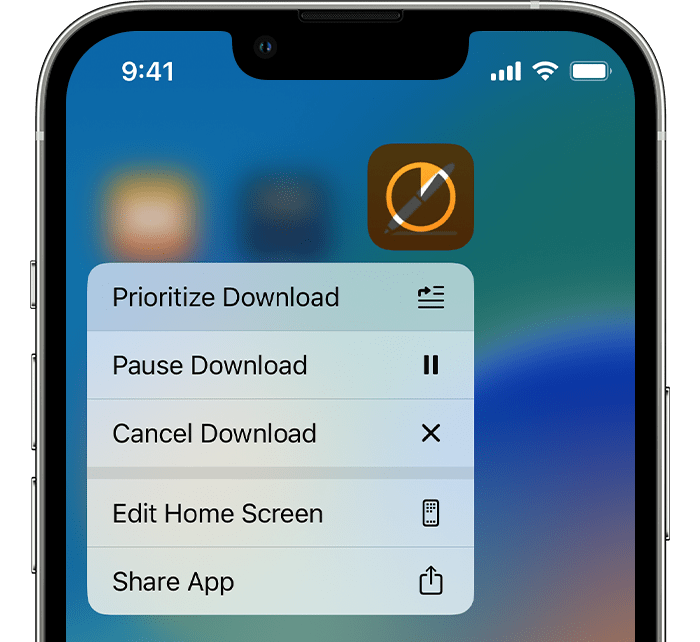
4. Prioritize the download
From the Home Screen, touch and hold the app. From the menu that appears, choose Prioritize Download.
 
Prioritize Download is at the top of the menu that appears when you touch and hold the app.

5. Restart your device
Restart your iPhone or iPad, then check to see if you can download or update apps.
Restart your iPhone
Restart your iPad

Following these steps may help and is outlined here: If you can’t download or update apps on your iPhone or iPad


Kind regards.


This thread has been closed by the system or the community team. You may vote for any posts you find helpful, or search the Community for additional answers.

Cannot download Facebook app

Welcome to Apple Support Community
A forum where Apple customers help each other with their products. Get started with your Apple Account.