
I need to pay last bill with updated card.

How do I Pay 5 JAN 2023 bill with new card?

Posted on Jan 6, 2023 2:00 PM

Reply
Question marked as Top-ranking reply

Posted on Jan 8, 2023 6:25 PM

Hello Dank0001,


Thank you for reaching out to Apple Support Communities, and we'll be happy to help in any way we can. We understand you'd like to update your payment method. Try the steps listed here to add the method you'd like to use: Add a payment method to your Apple ID


"Add a payment method on your iPhone or iPad

  1. Open the Settings app.
  2. Tap your name.
  3. Tap Media & Purchases, then tap View Account. You might be asked to sign in with your Apple ID.
  4. Tap Manage Payments.
  5. Tap Add Payment Method.

On iPhone, the Add Payment button appears below the list of payment methods.    

 6. Enter the payment method details, then tap Done.


Add a payment method on your Mac
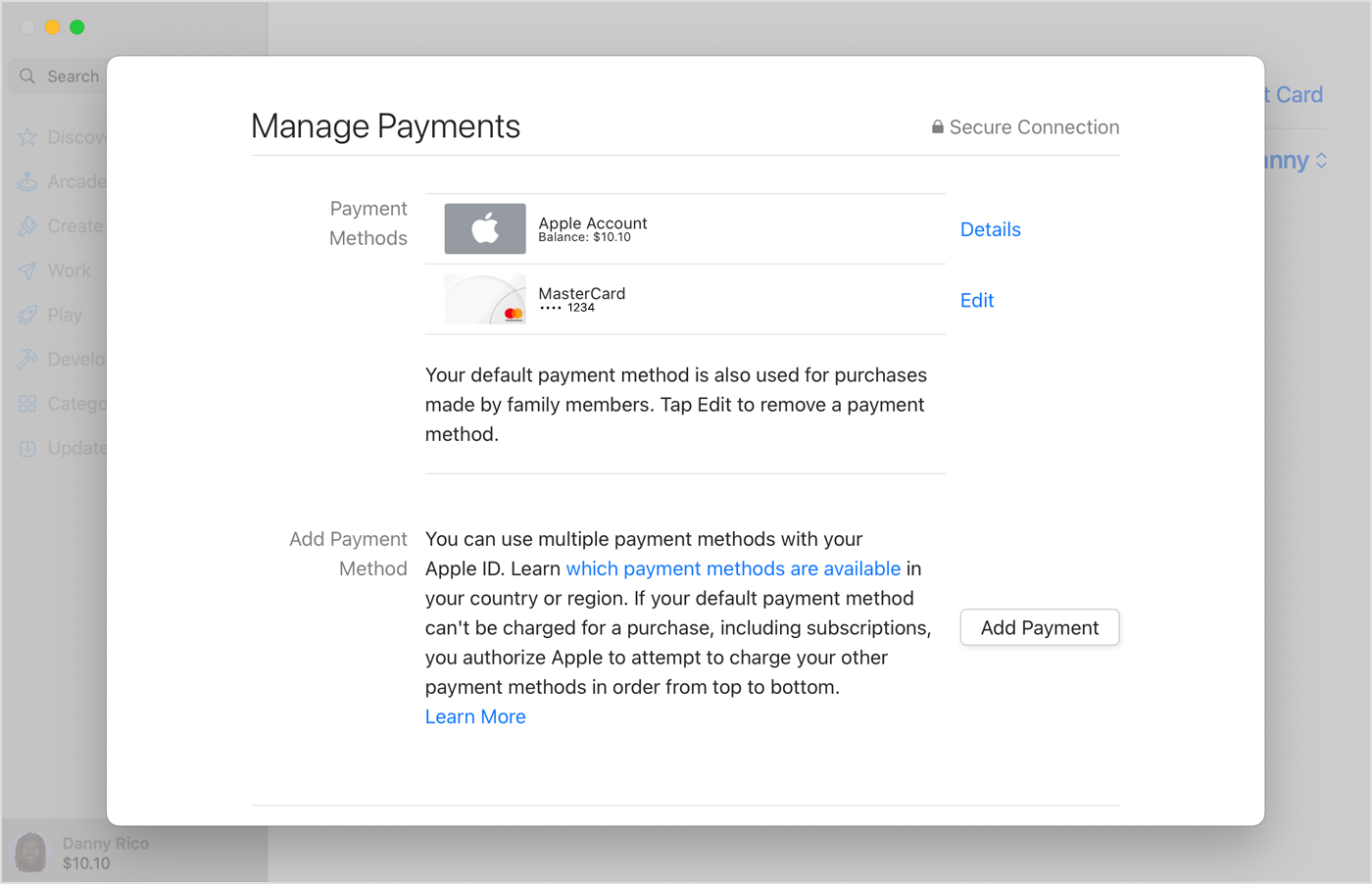
  1. Open the App Store.
  2. Click your name. If your name doesn't appear, click the Sign In button, sign in with your Apple ID, then click your name.
  3. Click Account Settings.
  4. Next to Payment Information, click Manage Payments. (If you're using an older version of macOS, click Edit next to Payment Type.)
  5. Click Add Payment.
  6. Enter the payment method details, then click Done.

On Mac, the Add Payment button appears below the list of payment methods.


Add a payment method on your Windows PC or Microsoft Surface
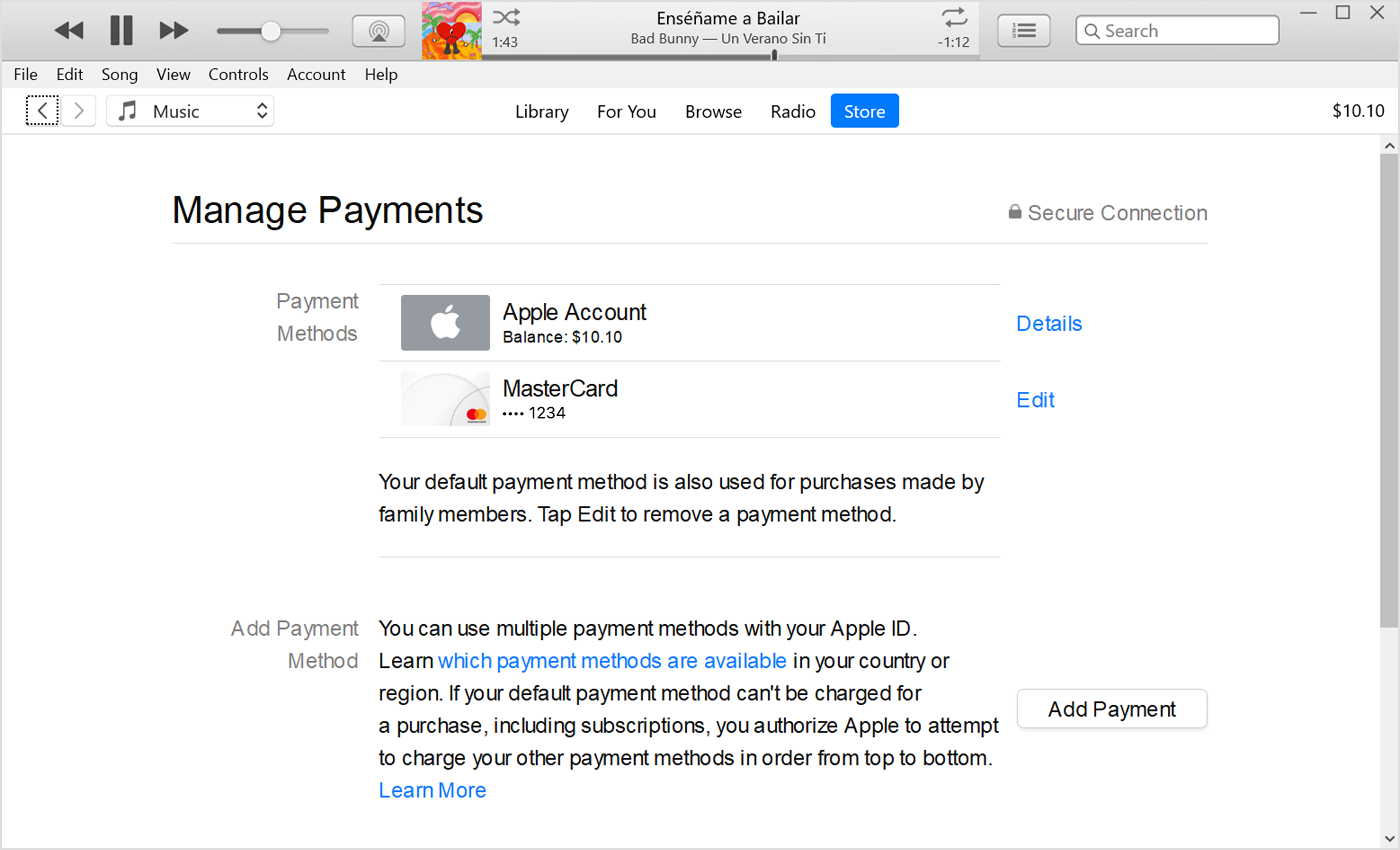
  1. Open iTunes.
  2. In the menu bar at the top of the iTunes window, tap or click Account, then tap or click View My Account.
  3. Sign in with your Apple ID.
  4. Tap or click the Manage Payments button next to Payment Information. (If you're using an older version of iTunes, tap or click the Edit button next to Payment Type.)
  5. Tap or click Add Payment.

In iTunes on a PC, the Add Payment button appears below the list of payment methods. 


Add a payment method online

If you want to keep more than one payment method on file, add the payment method in Settings on iPhone or iPadin the App Store on Mac, or in iTunes on your PC. When you edit payment information online at appleid.apple.com, additional payment methods might be removed from your account automatically.

  1. Go to appleid.apple.com.
  2. Tap or click Sign In, then sign in with your Apple ID.
  3. Tap or click Payment Methods.
  4. Tap or click Manage payment method.
  5. Enter your payment information, then tap or click Update.

Apple will attempt to charge payment methods in order from top to bottom. You can't change the order in which Apple Account balance is charged."


We hope this helps.


Cheers!

1 reply
Question marked as Top-ranking reply

Jan 8, 2023 6:25 PM in response to Dank0001

Hello Dank0001,


Thank you for reaching out to Apple Support Communities, and we'll be happy to help in any way we can. We understand you'd like to update your payment method. Try the steps listed here to add the method you'd like to use: Add a payment method to your Apple ID


"Add a payment method on your iPhone or iPad

  1. Open the Settings app.
  2. Tap your name.
  3. Tap Media & Purchases, then tap View Account. You might be asked to sign in with your Apple ID.
  4. Tap Manage Payments.
  5. Tap Add Payment Method.

On iPhone, the Add Payment button appears below the list of payment methods.    

 6. Enter the payment method details, then tap Done.


Add a payment method on your Mac

  1. Open the App Store.
  2. Click your name. If your name doesn't appear, click the Sign In button, sign in with your Apple ID, then click your name.
  3. Click Account Settings.
  4. Next to Payment Information, click Manage Payments. (If you're using an older version of macOS, click Edit next to Payment Type.)
  5. Click Add Payment.
  6. Enter the payment method details, then click Done.

On Mac, the Add Payment button appears below the list of payment methods.


Add a payment method on your Windows PC or Microsoft Surface

  1. Open iTunes.
  2. In the menu bar at the top of the iTunes window, tap or click Account, then tap or click View My Account.
  3. Sign in with your Apple ID.
  4. Tap or click the Manage Payments button next to Payment Information. (If you're using an older version of iTunes, tap or click the Edit button next to Payment Type.)
  5. Tap or click Add Payment.

In iTunes on a PC, the Add Payment button appears below the list of payment methods. 


Add a payment method online

If you want to keep more than one payment method on file, add the payment method in Settings on iPhone or iPadin the App Store on Mac, or in iTunes on your PC. When you edit payment information online at appleid.apple.com, additional payment methods might be removed from your account automatically.

  1. Go to appleid.apple.com.
  2. Tap or click Sign In, then sign in with your Apple ID.
  3. Tap or click Payment Methods.
  4. Tap or click Manage payment method.
  5. Enter your payment information, then tap or click Update.

Apple will attempt to charge payment methods in order from top to bottom. You can't change the order in which Apple Account balance is charged."


We hope this helps.


Cheers!

This thread has been closed by the system or the community team. You may vote for any posts you find helpful, or search the Community for additional answers.

I need to pay last bill with updated card.

Welcome to Apple Support Community
A forum where Apple customers help each other with their products. Get started with your Apple Account.