My private relay emails are not going to any of my email addresses

My emails in twitter is using a private relay email but the emails are not going to any of my email addresses - not iCloud or gmail. How do I set twitter to use this so I can get my emails.


[Re-Titled by Moderator]


iPhone 8 Plus, iOS 16

Posted on Jan 7, 2023 5:52 AM

Reply
Question marked as Top-ranking reply

Posted on Jan 10, 2023 7:18 AM

Hey there RobbinLynn,


You may actually be referring to the Hide My Email feature. Check if Twitter is using this by going to Settings > ["Your Name"] > iCloud > Hide My Email and check if Twitter is there.


You may also need to check your Twitter settings to see which email is set up.


Regards.

3 replies

Jan 9, 2023 1:18 PM in response to RobbinLynn

Hi RobbinLynn,


Verifying that you've followed these steps to set up Private Relay could be helpful: About iCloud Private Relay. There's additional information in that resource that will help if a website or network doesn't work with Private Relay.

Turn on Private Relay on your iPhone or iPad

1. Open the Settings app, then tap your name.
2. Tap iCloud, then select Private Relay. 
3. To turn Private Relay on or off, tap Private Relay.
4. To choose a setting for your IP address, tap IP Address Location.
• To let sites show you localized content in Safari while your IP address stays hidden, tap Maintain general location.
• To use a broader location for your IP address, still within your country and time zone, tap Use country and time zone.

If a website or network doesn't work with Private Relay
Private Relay is designed to protect your internet privacy and maintain a high-performance browsing experience. Some websites, networks, or services may need to make updates for Private Relay, including networks that require the ability to audit traffic or perform network-based filtering — such as business or education networks—or services that rely on viewing your browsing activity, like parental controls or some "zero rated" services that don’t count against your data usage.

In addition, if you travel somewhere that Private Relay isn't available, it will automatically turn off and will turn on again when you re-enter a country or region that supports it. Private Relay will notify you when it's unavailable and when it's active again.

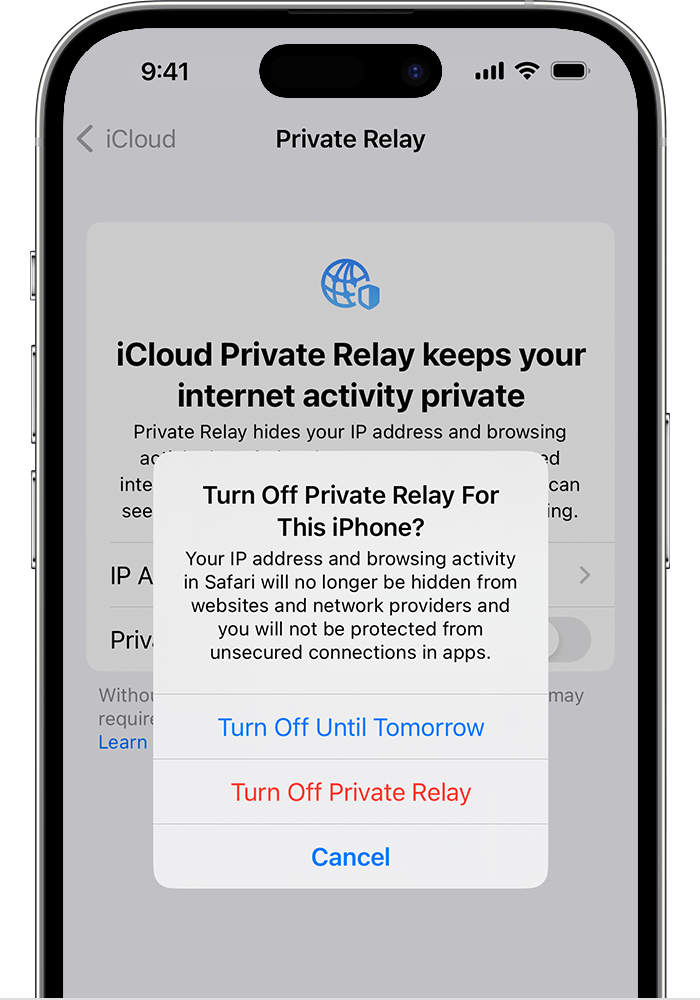
If you turn off Private Relay, network providers and websites can monitor your internet activity in Safari.
Choose whether to pause Private Relay until tomorrow or turn it off.

If a website doesn't work with Private Relay
If a website relies on IP filtering, monitoring, or rate-limiting, it might require your IP address to be visible. You can turn off Private Relay temporarily for that website only.

To temporarily allow a website to see your IP address:*

• iPhone or iPad: Tap the Page Settings button , then tap Show IP Address.
• Mac: In Safari, choose View > Reload and Show IP Address.

* If you don't see the option to temporarily allow a website to see your IP address, update your device to the latest version of iOS, iPadOS, or macOS, and try again.

Regards.

This thread has been closed by the system or the community team. You may vote for any posts you find helpful, or search the Community for additional answers.

My private relay emails are not going to any of my email addresses

Welcome to Apple Support Community
A forum where Apple customers help each other with their products. Get started with your Apple Account.