iPad stop charging with electric

iPad stop charging with electric block and cord. Will charge with a battery backup and cable


iPad Air, iPadOS 16

Posted on Jan 7, 2023 1:24 PM

Reply
Question marked as Top-ranking reply

Posted on Jan 9, 2023 4:05 PM

Hello Flooringrocks,


Thank you for reaching out to Apple Support Communities, and we'll be happy to help in any way we can. We understand you're having issues with charging your iPad. Try the steps in this article to see if they resolve the issue: If your iPad won't charge


"First, make sure that you’re using the right accessories

Connect your iPad to a USB charging cable (preferably the cable that came with your iPad). Then plug the cable into one of these power sources:

  • A USB power adapter that’s plugged into a working wall outlet. It's best to use the USB power adapter that came with your iPad. Learn more about Apple USB power adapters.
  • A USB port that supports USB 2 or later, on a computer that’s on and not in sleep mode.
  • A powered USB hub, docking station, or other Apple-certified accessory.


If your iPad still won’t charge, try these tips
  • Use a different power adapter or a different charging cable. If you don’t have those, contact Apple Support.
  • Make sure that your iPad isn't too hot or too cold. Learn about keeping your iPad within acceptable operating temperatures.
  • Force restart your iPad: 
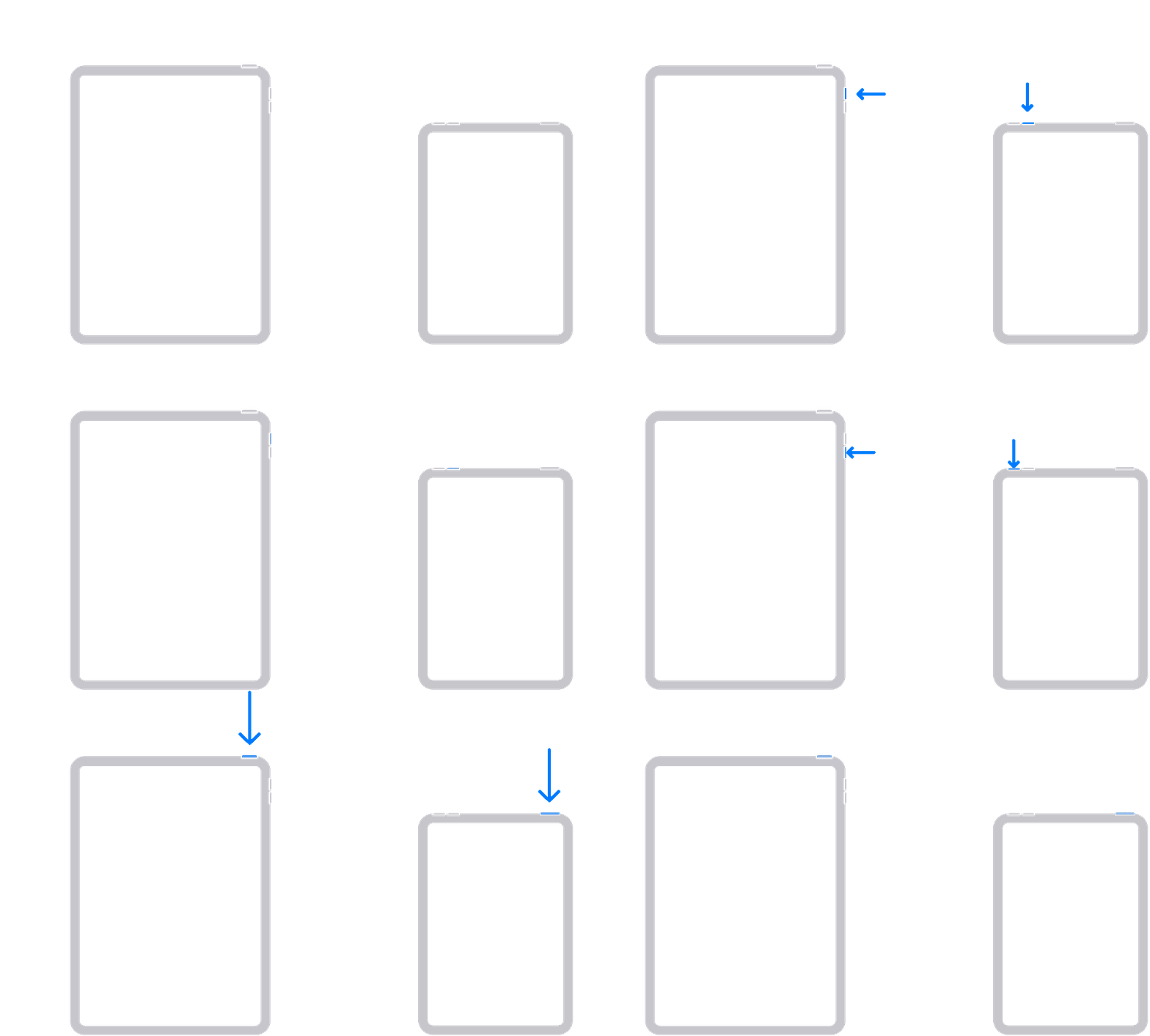
  • For an iPad without a Home button: Press and quickly release the volume button closest to the top button. Press and quickly release the volume button farthest from the top button. Press and hold the top button until your iPad restarts.

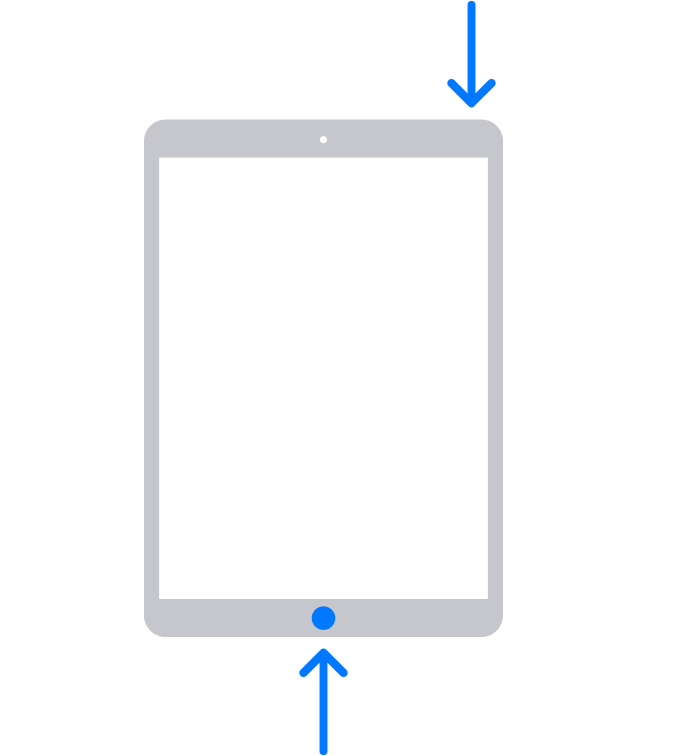
  • For an iPad with a Home button: Press and hold both the top (or side) button and the Home button until you see the Apple logo.
    • "


We hope this helps.


Cheers!

1 reply
Question marked as Top-ranking reply

Jan 9, 2023 4:05 PM in response to Flooringrocks

Hello Flooringrocks,


Thank you for reaching out to Apple Support Communities, and we'll be happy to help in any way we can. We understand you're having issues with charging your iPad. Try the steps in this article to see if they resolve the issue: If your iPad won't charge


"First, make sure that you’re using the right accessories

Connect your iPad to a USB charging cable (preferably the cable that came with your iPad). Then plug the cable into one of these power sources:

  • A USB power adapter that’s plugged into a working wall outlet. It's best to use the USB power adapter that came with your iPad. Learn more about Apple USB power adapters.
  • A USB port that supports USB 2 or later, on a computer that’s on and not in sleep mode.
  • A powered USB hub, docking station, or other Apple-certified accessory.


If your iPad still won’t charge, try these tips
  • Use a different power adapter or a different charging cable. If you don’t have those, contact Apple Support.
  • Make sure that your iPad isn't too hot or too cold. Learn about keeping your iPad within acceptable operating temperatures.
  • Force restart your iPad: 
  • For an iPad without a Home button: Press and quickly release the volume button closest to the top button. Press and quickly release the volume button farthest from the top button. Press and hold the top button until your iPad restarts.

  • For an iPad with a Home button: Press and hold both the top (or side) button and the Home button until you see the Apple logo.
    • "


We hope this helps.


Cheers!

This thread has been closed by the system or the community team. You may vote for any posts you find helpful, or search the Community for additional answers.

iPad stop charging with electric

Welcome to Apple Support Community
A forum where Apple customers help each other with their products. Get started with your Apple Account.