Rank Values Based on Multiple Criteria

I need to rank values based on multiple criteria. I hope this is possible...


First, I would like to look at the TRUE counts in columns A, D, G, J, and M.  The higher number is best (1st rank).


If there are multiple columns with the same TRUE count, then I need to compare the values in columns B, E, H, K, and N. The lowest number is best (1st rank).


In my example below, the first criteria would find 3 columns with a TRUE values (columns A, D and J).  The next criteria would then check the values in columns B, E and J.


As always, thank you for your help.


MacBook Pro 15″, macOS 11.7

Posted on Jan 8, 2023 1:38 PM

Reply
Question marked as Top-ranking reply

Posted on Jan 9, 2023 3:25 PM

Hi Bear34_1,

as you have learned RANK can only check for one criteria, therefore you have to calculate a new criteria that will combine your two existing criteria.


Here one possible solution:

It will work as long as the sum in the column B, E, H, K, and N will stay below 1,000 and you have max 9 groups of columns.


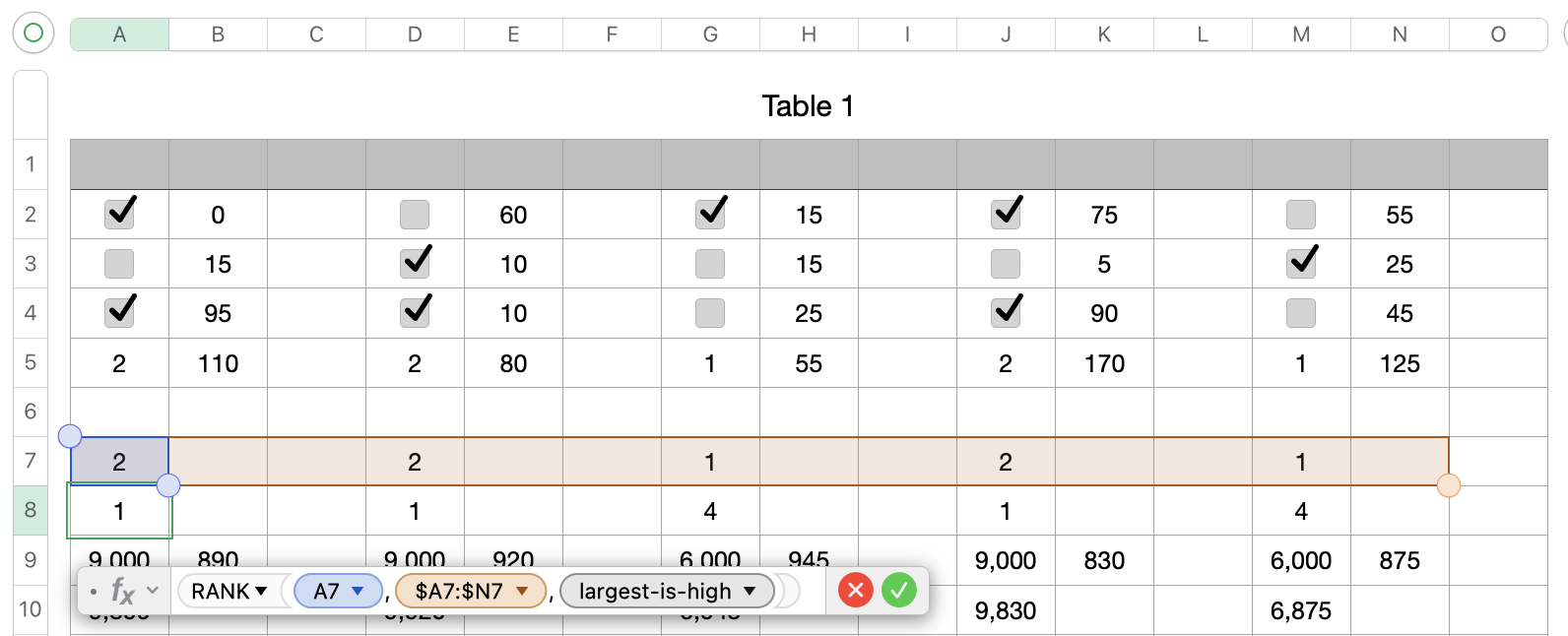
Row 7 is a simple copy of the count for the checkmarks in row 5, this will make the RANK formula in row 8 easier.

Formula for A8=RANK(A7,$A7:$N7,largest-is-high) $-signs are important to preserve the columns

Formula for A9=10000−(A8×1000) Here I will calculate a support value.

If the rank is 1 I get 9000, if it would be 2 I get 8000, ... This will ensure that a high rank will get a high total value.


Formula for B9=1000−B5 Here I will calculate a support value.

If the total from B2 to B4 is low I get a high result


In A10 I create the sum of A9+B9


Formula for A12=RANK(A10,$A10:$N10,largest-is-high)

This will give you the rank based on the calculation for the support values.
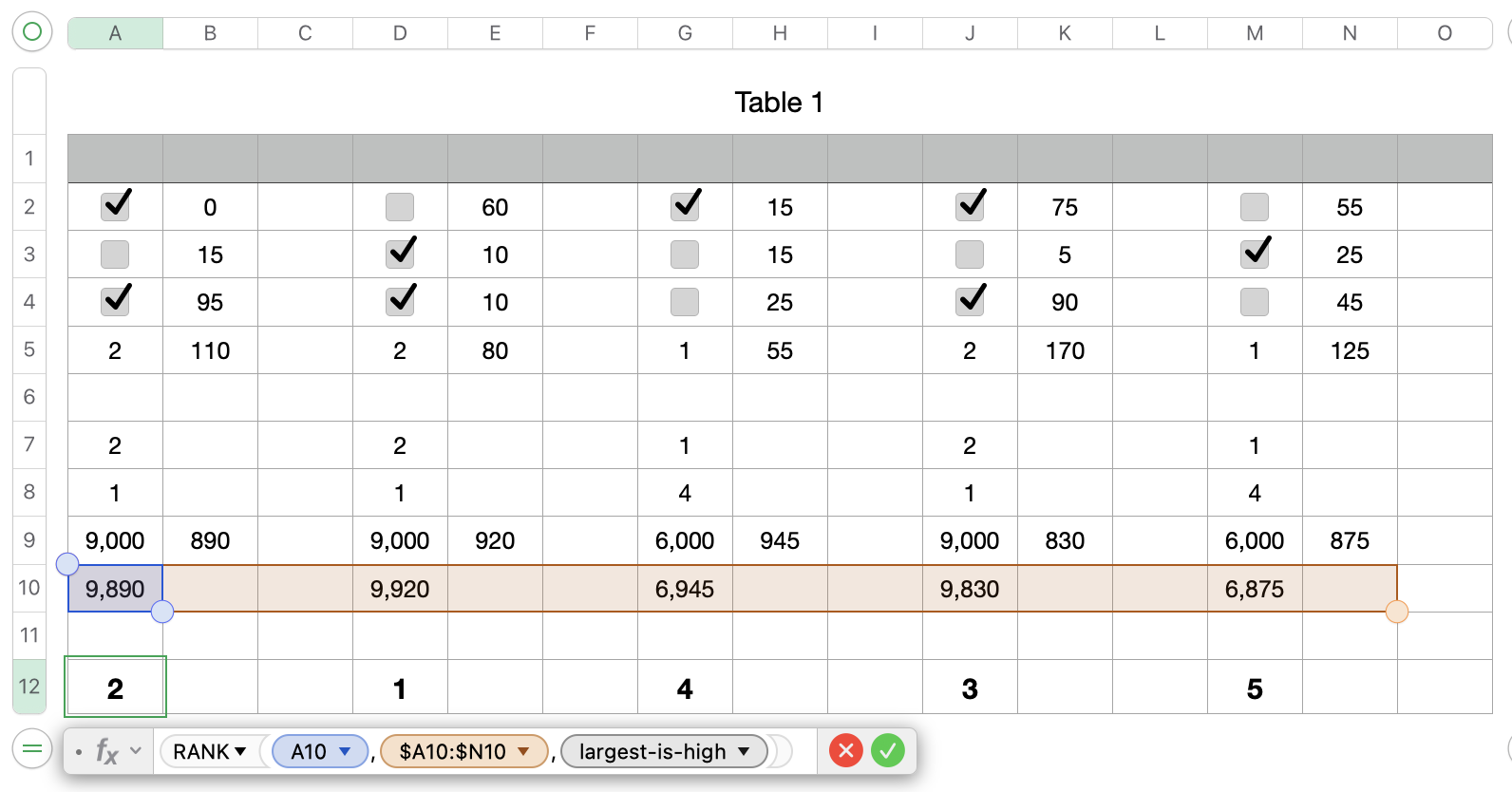

You can hide rows 6 to 11, to have a clean looking table.


Based on your region the , or the ; will be used to separate the different sections of a formula. If you write one thousand as 1,000.00 then the , is used as your formula separator. If you write one thousand as 1.000,00 then the ; is used as your formula separator.


Hope this will solve your question, please let me know if this worked for you or if something in unclear.


Regards Ralf


5 replies
Question marked as Top-ranking reply

Jan 9, 2023 3:25 PM in response to Bear34_1

Hi Bear34_1,

as you have learned RANK can only check for one criteria, therefore you have to calculate a new criteria that will combine your two existing criteria.


Here one possible solution:

It will work as long as the sum in the column B, E, H, K, and N will stay below 1,000 and you have max 9 groups of columns.


Row 7 is a simple copy of the count for the checkmarks in row 5, this will make the RANK formula in row 8 easier.

Formula for A8=RANK(A7,$A7:$N7,largest-is-high) $-signs are important to preserve the columns


Formula for A9=10000−(A8×1000) Here I will calculate a support value.

If the rank is 1 I get 9000, if it would be 2 I get 8000, ... This will ensure that a high rank will get a high total value.


Formula for B9=1000−B5 Here I will calculate a support value.

If the total from B2 to B4 is low I get a high result


In A10 I create the sum of A9+B9


Formula for A12=RANK(A10,$A10:$N10,largest-is-high)

This will give you the rank based on the calculation for the support values.


You can hide rows 6 to 11, to have a clean looking table.


Based on your region the , or the ; will be used to separate the different sections of a formula. If you write one thousand as 1,000.00 then the , is used as your formula separator. If you write one thousand as 1.000,00 then the ; is used as your formula separator.


Hope this will solve your question, please let me know if this worked for you or if something in unclear.


Regards Ralf


Jan 9, 2023 2:13 AM in response to Bear34_1

Hi Bear34_1,

could you please check your description and your attached screenshot.

Based on how I understand they do not macht!


A, D, G, J, and M are TRUE as soon as they have a checkmark.

Column J is the only one that has 3 TRUE checkmarks, therefore it should be 1st.

The columns with 2 TRUE checkmarks should be 2 and 3.

The columns with 1 TRUE checkmarks should be 4 and 5.


What range would the columns B, E, H, K, and N have?

0 to 100, 0 to 1000, or something other?


I assume that you would like to rank based on the totals in row 4, correct?


I added the ranking in yellow, based on how I understand it.


Regards Ralf


Jan 9, 2023 12:02 PM in response to Ralf-F

Ralf,


I'm sorry for the confusion. You are correct, my description does not match my screenshot. I don't have a clue how I messed-up my original post. I guess I will strike it up to A-G-E.


Let me try this again...


First, I would like to look at the TRUE counts in columns A, D, G, J, and M.  The higher number is best (1st rank).


If there are multiple columns with the same TRUE count, then I need to compare the values in columns B, E, H, K, and N.  The lowest number is best (1st rank).


In my example below, the first criteria would find 3 columns with the higher TRUE values (columns A, D and J).  Since columns A, D and J all have 2 true values, the next part of the formula would evaluate the appropriate values in columns B, E and K for the lowest number. The final ranking order is column D/E ranks first, followed by A/B, J/K, G/H, and finally M/N.


Again, I'm so sorry for the confusion.

This thread has been closed by the system or the community team. You may vote for any posts you find helpful, or search the Community for additional answers.

Rank Values Based on Multiple Criteria

Welcome to Apple Support Community
A forum where Apple customers help each other with their products. Get started with your Apple Account.