Why can’t I open attachments in mail
I have a new iPhone 14. I can’t open attachments in mail
iPhone 14, iOS 16
I have a new iPhone 14. I can’t open attachments in mail
iPhone 14, iOS 16
Hello bernburra,
Thank you for reaching out in Apple Support Communities. We recommend to test this behavior on both cellular data and Wi-Fi. This can help determine if you're unable to open attachments in the Mail app.
In addition, are you unable to download attachments from your emails? Just to be sure, you can follow these steps to download attachments:
Download an attachment sent to you
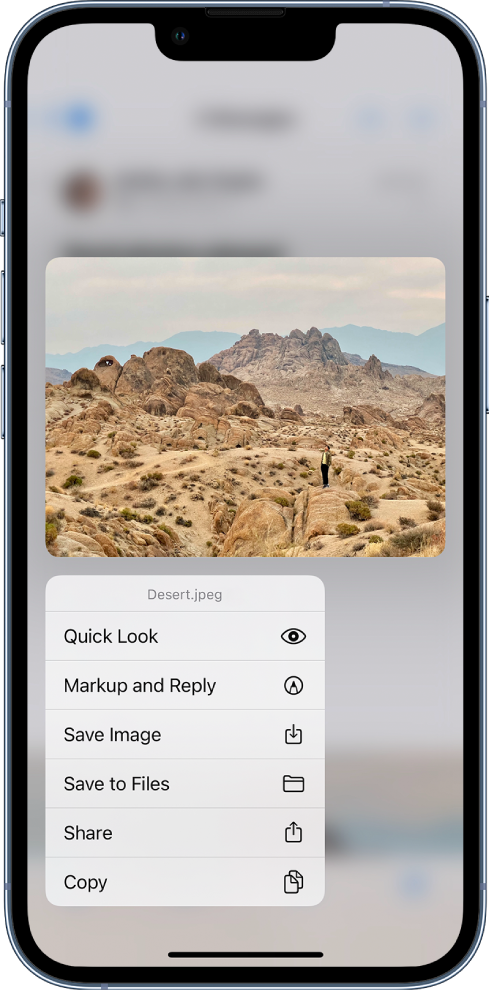
Touch and hold the attachment, then choose Save Image or Save to Files.
If you choose Save Image, you can find it later in the Photos app. If you choose Save to Files, you can find it later in the Files app.
Tip: To open the attachment with another app, tap Share, then choose the app.
These steps are outlined here: Download email attachments in Mail on iPhone
We look forward to hearing back from you with an update.
Kind regards.
Hello bernburra,
Thank you for reaching out in Apple Support Communities. We recommend to test this behavior on both cellular data and Wi-Fi. This can help determine if you're unable to open attachments in the Mail app.
In addition, are you unable to download attachments from your emails? Just to be sure, you can follow these steps to download attachments:
Download an attachment sent to you
Touch and hold the attachment, then choose Save Image or Save to Files.
If you choose Save Image, you can find it later in the Photos app. If you choose Save to Files, you can find it later in the Files app.
Tip: To open the attachment with another app, tap Share
These steps are outlined here: Download email attachments in Mail on iPhone
We look forward to hearing back from you with an update.
Kind regards.
Thank you but I reached out to Apple and just as I connected with Apple support my attachments suddenly downloaded. I was using a different Wi-Fi service so maybe something to do with Wi-Fi . Good news is attachments open as normal now !
Greetings bernburra,
Thanks for following up and letting us know that the network may have been the culprit with being unable to open the attachments.
Cheers.
Why can’t I open attachments in mail