Apple Pay verification code
Does anyone know how I can get an email sent with my verification code for my card? It never sent.
Does anyone know how I can get an email sent with my verification code for my card? It never sent.
Hello mayla288,
Are you trying to set up Apple Pay? If so, try these related steps: Set up Apple Pay
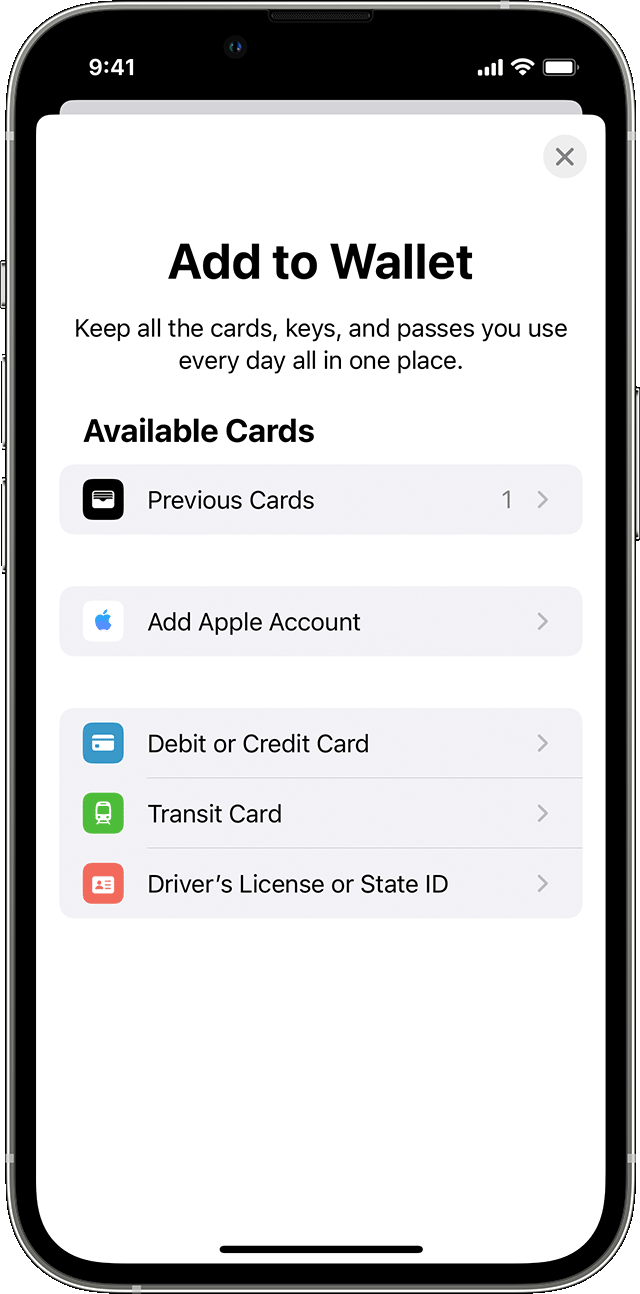
How to add a debit or credit card on your iPhone
1. In the Wallet app, tap the Add button.
- Tap Debit or Credit Card to add a new card.
- Tap Previous Cards to add a card that you used previously.
2. Tap Continue.
3. Follow the steps on the screen to add a new card.
4. Verify your information with your bank or card issuer. They might ask you to provide more information or to download an app before approving your card for use with Apple Pay.
5. If you have a paired Apple Watch, you have the option to also add the card to your watch.
To remove a card from the Previous Cards screen, tap Edit > Remove button> Delete. Then, tap Delete Card to confirm and remove the card from all your devices.
If you're trying to verify an Apple Card or Apple Cash, see these steps instead: Identity verification for Apple Card or Apple Cash
These steps didn't mention email verification. What happens when you follow these steps? Are you receiving any errors or messages about verification? Have you been in touch with your bank or card issuer? Tell us more, so we're on the same page for further help.
Wishing you well, take care.
Apple Pay verification code