Hi reinbj14,
Welcome to Apple Support Communities. We understand that you're having an issue with with your daughter's playlists. We'd like to help.
Just to confirm, you mentioned that you see playlists on your iPhone. Does this include the playlists that she is missing? Are you sharing an Apple ID? We ask because we're wording if Sync Library is turned on between all the devices with the same Apple ID.
Before you toggle anything on either devices, we would recommend making sure that your daughter has a copy of the songs that were in her playlists. We say that because there is a chance of data loss when toggling Sync Library off and on.
Once you're ready, these steps should help:
How to turn on Sync Library on your iPhone or iPad
1. Make sure that your iPhone or iPad is signed in with the same Apple ID that you use with your Apple Music subscription.
2. Go to Settings.
3. Tap Music.
4. Turn on Sync Library.
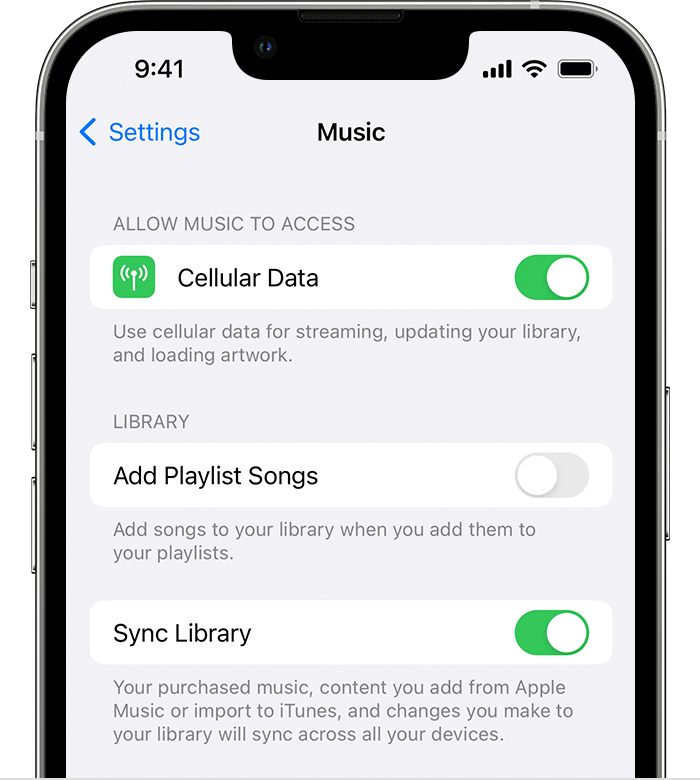
5. Turn on Sync Library on your other devices.
Hope that helps.
Cheers!


