Started to back up my phone and there’s a iPhone that is not mine. How can I tell who’s it is?
Is there a way to tell who a phone belongs to that is on my iCloud?
iPhone XR, iOS 16
Is there a way to tell who a phone belongs to that is on my iCloud?
iPhone XR, iOS 16
Hello karyfromfredericktown,
For any devices signed into your account that you don't recognize, you'll want to remove them using the steps below:
If you aren't using your device anymore, or if you don't recognize a listed device, you should remove it from the list.
If you set up two-factor authentication for your Apple ID, removing a device will ensure that it can no longer display verification codes. It also won't have access to iCloud and other Apple services, including Find My, until you sign in again with two-factor authentication. The device won't reappear in the list unless you sign in again.
You can also permanently remove a device from your account page
Use your iPhone or iPad to remove a device
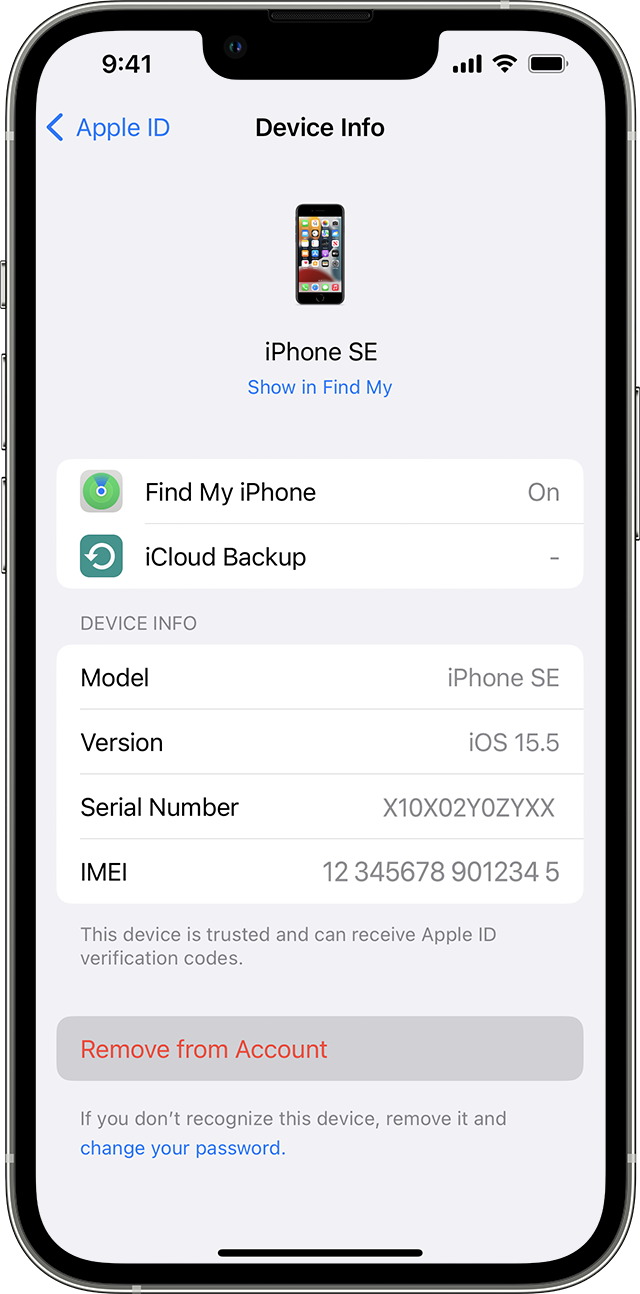
1. Tap the device to find its details, then tap Remove from Account.
2. Review the message that appears, then tap again to confirm that you want to remove the device.
You can also find those steps in this resource: Check your Apple ID device list to find where you're signed in - Apple Support
If you have any further concerns, you'll want to reach out to Apple Support: Contact - Official Apple Support They'll be in the best position to assist with any account related concerns.
Take care.
Started to back up my phone and there’s a iPhone that is not mine. How can I tell who’s it is?