How can customize my Apple serie 7
Apple Watch Series 7, watchOS 9
Apple Watch Series 7, watchOS 9
Hi RamirezEli,
We recommend that you try the steps in the link below since it sounds like you'd like to make some customizations to your Apple Watch.
To perform the recommended troubleshooting steps via the link above, complete the steps in the sections titled "Choose a different watch face" and "Add complications to the watch face."
Choose a different watch face
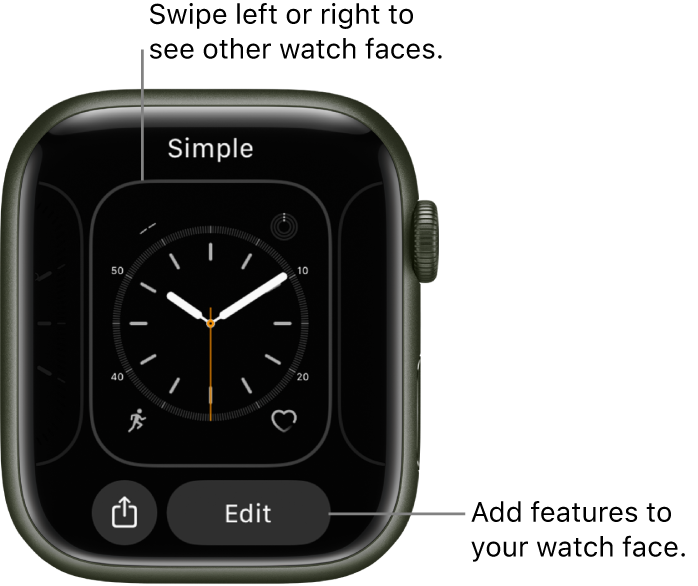
*Swipe edge to edge across the watch face to see other faces in your collection.
*To see all available watch faces, touch and hold the watch face, swipe to the one you want, then tap it.
Add complications to the watch face
You can add special features—called complications—to some watch faces, so you can instantly check things like stock prices, the weather report, or information from other apps you installed.
1) With the watch face showing, touch and hold the display, then tap Edit.
2) Swipe left all the way to the end.
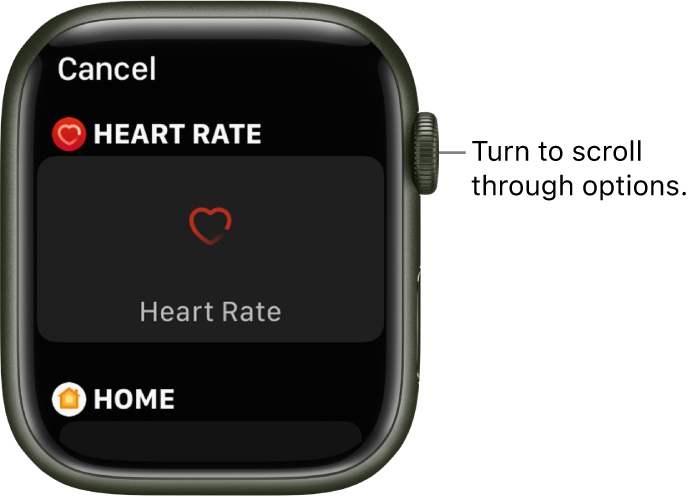
If a face offers complications, they’re shown on the last screen.
3) Tap a complication to select it, then turn the Digital Crown to choose a new one—Activity or Heart Rate, for example.
4) When you’re finished, press the Digital Crown to save your changes, then tap the face to switch to it.
Some apps you get from the App Store also include complications.
We recommend the steps above because they will show you how to personalize your Apple Watch face, so it looks the way you want and provides the functions you need.
Please do not hesitate to contact us if you have other questions about customizing your Apple Watch.
Thanks for using the Apple Support Communities.
Cheers!
How can customize my Apple serie 7