Apple Watch temperature
How can I set my watch face to show temperature in current location?
How can I set my watch face to show temperature in current location?
Hey Barbsoff,
We'd be happy to help out. To get started, make sure you're using a watch face that has the complication available that you'd like to use. All watch faces have different options available. Once you've found a watch face which allows for the complication you'd like to use, you can add it using the steps below:
Choose a different watch face
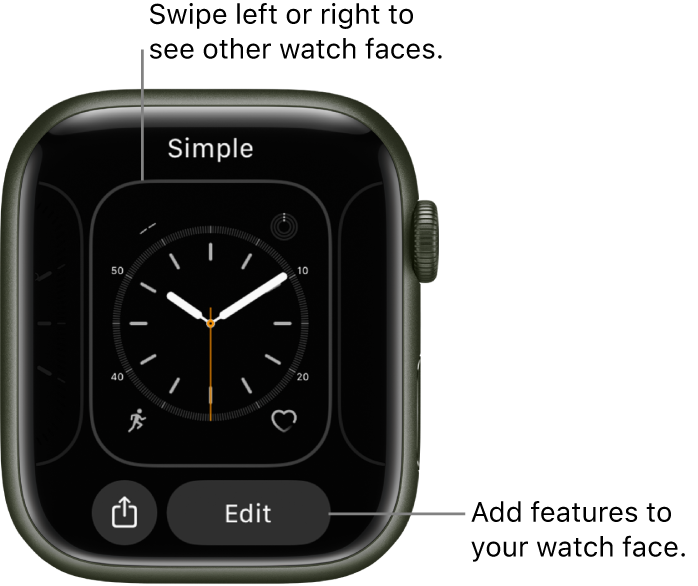
• Swipe edge to edge across the watch face to see other faces in your collection.
• To see all available watch faces, touch and hold the watch face, swipe to the one you want, then tap it.
Add complications to the watch face
You can add special features—called complications—to some watch faces, so you can instantly check things like stock prices, the weather report, or information from other apps you installed.
1. With the watch face showing, touch and hold the display, then tap Edit.
2. Swipe left all the way to the end.
3. If a face offers complications, they’re shown on the last screen.
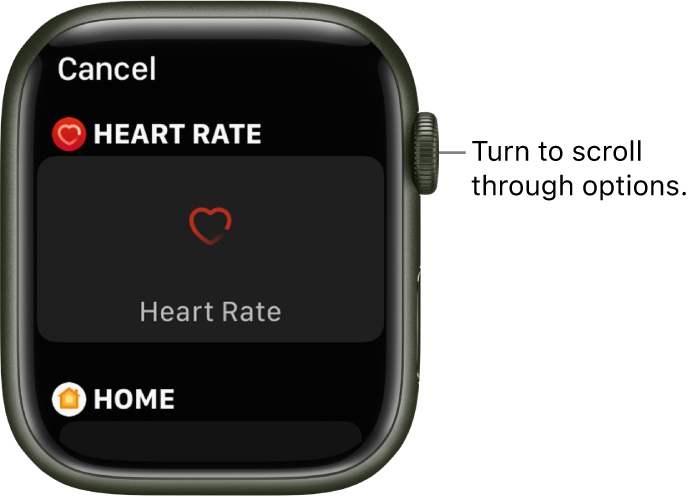
4. Tap a complication to select it, then turn the Digital Crown to choose a new one—Activity or Heart Rate, for example.
5. When you’re finished, press the Digital Crown to save your changes, then tap the face to switch to it.
Some apps you get from the App Store also include complications.
All this and more is available here: Customize the watch face - Apple Support
We hope this helps out.
Take care!
Hey Barbsoff,
We'd be happy to help out. To get started, make sure you're using a watch face that has the complication available that you'd like to use. All watch faces have different options available. Once you've found a watch face which allows for the complication you'd like to use, you can add it using the steps below:
Choose a different watch face
• Swipe edge to edge across the watch face to see other faces in your collection.
• To see all available watch faces, touch and hold the watch face, swipe to the one you want, then tap it.
Add complications to the watch face
You can add special features—called complications—to some watch faces, so you can instantly check things like stock prices, the weather report, or information from other apps you installed.
1. With the watch face showing, touch and hold the display, then tap Edit.
2. Swipe left all the way to the end.
3. If a face offers complications, they’re shown on the last screen.
4. Tap a complication to select it, then turn the Digital Crown to choose a new one—Activity or Heart Rate, for example.
5. When you’re finished, press the Digital Crown to save your changes, then tap the face to switch to it.
Some apps you get from the App Store also include complications.
All this and more is available here: Customize the watch face - Apple Support
We hope this helps out.
Take care!
Apple Watch temperature