
Calendar
How can I retrieve all the information that was removed from my calendar on my MacBook Air 256?
MacBook Air 11″, macOS 10.12
How can I retrieve all the information that was removed from my calendar on my MacBook Air 256?
MacBook Air 11″, macOS 10.12
Hello,
Thank you for reaching out to Apple Support Communities, and we'll be happy to help in any way we can. We understand you're having issues with calendar data. Was this in iCloud Calendar? If so, try the steps here to see if they resolve the issue: If your iCloud Contacts, Calendars, or Reminders won’t sync - Apple Support
"Things to check first
Try the steps for your device
If you still need help, try the steps for your device below.

iOS and iPadOS
After each step, check your contacts, calendars, or reminders.
Restart the Contacts, Calendar, or Reminders app
Refresh your contacts and calendars
To refresh your contacts, open the Contacts app and swipe down on the list. To refresh your contact groups, tap Lists in the upper-left corner, then swipe down on the list.
To refresh your calendars:
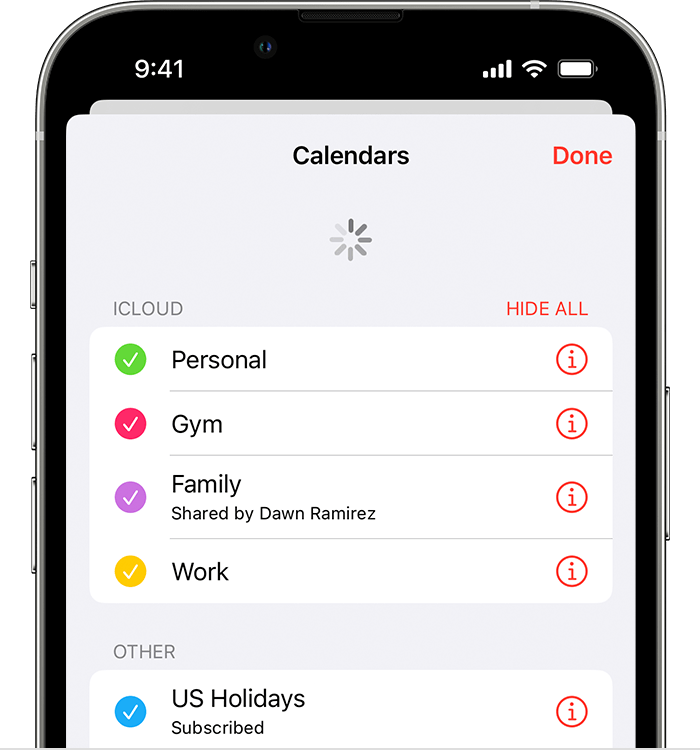
Check your app settings
If you use multiple groups or accounts in the Contacts or Calendars app, make sure that your iCloud Contacts and Calendars are set to appear:
Change how often your calendars update:
Since the iCloud Birthdays calendar updates daily, changes to birthdays might not appear in the Calendars app until the next day.
Set iCloud Contacts, Calendars, or Reminders as your default
If your contacts, calendars, and reminders are in iCloud, then iCloud automatically updates your information. If your information is in a third-party account, like Google or Yahoo, you can change your default account to iCloud. Changing your default account to iCloud won't move your existing information from a third-party service to iCloud.
Contacts
To see which account your contacts are in:
In iOS 16 or later:
In iOS 15 or earlier:
Set iCloud as the default account for your contacts:
Calendars and Reminders
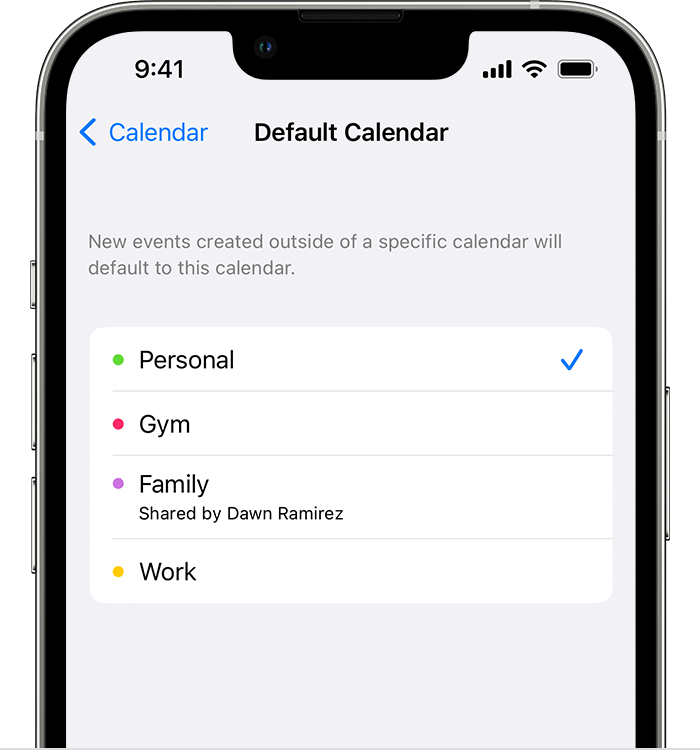
To check which account your calendars are in, open the Calendar app, then tap the Calendars tab.
Set an iCloud calendar as the default calendar:
Set an iCloud reminders list as the default list:
Delete overdue reminders
Repeat these steps on each device that's using iCloud Reminders.
Restart your iPhone, iPad, or iPod touch
Force sync Calendar data on Apple Watch
If a family member set up your Apple Watch for you, you can't force sync Calendar data.
macOS
After each step, check your contacts, calendars, or reminders.
Refresh your calendars
You can refresh your calendars from the Calendars app:
Since the iCloud Birthdays calendar updates hourly, you might not see changes to birthdays in the Contacts or Calendars app for an hour.
Check your default Calendar, Reminders, and Contacts account
If you store and edit your events in iCloud instead of another place, like On My Mac, Exchange, or Google, then iCloud automatically updates your calendars. If you use multiple accounts on your Mac like iCloud, Gmail, and Yahoo, make sure that iCloud is your default Calendar account:
If you store and edit your contacts in iCloud instead of another place, like On My Mac, Exchange, or Google, then iCloud automatically updates your contacts. If you use multiple accounts on your Mac like iCloud, Gmail, and Yahoo, make sure that iCloud is your default Contacts account:
As long as you've turned on Reminders in iCloud Settings, your iCloud reminders appear on your Mac.
Delete completed or overdue reminders
Repeat these steps on each device that's using iCloud Reminders.
Restart your computer
After you restart your computer, check if you fixed the issue.
iCloud.com
If all your updates don't appear or you have another issue, try these steps on iCloud.com:
Since the iCloud Birthdays calendar updates daily, changes to birthdays might not appear in the Calendars app until the next day.
Microsoft Windows
After each step, check your contacts, calendars, or reminders.
Refresh Outlook
Click Refresh  in Outlook.
Turn off iCloud Contacts and Calendar, then turn it back on
Make sure the iCloud Outlook Add-in is active
In Outlook 2010 and later:
Learn how to manage Add-ins with Microsoft Outlook.
Check your default account in Outlook
In Outlook 2010 and later:
Restart your computer
After you restart your computer, check if you fixed the issue.
If you still need help
If you still need help, contact Apple Support."
We hope this helps.
Cheers!
Calendar

