
Apple Watch mobile plan activating
So I noticed my watch said plan not in use although mr carrier are definitely charging me for it. So I tried removing and adding it again but now it just says “Activating”.
Apple Watch SE, watchOS 9
So I noticed my watch said plan not in use although mr carrier are definitely charging me for it. So I tried removing and adding it again but now it just says “Activating”.
Apple Watch SE, watchOS 9
Hello Toby1997,
We understand that you're running into an issue when trying to set up cellular on Apple Watch. We'd like to provide you with a few steps that may able to assist you:
"Before you start
Set up cellular on Apple Watch
You can activate cellular when you first set up your Apple Watch, or when you set up a watch for a family member. During setup, look for the option to set up cellular, then follow the onscreen steps.
You can also set up cellular later from the Apple Watch app:
You might see a phone number assigned to your Apple Watch that differs from the phone number assigned to your iPhone. The number shown for your Apple Watch is for your carrier's billing or tracking purposes only; your iPhone and Apple Watch share the same number.
Connect to a cellular network
Your Apple Watch with cellular automatically switches to the most power-efficient wireless available: It can connect to your iPhone when itʼs nearby, a Wi-Fi network, or cellular. When your watch connects to cellular, it uses LTE networks. If LTE isn't available, your watch will try to connect to UMTS if your carrier supports it.
When your watch connects to a cellular network, you can check the signal strength from Control Center or the Cellular complication that you can add to most watch faces. To open Control Center, touch and hold the bottom of the screen, then swipe up.
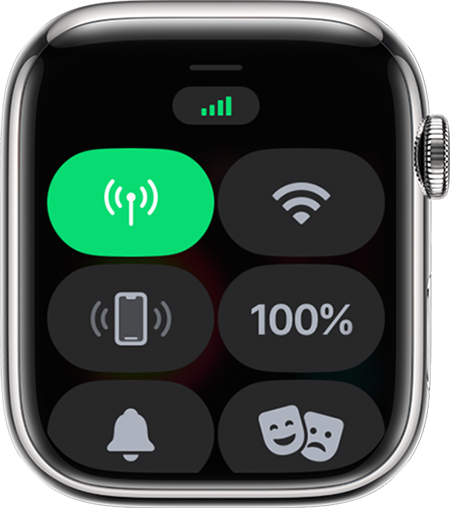
The Cellular button turns green when you have a connection. The green bars show the signal strength.
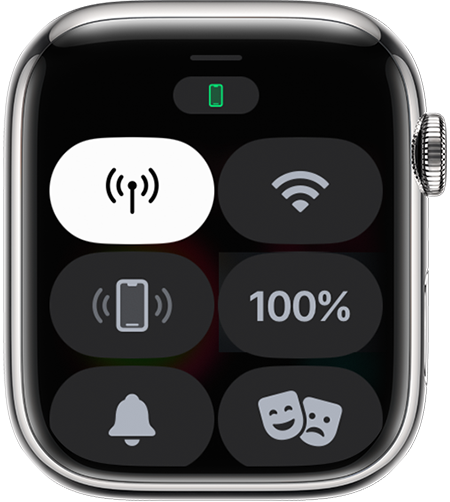
The Cellular button turns white when your cellular plan is active, but your watch is connected via Bluetooth or Wi-Fi to your iPhone.

Learn what your Apple Watch can do while connected to Wi-Fi or cellular, even when your iPhone isn't nearby."
Let us know if this helps.
Take care!
Apple Watch mobile plan activating

