Ghost-Device Glitch with Icloud Account

Logged into apple discussion forums and noticed two devices under the My Devices Panel. One being my Iphone 14+ and another “Iphone”. 


I then logged into iCloud.com to double check logged in devices on my iCloud account, and while logging in it said it would send two-step verification pings to my “devices running IOS 16.2”


When I checked it in iCloud.Com it only shows my Iphone 14+ as being logged in. Additionally, when I check under settings it only shows my Iphone 14+


Why would it send two step verification pings to my “devices” if I only have one device logged in.

Why would it list another Iphone under my devices in discussion forums when I only have an Iphone 14+ on this ICloud Account.


If the device is not listed under settings and devices can we be 100% sure its not connected to the iCloud account and just be a glitch?


Thank you.

iPhone 14 Plus, iOS 16

Posted on Jan 17, 2023 12:54 AM

Question marked as Top-ranking reply

Posted on Jan 18, 2023 11:54 AM

Hello aooqoqo,


You can always use these steps to determine where you're sign in to your Apple ID: Check your Apple ID device list to find where you're signed in


Check your Apple ID device list to find where you're signed in

Learn which devices appear in your Apple ID device list, how to find your device's details (including if it's a trusted device), and how to remove a device.

Find where you're signed in

Follow these steps to find the devices that you're currently signed in to with your Apple ID. 

Find what devices you're signed in to with your Apple ID on iPhone 

Use your iPhone, iPad, iPod touch, or Apple Watch to find where you're signed in

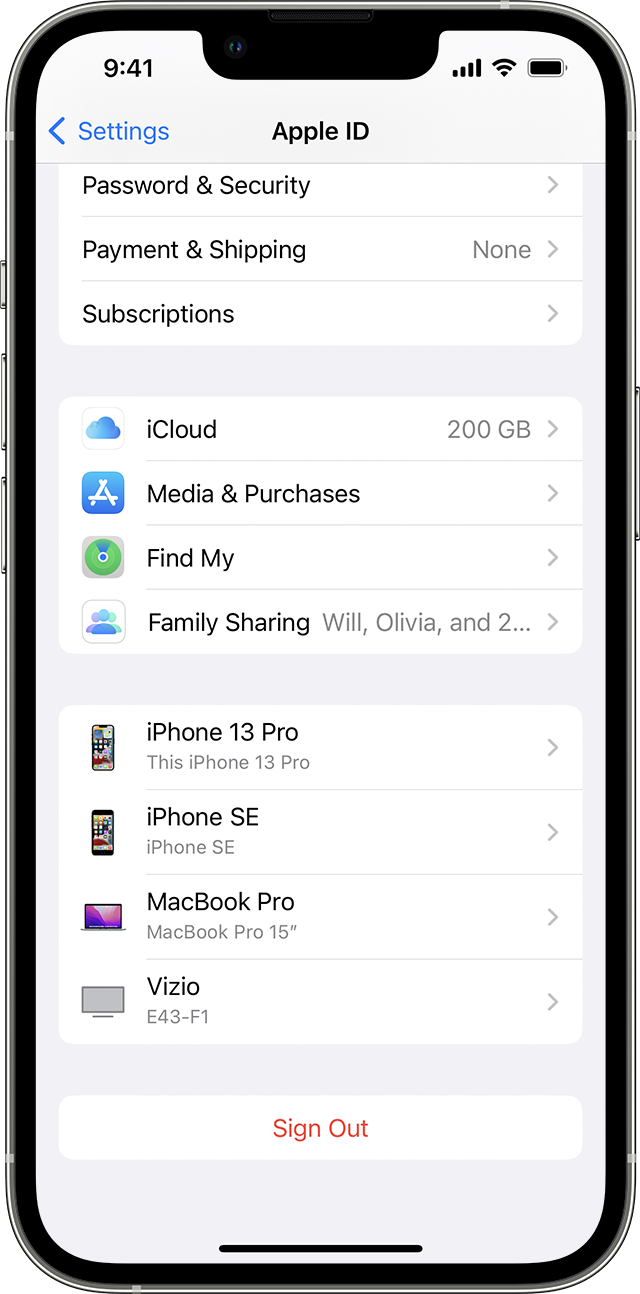
1. Tap Settings > [your name], then scroll down. 

2. Tap any device name to view that device's information, such as the device model, serial number, OS version, and whether it's a trusted device that can be used to receive Apple ID verification codes. The information might vary depending on the device type. You might need to answer your security questions to view device details. 


If the device doesn't appear here, then it is no longer signed in to the iCloud account.


Without knowing your device history, it may be hard to provide a reason this would appear on the Apple Support Community website. Unless it was associated previously with your account and this information was not updated at that time.


We hope this helps out, take care.

Similar questions

1 reply
Question marked as Top-ranking reply

Jan 18, 2023 11:54 AM in response to Community User

Hello aooqoqo,


You can always use these steps to determine where you're sign in to your Apple ID: Check your Apple ID device list to find where you're signed in


Check your Apple ID device list to find where you're signed in

Learn which devices appear in your Apple ID device list, how to find your device's details (including if it's a trusted device), and how to remove a device.

Find where you're signed in

Follow these steps to find the devices that you're currently signed in to with your Apple ID. 

Find what devices you're signed in to with your Apple ID on iPhone 

Use your iPhone, iPad, iPod touch, or Apple Watch to find where you're signed in

1. Tap Settings > [your name], then scroll down. 

2. Tap any device name to view that device's information, such as the device model, serial number, OS version, and whether it's a trusted device that can be used to receive Apple ID verification codes. The information might vary depending on the device type. You might need to answer your security questions to view device details. 


If the device doesn't appear here, then it is no longer signed in to the iCloud account.


Without knowing your device history, it may be hard to provide a reason this would appear on the Apple Support Community website. Unless it was associated previously with your account and this information was not updated at that time.


We hope this helps out, take care.

This thread has been closed by the system or the community team. You may vote for any posts you find helpful, or search the Community for additional answers.

Ghost-Device Glitch with Icloud Account

Welcome to Apple Support Community
A forum where Apple customers help each other with their products. Get started with your Apple Account.