Reanimationed,
Got it. Having this information allows us to get a clear understanding of the issue. At this time, we'd like to provide you with two options that can assist you.
• You can dislike or the music the music that has been curated. When you dislike a song or album, you receive fewer suggestions for similar music.
However, depending on the amount of music that has been presented to you, this may be very time consuming. Here's how to perform those steps:
"1. In the iTunes app on your PC, choose Music from the pop-up menu at the top left.
2. Do any of the following:
• View recommendations tailored for you: Click For You, then find music you recently played, personal playlists created for you, genres you might like, and more.

If you don’t see For You, make sure you’re signed in to Apple Music using your Apple ID.
• See what’s new in Apple Music: Click Browse, then find music by mood, new releases, charts, and more.

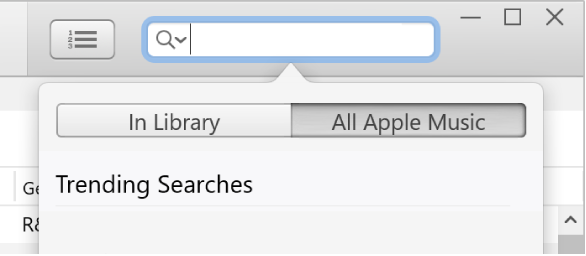
• Search the Apple Music catalog: Click in the search field in the top-right corner of the iTunes window, enter a word or phrase, then click All Apple Music.
3. To play an item, double-click it.
4. To love or dislike a song or album, right-click the item, then choose Love or Dislike. You can also click an item’s Not Loved button

or Loved button

wherever it appears in iTunes."
More details here: Stream recommended music and video in iTunes on PC
• You can delete your profile in order to reset these recommendations and create a new one. "Note: Your Apple Music subscription, library,
and playlists aren’t affected if you delete your profile, but you’re no longer able to see what your friends are listening to:
- In the iTunes app
 on your PC, choose Music from the pop-up menu at the top left, then click For You.
If you don’t see For You, make sure you’re signed in to Apple Music using your Apple ID.
2. Click the My Account button (looks like a photo or monogram) in the top-right corner of the window, then click Edit.
3. Click Delete Profile, then click Delete Profile again to confirm.
If you create your profile again within 90 days, your previous information and followers will be restored.
Note: If you delete your profile, it might take several minutes before it’s no longer visible to your followers or in searches."
From there you can create a new profile and will be asked to set your preferences.
Click here for more details: Create an Apple Music profile in iTunes on PC
We hope this helps.
Stay safe and well!



