text verification code not received, phone call verification does?
text verification code no longer received.... This has been working fine for years, now only phone call verification works? Total pain... what could have changed?
iPhone 8 Plus
text verification code no longer received.... This has been working fine for years, now only phone call verification works? Total pain... what could have changed?
iPhone 8 Plus
Hi buddhahead,
The following article has some steps that are useful if you're unable to receive messages: If you can't send or receive messages on your iPhone or iPad.
Are you having trouble receiving short code messages? If so, SMS messages (green bubbles) are managed through your cellular carrier. If you continue to have issues with receiving SMS messages after reviewing that article, contact your carrier for help with SMS messages and short code messages. : About iMessage and SMS/MMS
If you're referring to not receiving a verification code for two-factor authentication, check out this article: Get a verification code and sign in with two-factor authentication.
Get a text or phone call
If you don’t have a trusted device handy, you can have a verification code sent to your trusted phone number as a text message or phone call.
1. Click Didn't get a verification code on the sign in screen.
2. Choose to have the code sent to your trusted phone number.
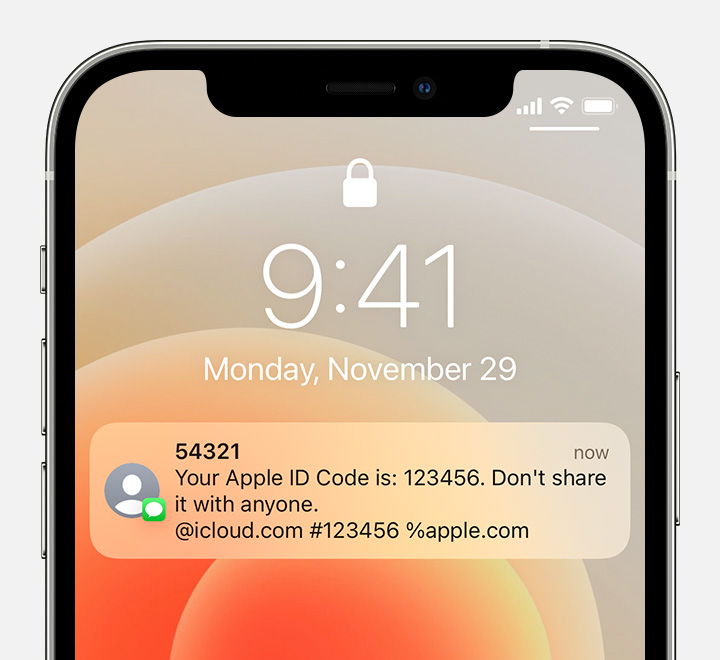
3. You'll get a text message or phone call from Apple with your verification code. This text message might include an additional domain validation line. This line includes the @ symbol, the website name, and your code (for example: @icloud.com #123456 %apple.com).
4. Enter the code on your other device to complete sign in.
Regards.
text verification code not received, phone call verification does?