Apple watch ultra
My apple watch ultra won't charge passed 80%.
My apple watch ultra won't charge passed 80%.
Hello nstpierre,
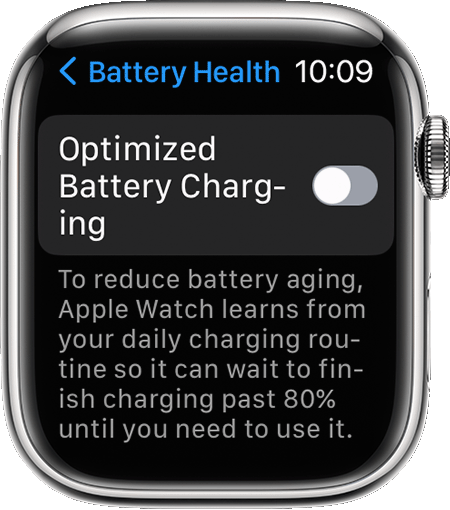
Thanks for reaching out to Apple Support Communities. We see you have some questions about your Apple Watch not charging past 80%, and we'd like to help. It sounds like you may have Optimized Battery Charging turned on, which does stop charging past 80%. The following link can assist with turning it off: About Optimized Battery Charging on your Device
If you want to turn off Optimized Battery Charging:
1) Open the Settings app on your Apple Watch.
2) Scroll down, then tap Battery.
3) Tap Battery Health.
4) Turn off Optimized Battery Charging.
5) Choose Turn Off Until Tomorrow or Turn Off.
Let us know if this helps.
Regards.
Hello nstpierre,
Thanks for reaching out to Apple Support Communities. We see you have some questions about your Apple Watch not charging past 80%, and we'd like to help. It sounds like you may have Optimized Battery Charging turned on, which does stop charging past 80%. The following link can assist with turning it off: About Optimized Battery Charging on your Device
If you want to turn off Optimized Battery Charging:
1) Open the Settings app on your Apple Watch.
2) Scroll down, then tap Battery.
3) Tap Battery Health.
4) Turn off Optimized Battery Charging.
5) Choose Turn Off Until Tomorrow or Turn Off.
Let us know if this helps.
Regards.
To add to what Jmanna13 provided above, on Apple Watch Ultra, it is called Optimized Charge Limit. And by design after you've owned your watch for about a month, the watch learns from your power needs and it does indeed stop the charge level at about 80%. If you used more power on the watch and needed a full 100%, it would charge to a higher level. But your usage is evidently much like how I use my Ultra and I awaken to a watch charged to 80%, which is more than enough charge to get me through a full day, with much leftover. I charge my watch at night while I sleep and I imagine you do as well.
So, this is normal and as designed and nothing to be concerned about. You spent a LOT of money on your watch and the battery management system built into your watch is going to extend the useful life of the battery so your watch lasts longer. That's a very good thing. As as posted above, if you do think you'll need your watch charged to 100%, you can turn off Optimized Charge Limit and when you do, it will ask if you want to turn it off just until tomorrow or permanently. I wouldn't turn it off permanently. But that is your choice.
Apple watch ultra