
no cellular tab
i cannot find cellular tab on my iPhone
iPhone 13 Pro, iOS 15
i cannot find cellular tab on my iPhone
iPhone 13 Pro, iOS 15
Hi sabah122,
You started from a great resource: How to set up a Personal Hotspot on your iPhone or iPad
It does mention: "If you don't see the option for Personal Hotspot, contact your carrier to make sure that you can use Personal Hotspot with your plan."
However, for help with locating your cellular settings, view the information below found in the article here: Use cellular data on your iPhone or iPad
"Turn cellular data on or off
To turn cellular data on or off, go to Settings, then tap Cellular or Mobile Data. If you're using an iPad, you might see Settings > Cellular Data.
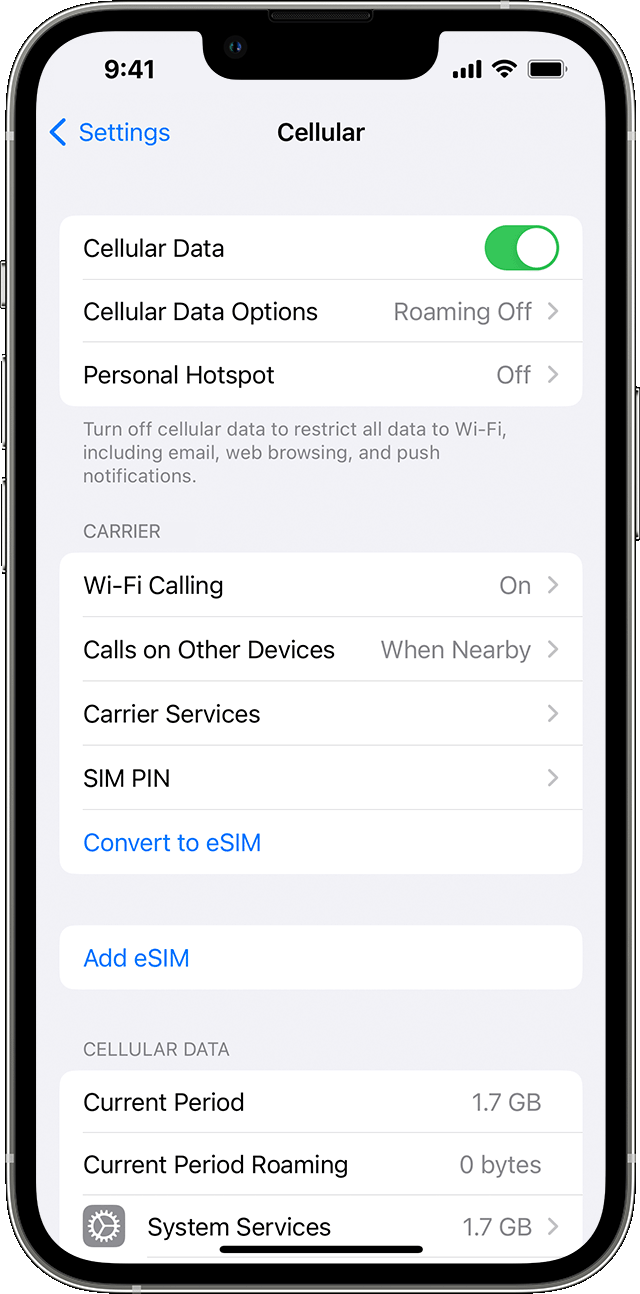
Depending on your carrier and device, you might have additional options listed under Cellular Data Options:
If you continue to have an issue, ensure you're running the latest iOS available for your iPhone and continue with the article below.
If you see No Service, Searching, or SOS on your iPhone or iPad
Cheers.
Hi sabah122,
You started from a great resource: How to set up a Personal Hotspot on your iPhone or iPad
It does mention: "If you don't see the option for Personal Hotspot, contact your carrier to make sure that you can use Personal Hotspot with your plan."
However, for help with locating your cellular settings, view the information below found in the article here: Use cellular data on your iPhone or iPad
"Turn cellular data on or off
To turn cellular data on or off, go to Settings, then tap Cellular or Mobile Data. If you're using an iPad, you might see Settings > Cellular Data.
Depending on your carrier and device, you might have additional options listed under Cellular Data Options:
If you continue to have an issue, ensure you're running the latest iOS available for your iPhone and continue with the article below.
If you see No Service, Searching, or SOS on your iPhone or iPad
Cheers.
In some regions Cellular is called “Mobile Data” in the Settings app.
no cellular tab


