
iOS Saffari back button
Why do I have to open up the sidebar to use my back button in Saffari for iOS? Remember when apple used to hold back stuff so that they made sure the products worked flawlessly? Yeah, me too.
iPad Pro, iPadOS 16
Why do I have to open up the sidebar to use my back button in Saffari for iOS? Remember when apple used to hold back stuff so that they made sure the products worked flawlessly? Yeah, me too.
iPad Pro, iPadOS 16
I’m unable to replicate your issue on any iPad. Regardless of screen orientation, the page forward and back buttons remain visible whether or not the Safari Sidebar is active:
Try a forced-restart of your iPad - as this will often clear an isolated software issue:
Force restart iPad (models with Face ID or with Touch ID in the top button)
If your iPad doesn’t have the Home button, do the following:

Force restart iPad (models with the Home button)
Press and hold the top button and the Home button at the same time. When the Apple logo appears, release both buttons.
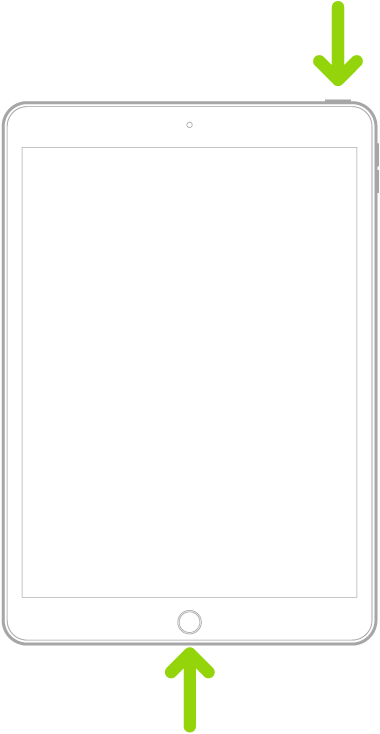
If the problem persists, a reset of your iPad settings may help. Resetting your iPad settings will not impact your locally stored data:
Settings > General > Transfer or Reset iPad > Reset > Reset All Settings
I’m unable to replicate your issue on any iPad. Regardless of screen orientation, the page forward and back buttons remain visible whether or not the Safari Sidebar is active:
Try a forced-restart of your iPad - as this will often clear an isolated software issue:
Force restart iPad (models with Face ID or with Touch ID in the top button)
If your iPad doesn’t have the Home button, do the following:
Force restart iPad (models with the Home button)
Press and hold the top button and the Home button at the same time. When the Apple logo appears, release both buttons.
If the problem persists, a reset of your iPad settings may help. Resetting your iPad settings will not impact your locally stored data:
Settings > General > Transfer or Reset iPad > Reset > Reset All Settings
iOS Saffari back button
