Trying to make an iMovie for a memorial service, but cannot find a way to identify DRM protection PRIOR to purchase. Does anyone know of a way to identify DRM before paying for music?

Trying to make an iMovie for a memorial service, but cannot find a way to identify DRM protection PRIOR to purchase. Does anyone know of a way to identify DRM before paying for music?


MacBook Pro 13″, macOS 10.14

Posted on Jan 20, 2023 8:00 AM

Reply
Question marked as Top-ranking reply

Posted on Jan 20, 2023 8:56 AM

Hi, BugabooYVR,


All music from Apple Music (the subscription service) is DRM protected. You can assume that all songs on commercial CD's are DRM protected unless otherwise indicated.


Songs purchased from iTunes after year 2009, on the other hand, are not DRM protected.


Regarding songs purchased from other websites, you would need to refer to the rules of the applicable website, or the llicense agreement for particular songs, to determine which songs carry DRM or copyright protection.


You might check out the You Tube audio library as I believe (but not entirely sure) that it has songs available for use in its video projects that are not DRM protected, although they cannot be used as standalone music.


-- Rich


Similar questions

3 replies
Question marked as Top-ranking reply

Jan 20, 2023 8:56 AM in response to BugabooYVR

Hi, BugabooYVR,


All music from Apple Music (the subscription service) is DRM protected. You can assume that all songs on commercial CD's are DRM protected unless otherwise indicated.


Songs purchased from iTunes after year 2009, on the other hand, are not DRM protected.


Regarding songs purchased from other websites, you would need to refer to the rules of the applicable website, or the llicense agreement for particular songs, to determine which songs carry DRM or copyright protection.


You might check out the You Tube audio library as I believe (but not entirely sure) that it has songs available for use in its video projects that are not DRM protected, although they cannot be used as standalone music.


-- Rich


Jan 20, 2023 1:04 PM in response to BugabooYVR

Were these iTunes songs purchased recently, i.e, after year 2009? If so, they should not have DRM protection. Since the songs that you bought have DRM protection, something is amiss there. Possibly the songs are not showing for some other reason.


To cover the bases, open your iTunes library on the iTunes website. Pick a couple of the songs that you believe are DRM protected and not showing in iMovie. Control-click on the song's title. In the pop up menu, click on Song Info. In the pop up info box that appears, click on File at the top right of the box. At the top of the box,under the heading "Kind", it will show whether the song is protected and will also show the purchase date. The song in the example below was purchased in 2006, before 2009, and thus carries DRM protection, and is shown as a Protected AAC Audio File.
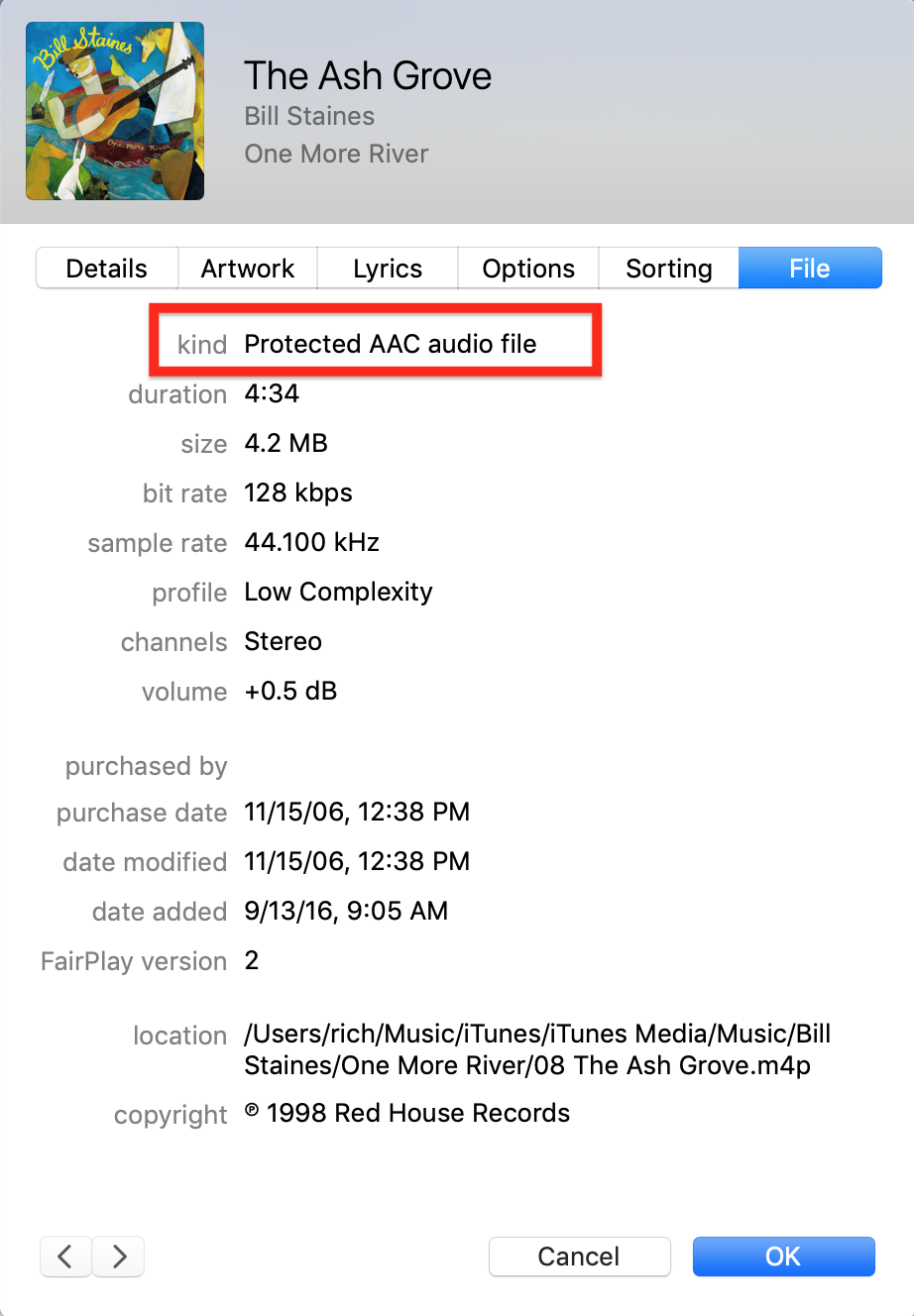


So, is the above what is showing for your songs ? If so, is the purchase date prior to year 2009? Did you purchase the song directly from iTunes?


If you don't mind spending $1.30 to repurchase a song that is shown as protected, try repurchasing and see if that cleanses it of the DRM protection. It should.


-- Rich

This thread has been closed by the system or the community team. You may vote for any posts you find helpful, or search the Community for additional answers.

Trying to make an iMovie for a memorial service, but cannot find a way to identify DRM protection PRIOR to purchase. Does anyone know of a way to identify DRM before paying for music?

Welcome to Apple Support Community
A forum where Apple customers help each other with their products. Get started with your Apple Account.
