
Vertifyingbto find number on iMessage
Y’all help me
iPhone 8, iOS 16
Y’all help me
iPhone 8, iOS 16
Hey there, and welcome to Apple Support Communities zaniyay,
We can certainly understand your concern and can help provide some insight.
We recommend checking out these steps on how to add and remove your phone number on iMessages.
" Set up your phone number
On your iPhone:
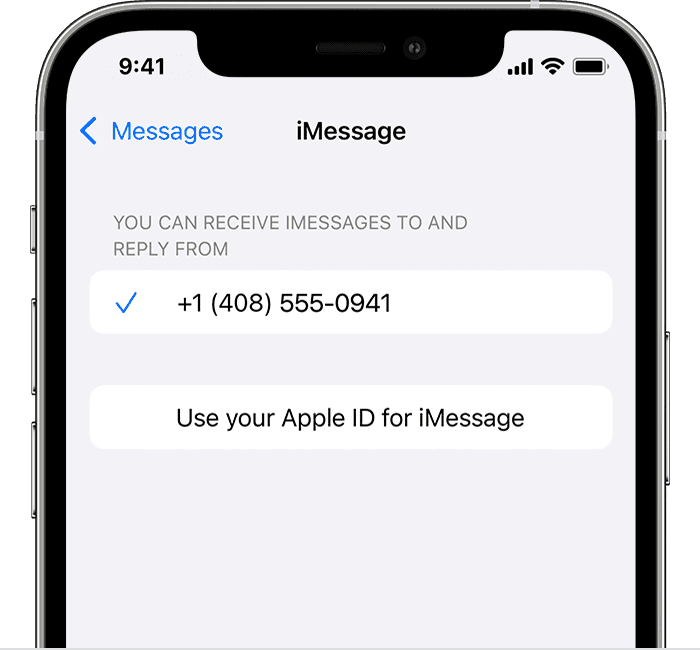
3. In the "You can receive iMessages to and Reply From" section, make sure that your phone number and Apple ID are selected.
4. Go to Settings > FaceTime and make sure that your phone number and Apple ID are selected in the "You can be reached by FaceTime at" section.
On your other devices, you can now turn on the phone number that you just set up:
For additional information, check out this link: Add or remove your phone number in Messages or FaceTime - Apple Support
These steps will help ensure your device is working with ease and can fix common issues like the ones you’re experiencing.
Kindest regards!
Hey there, and welcome to Apple Support Communities zaniyay,
We can certainly understand your concern and can help provide some insight.
We recommend checking out these steps on how to add and remove your phone number on iMessages.
" Set up your phone number
On your iPhone:
3. In the "You can receive iMessages to and Reply From" section, make sure that your phone number and Apple ID are selected.
4. Go to Settings > FaceTime and make sure that your phone number and Apple ID are selected in the "You can be reached by FaceTime at" section.
On your other devices, you can now turn on the phone number that you just set up:
For additional information, check out this link: Add or remove your phone number in Messages or FaceTime - Apple Support
These steps will help ensure your device is working with ease and can fix common issues like the ones you’re experiencing.
Kindest regards!
Vertifyingbto find number on iMessage

