Cannot share to iMessage
On my iPhone 12 Pro, on the latest iOS, when I try to share a link or a photo I only get suggestions for my WhatsApp and Viber contacts but not for my iMessage contacts. Can you please help me?
iPhone 12 Pro
On my iPhone 12 Pro, on the latest iOS, when I try to share a link or a photo I only get suggestions for my WhatsApp and Viber contacts but not for my iMessage contacts. Can you please help me?
iPhone 12 Pro
Hello nickex,
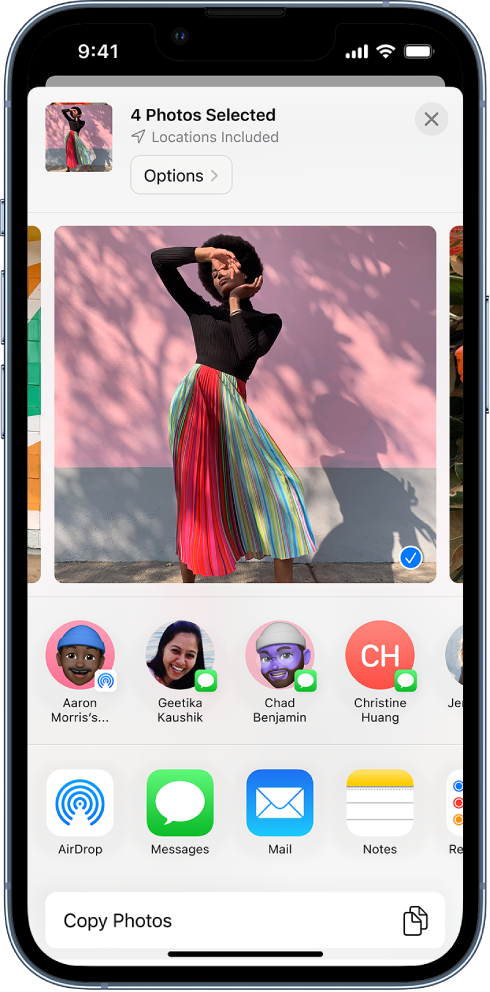
When you attempt to share something, suggestions will be provided based on your usage and common contacts towards the top. These may change based on your recent usage of these apps and which contacts you were using.
You should be able to select the option for Messages under these suggested apps and contacts. You should see an option for AirDrop, Messages, Mail, etc. See the image below for reference.
Learn more here: Share photos and videos on iPhone
Share photos and videos on iPhone
You can share photos and videos from the Photos appin Mail or Messages, or other apps you install. Photos even selects your best photos from an event and recommends people you may want to share them with.
Share photos and videos
- Share a single photo or video: Open the photo or video, tap, then choose a share option.
- Share multiple photos or videos: When viewing a screen with multiple thumbnails, tap Select, then tap the thumbnail of the photos and videos you want to share. Tap
- Share photos or videos from a day or month: Tap Library, tap Days or Months, tap, then tap Share Photos and choose a share option.
When iCloud Photos is turned on, you can share multiple full-quality photos with an iCloud link. iCloud links remain available for 30 days, can be viewed by anyone, and can be shared using any app, such as Messages or Mail.
You can also use Shared Albums to share photos and videos with just the people you choose. See Use iCloud Shared Albums with iPhone.
Note: The size limit of attachments is determined by your service provider. For devices or services that don’t support Live Photos, a Live Photo is shared as a still photo.
Let us know if that helps out, take care!
nickex,
Thanks for clarifying. These suggestions are automatically generated based on your device usage. You will see this change over time. If this is something you'd like to be able to customize we'd encourage you to leave that feedback here: Product Feedback - Apple
Take care.
Hello nickex,
Since this only happens with your iPhone, and your iPhone is all up to date, you'll want to reach out to Apple Support: Contact - Official Apple Support They'll be in the best position to look into this further.
Take care.
This helps, thank you! I was not clear enough it seems though. I do see the option to share to iMessage but I don’t see any of my contacts that I have sent iMessage to appear on the list. It only shows Viber and WhatsApp contacts there.
[Image Edited by Moderator to Remove Personal Information]
Thank you for the reply! The only thing is that I used to see my iMessage contacts show up there on my iPhone. They still show up on my iPad. But now, no matter how many people I text and iMessage, none of those comes up as a suggestion on my iPhone. Somehow iMessage is blocked from that list. The list only shows Viber and WhatsApp contacts that I have recently interacted with. This changed sometime last year.
Cannot share to iMessage