Black iMessage Bubble

I have my messages set up to come to my iPhone and my mac. I just opened my computer and I had a message notification, but not one on my phone...the message was sent to me on Saturday and another on Sunday. When I messaged to person back, it still does not show up on my phone. AND the initial message they sent had a black bubble instead of a blue bubble; every message since the initial has been regular (blue and gray bubbles). They also sent me a payment via Apple Pay, but I didn't get a notification. WTF?!


iPhone 14 Pro

Posted on Jan 23, 2023 11:21 AM

Reply
5 replies

Jan 25, 2023 2:30 PM in response to Shanee8126

Shanee8126,


Thanks for letting us know. Next, have you tried restarting your device to see if that positively impacts the issue you’re experiencing as it pertains to the Messages app on your iPhone? If not, please try that by following the steps in the link below.


Restart your iPhone - Apple Support


1) Press and hold either volume button and the side button until the power-off slider appears.
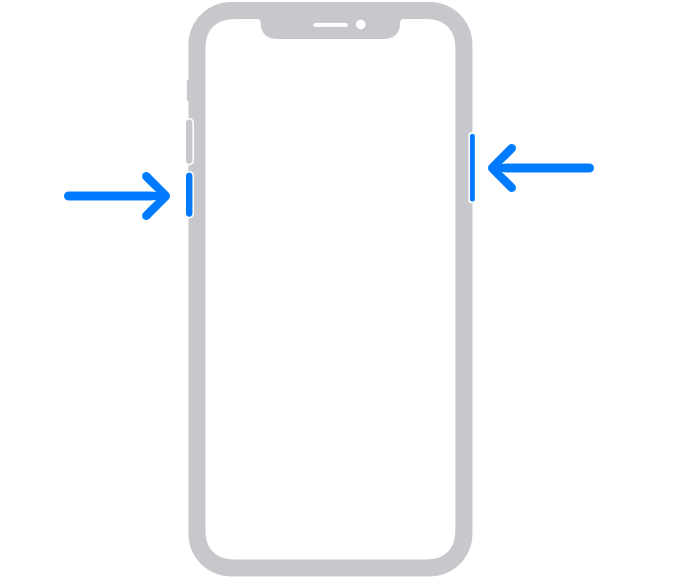
The volume button is located on the left side of the device, and the side button is located on the right
2) Drag the slider, then wait 30 seconds for your device to turn off. If your device is frozen or unresponsive, force restart your device.
3) To turn your device back on, press and hold the side button (on the right side of your iPhone) until you see the Apple logo.


We recommend the steps above because while a restart can seem unimportant, it can resolve many minor issues with the device.


Also, use the link below to double-check to make sure that the contact you're referring to hasn't accidentally been blocked.


Block phone numbers, contacts, and emails on your iPhone or iPad - Apple Support


Please let us know the outcome after giving the above steps a try.


Thanks for using the Apple Support Communities.


Cheers!

Jan 25, 2023 10:50 AM in response to Shanee8126

Hello Shanee8126,


Make sure you have text message forwarding turned on to help resolve your issue:

Forward SMS/MMS text messages from your iPhone to your Mac or iPad - Apple Support


Automatically forward texts to your other devices
1. Make sure that you're signed in to iMessage with the same Apple ID on each device:
iPhone or iPad: Check the Apple ID shown in Settings > Messages > Send & Receive.
Mac: Open the Messages app, choose Messages > Settings (or Preferences), then click iMessage. Check the Apple ID shown.
2. On your iPhone, go to Settings > Messages > Text Message Forwarding.
If you don't see Text Message Forwarding, go to Settings > Messages. Turn off iMessage, then turn it back on. Tap Send & Receive, tap Use Your Apple ID for iMessage, then sign in with the same Apple ID used on your other devices.
3. Choose which devices can send and receive text messages from your iPhone:


Best Regards.


This thread has been closed by the system or the community team. You may vote for any posts you find helpful, or search the Community for additional answers.

Black iMessage Bubble

Welcome to Apple Support Community
A forum where Apple customers help each other with their products. Get started with your Apple Account.
