I keep getting a notification saying that my number will continue to be registered for I message and FaceTime you can change this in messages settings. Why am I seeing this both FaceTime and iMessage work ok

Why am I seeing this and can I remove the notification?

iPhone 14 Plus, iOS 16

Posted on Jan 25, 2023 4:27 AM

Reply
Question marked as Top-ranking reply

Posted on Jan 26, 2023 3:16 PM

Hello Simonbambi,


Did you recently change numbers or wireless providers? We ask because this message you are receiving may be related to a change like that.


If you would like to use your number with iMessage, make sure to follow the steps here to add it to iMessage settings: Add or remove your phone number in Messages or FaceTime

  1. "Go to Settings > Messages and make sure iMessage is turned on. You may need to wait a moment for it to be activated.
  2. Tap Send & Receive. If you see "Use your Apple ID for iMessage", tap it and sign in with the same Apple ID that you use on your Mac, iPad and iPod touch.
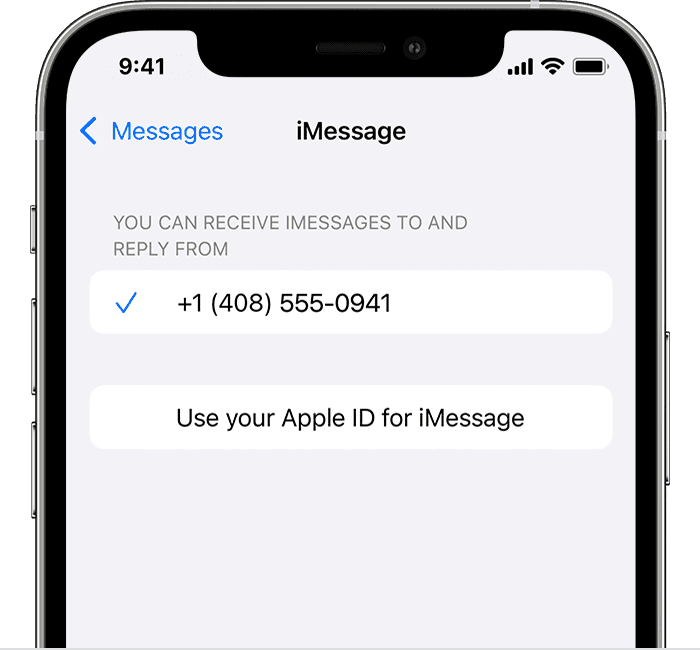
iPhone showing how to select iMessage settings


3. In the "You can receive iMessages to and Reply From" section, make sure your phone number and Apple ID are selected.

4. Go to Settings > FaceTime and make sure your phone number and Apple ID are selected in the "You can be reached by FaceTime on" section."


We also recommend restarting your device and keeping it updated as those steps assure you have cleared out any minor software issues and are running the most current version.


Restart your iPhone - Apple Support

Update your iPhone or iPad - Apple Support


If you still have questions, reach out to Apple Support directly, as this may require closer guidance: Get Support


Cheers!


1 reply
Question marked as Top-ranking reply

Jan 26, 2023 3:16 PM in response to Simonbambi

Hello Simonbambi,


Did you recently change numbers or wireless providers? We ask because this message you are receiving may be related to a change like that.


If you would like to use your number with iMessage, make sure to follow the steps here to add it to iMessage settings: Add or remove your phone number in Messages or FaceTime

  1. "Go to Settings > Messages and make sure iMessage is turned on. You may need to wait a moment for it to be activated.
  2. Tap Send & Receive. If you see "Use your Apple ID for iMessage", tap it and sign in with the same Apple ID that you use on your Mac, iPad and iPod touch.

iPhone showing how to select iMessage settings


3. In the "You can receive iMessages to and Reply From" section, make sure your phone number and Apple ID are selected.

4. Go to Settings > FaceTime and make sure your phone number and Apple ID are selected in the "You can be reached by FaceTime on" section."


We also recommend restarting your device and keeping it updated as those steps assure you have cleared out any minor software issues and are running the most current version.


Restart your iPhone - Apple Support

Update your iPhone or iPad - Apple Support


If you still have questions, reach out to Apple Support directly, as this may require closer guidance: Get Support


Cheers!


This thread has been closed by the system or the community team. You may vote for any posts you find helpful, or search the Community for additional answers.

I keep getting a notification saying that my number will continue to be registered for I message and FaceTime you can change this in messages settings. Why am I seeing this both FaceTime and iMessage work ok

Welcome to Apple Support Community
A forum where Apple customers help each other with their products. Get started with your Apple Account.