How do I use my Apple wallet to make ourchases
How do I use my Apple wallet to make purchases
Apple Watch SE, watchOS 9
How do I use my Apple wallet to make purchases
Apple Watch SE, watchOS 9
Hello ddorothyoz,
Thanks for posting in the Apple Support Communities. We're happy to look into this with you. Depending on the device you're using, the process is a bit different. If using an iPhone, you can access your cards in Apple Wallet for contactless payment using the actions below:
Use Apple Pay for contactless payments on iPhone - Apple Support
Pay with your default card on an iPhone with Face ID
1. Double-click the side button.
2. When your default card appears, glance at iPhone to authenticate with Face ID, or enter your passcode.
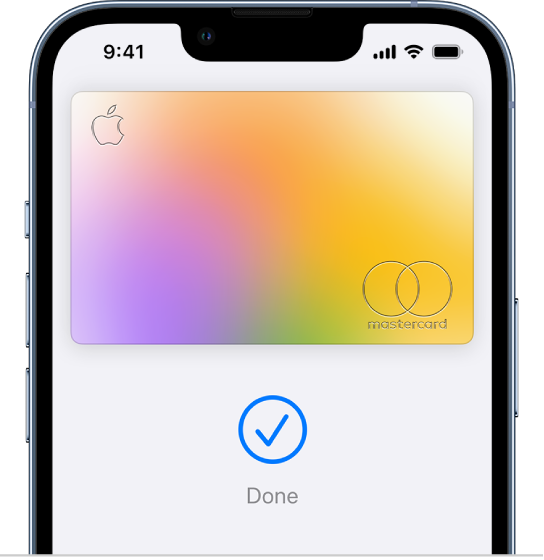
3. Hold the top of your iPhone near the card reader until you see Done and a checkmark on the screen.
If the device you're using is Apple Watch, the steps from article, Make purchases with Apple Watch - Apple Support will help with the process.
Pay for a purchase in a store with Apple Watch
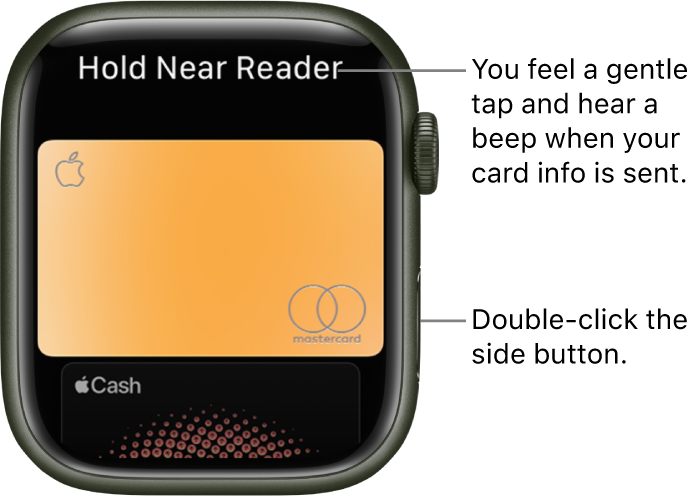
1. Double-click the side button.
2. Scroll to choose a card.
3. Hold your Apple Watch within a few centimeters of the contactless card reader, with the display facing the reader.
A gentle tap and beep confirm that the payment information was sent. You receive a notification in Notification Center when the transaction is confirmed.
For cards that support it, you also receive a notification for purchases made with any card you’ve added to Wallet, even if you didn’t make it with your Apple Watch, iPad, or an iOS device.
You can turn off notifications and history for individual cards within Wallet. Just open the Apple Watch app on your iPhone, tap My Watch, go to Wallet & Apple Pay, tap a card, tap Transactions, then turn Show History and Allow Notifications on or off.
If you have additional questions, or something isn't working correctly with the feature, let us know. You can also reach out to Apple Support for assistance at Get Support.
Best regards.
Hello ddorothyoz,
Thanks for posting in the Apple Support Communities. We're happy to look into this with you. Depending on the device you're using, the process is a bit different. If using an iPhone, you can access your cards in Apple Wallet for contactless payment using the actions below:
Use Apple Pay for contactless payments on iPhone - Apple Support
Pay with your default card on an iPhone with Face ID
1. Double-click the side button.
2. When your default card appears, glance at iPhone to authenticate with Face ID, or enter your passcode.
3. Hold the top of your iPhone near the card reader until you see Done and a checkmark on the screen.
If the device you're using is Apple Watch, the steps from article, Make purchases with Apple Watch - Apple Support will help with the process.
Pay for a purchase in a store with Apple Watch
1. Double-click the side button.
2. Scroll to choose a card.
3. Hold your Apple Watch within a few centimeters of the contactless card reader, with the display facing the reader.
A gentle tap and beep confirm that the payment information was sent. You receive a notification in Notification Center when the transaction is confirmed.
For cards that support it, you also receive a notification for purchases made with any card you’ve added to Wallet, even if you didn’t make it with your Apple Watch, iPad, or an iOS device.
You can turn off notifications and history for individual cards within Wallet. Just open the Apple Watch app on your iPhone, tap My Watch, go to Wallet & Apple Pay, tap a card, tap Transactions, then turn Show History and Allow Notifications on or off.
If you have additional questions, or something isn't working correctly with the feature, let us know. You can also reach out to Apple Support for assistance at Get Support.
Best regards.
How do I use my Apple wallet to make ourchases