
Apple Pay works on phone, but can not set it up on watch
I have set up ApplePay on iPhone XR, but when I try to add the cards to my Apple Watch 5, I am told that it can not set up Apple Pay.
Apple Watch Series 5, watchOS 9
I have set up ApplePay on iPhone XR, but when I try to add the cards to my Apple Watch 5, I am told that it can not set up Apple Pay.
Apple Watch Series 5, watchOS 9
Hi Pemela_R,
For help with adding card to Apple Pay to use on your Apple Watch, test adding the card via your iPhone using the steps below found here: Set up Apple Pay on Apple Watch - Apple Support
"Add a card to Apple Watch with your iPhone
Your card issuer may require additional steps to verify your identity.
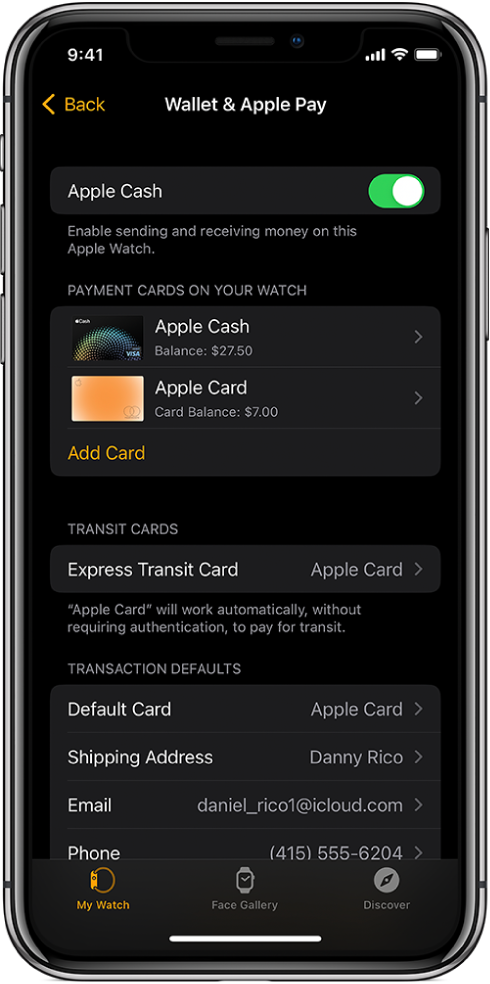 "
"
If the issue continues, test directly from your Apple Watch with the steps in the section "Add a card on Apple Watch" in the same article.
Test a normal restart of both your iPhone and Apple Watch if the issue remains, and ensure all iOS and watchOS updates are applied. We see you already checked out the resource on updating, but have included it below if you need guidance during the process.
Update your iPhone or iPad - Apple Support
Update your Apple Watch - Apple Support
If all steps here: If you can't add a card to Apple Wallet to use with Apple Pay are completed and the issue remains, reach out to Apple Support directly to further assist.
Contact - Official Apple Support
Contact Apple for support and service - Apple Support
Best.
Hi Pemela_R,
For help with adding card to Apple Pay to use on your Apple Watch, test adding the card via your iPhone using the steps below found here: Set up Apple Pay on Apple Watch - Apple Support
"Add a card to Apple Watch with your iPhone
Your card issuer may require additional steps to verify your identity.
"
If the issue continues, test directly from your Apple Watch with the steps in the section "Add a card on Apple Watch" in the same article.
Test a normal restart of both your iPhone and Apple Watch if the issue remains, and ensure all iOS and watchOS updates are applied. We see you already checked out the resource on updating, but have included it below if you need guidance during the process.
Update your iPhone or iPad - Apple Support
Update your Apple Watch - Apple Support
If all steps here: If you can't add a card to Apple Wallet to use with Apple Pay are completed and the issue remains, reach out to Apple Support directly to further assist.
Contact - Official Apple Support
Contact Apple for support and service - Apple Support
Best.
Apple Pay works on phone, but can not set it up on watch

