Playlist creation
Can I make playlists in Apple Music without syncing my library?
MacBook Pro 15″, macOS 13.0
Can I make playlists in Apple Music without syncing my library?
MacBook Pro 15″, macOS 13.0
Hey there, and welcome to Apple Support Communities Bad Seed,
We can certainly understand your concern and can help provide some insight.
To answer your question, you should be able to create a playlist on Apple Music without syncing your library to a device. We recommend checking out this link for more details on how to create a playlist on your device.
"Create a playlist on your Mac or PC
Want to add music to an existing playlist? Just drag and drop music to a playlist in the sidebar. "
For additional information, check out this link: How to make a playlist in the Apple Music app - Apple Support
These steps will help ensure your device is working with ease and can fix common issues like the ones you’re experiencing.
Kindest regards!
Thanks for that information Bad Seed,
Use Sync Library to access your music library across your devices - Apple Support -- One of the most important features with Apple Music is Sync Library. It takes the music in your iTunes/Music library and matches them to the songs and albums in the iCloud Music Library.
Search for music in Music on Mac - Apple Support -- Instead of having to merge music libraries, you can search for the music within Apple Music and add it to your Apple Music Library. This way, you’ll keep both libraries separate.
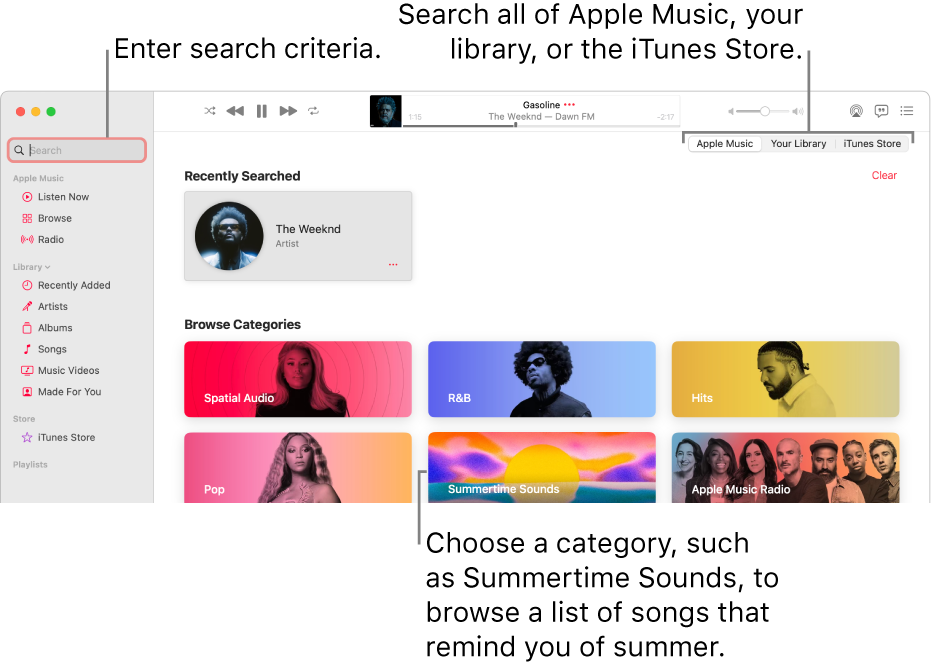
Search Apple Music, your library, or the iTunes Store
1. In the Music appon your Mac, click the search field in the top-left corner.
2. Do one of the following:
• Choose a recent search: Choose something you recently searched for, such as a song, artist, or album.
• Choose from categories: Select a genre, mood, or activity, such as Dance or Fitness.
• Search Apple Music: Enter what you’re searching for (such as a song title or lyric), click Apple Music on the right, then select a suggestion or press Return.
• Search your library: Enter what you’re searching for (such as an artist or album name), click Your Library on the right, then select a suggestion or press Return.
• Search the iTunes Store: Enter what you’re searching for (such as an artist or album name), click iTunes Store on the right, then select a suggestion or press Return.
If you don’t see iTunes Store, choose Music > Settings, click General, make sure iTunes Store is selected, then click OK.
Your search results appear in the main Music window.
To start a new search, delete the text from the search field or click the Delete buttonin the search field.
Feel free to get back to us with any questions or problems you may have.
All the best.
Hey there!
Good question. So first, do you subscribe to the Apple Music service? Or no?
Do you use more than one Apple ID for music?
Do you happen to know if you have more than one Music Library on this Mac?
If you have other Apple devices, do you have the same issue?
Thanks, those answers may help out.
My first inclination was to create a new Music Library, but it would depend on those answers, thanks!
Thank you for the suggestion. Unfortunately, if I drag and drop into a new playlist I am asked to Merge Library (which is what I am trying to avoid).
Thanks for the reply Jeff_W. Unfortunately, your information does not provide anything about creating a playlist without merging libraries. Would you have that information?
Thank you
Playlist creation