Hi there!
To adjust your Do Not Disturb settings, follow these steps from Use Do Not Disturb with Focus on your iPhone or iPad (that you may have already looked over):
Change your Do Not Disturb settings
If you don't want to be disturbed at a certain time, you can set a schedule and change other Do Not Disturb features to help you concentrate.
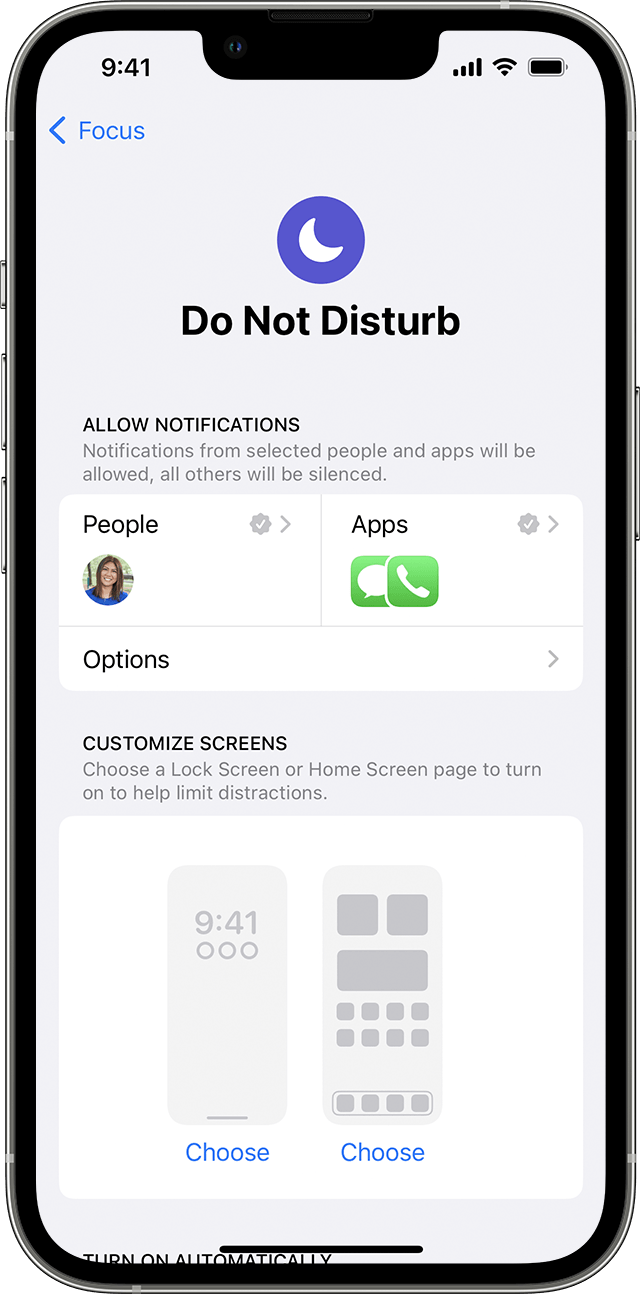
1. Go to Settings > Focus.
2. Tap Do Not Disturb.
3. You can select allowed or silenced notifications from people and apps, connect your Lock Screen or Home Screen, have this Focus turn on automatically, and add Focus filters.
You can also manually turn it off in Control Center. To do this, touch and hold Focus in the Control Center, then tap Do Not Disturb to enable/disable this feature.
If this continues after disabling Do Not Disturb, then this article can help resolve what's happening: If you hear no sound or distorted sound from your iPhone, iPad, or iPod touch speaker
Take care!


