
Notes have disappeared
This morning all my many Notes were there & now when I just clicked on Notes in the dock, it opened to No Notes. what to do?
iMac 21.5″, macOS 11.6
This morning all my many Notes were there & now when I just clicked on Notes in the dock, it opened to No Notes. what to do?
iMac 21.5″, macOS 11.6
Hey 1917MOEN,
If you recently removed an email account from your device or signed out of an account or out of iCloud, that could cause notes to go missing if they were stored in that account. You can learn more about that here: Add or remove accounts in Notes on Mac - Apple Support
We'd also suggest checking to see if the missing notes are located in the recently deleted section. This article explains how: Delete a note on Mac - Apple Support
"View a recently deleted note
 on your Mac, click Recently Deleted, then select the note.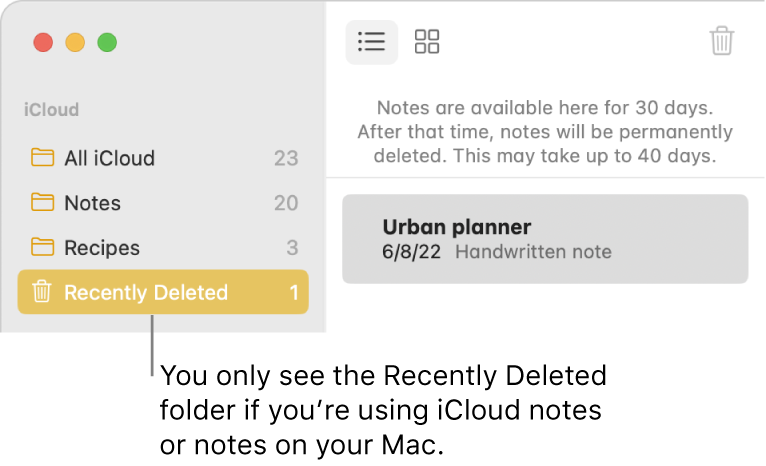
 (or press Delete).
"
Thanks!
Hey 1917MOEN,
If you recently removed an email account from your device or signed out of an account or out of iCloud, that could cause notes to go missing if they were stored in that account. You can learn more about that here: Add or remove accounts in Notes on Mac - Apple Support
We'd also suggest checking to see if the missing notes are located in the recently deleted section. This article explains how: Delete a note on Mac - Apple Support
"View a recently deleted note
on your Mac, click Recently Deleted, then select the note. (or press Delete)."
Thanks!
THANK YOU WinsC1 for your clear, detailed, graphic, very helpful answer!
I was despondent when they were no where to be found-you have saved the day & then some-Kristi
Hello 1917MOEN!,
Thanks for the update! We're glad to hear you were able to get that resolved.
Thanks for using Apple Support Communities.
Have a great day!
Thanks to ALL in the apple support community who have come to my rescue MANY times!
Notes have disappeared


