Watch battery died. How do I add steps from iPhone health app
Watch battery died. How do I add steps from iPhone health app
Apple Watch Series 8
Watch battery died. How do I add steps from iPhone health app
Apple Watch Series 8
Hi there bevil9933,
You can manually add data to the Health app with the steps below:
The Health app automatically counts your steps, walking, and running distances. And, if you have an Apple Watch, it automatically tracks all of your Activity data. If you're already using another app to track your health, you can try adding data from the app to Health, so all your information is in one place.
Enter information about your health
1. Open the Health app and tap the Browse tab.
2. Tap a category, like Activity.
3. Tap a subcategory, like Steps.
4. Tap Add Data in the upper-right corner.
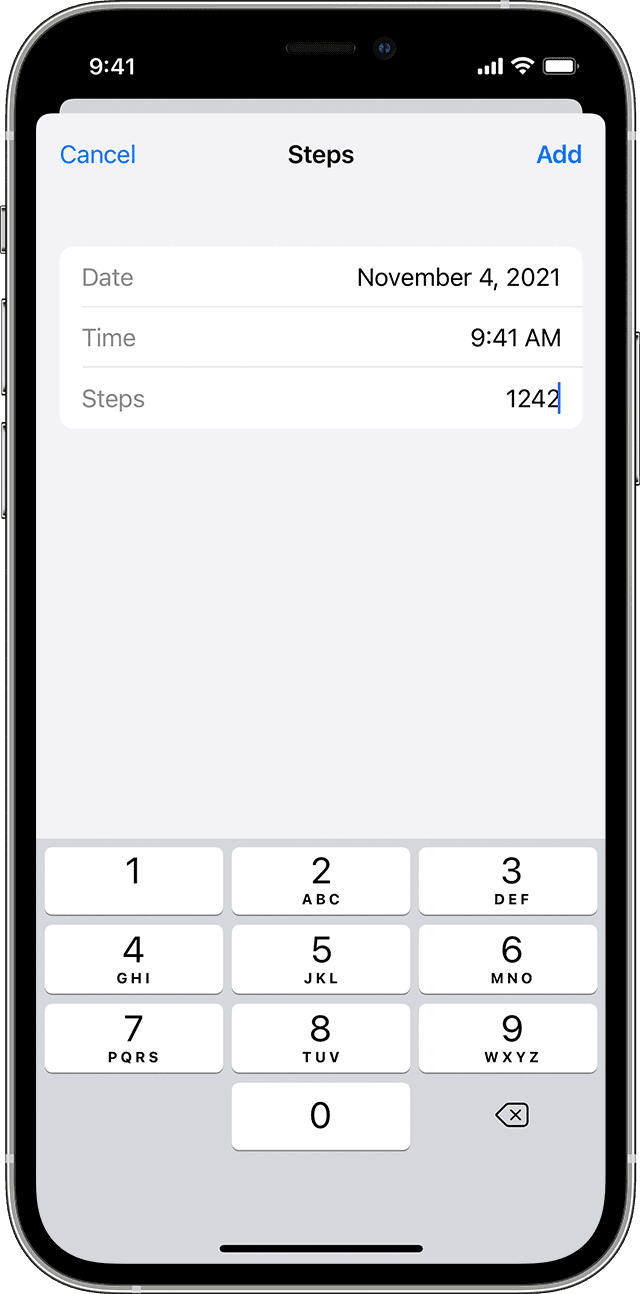
5. Enter the date, time, and data for that activity.
6. When you're finished, tap Add.
You'll find this information here: Manage Health data on your iPhone, iPod touch, or Apple Watch - Apple Support
If you need more help, you'll want to reach out to Apple Support directly. Their Health Support team is best-equipped to take a closer look and provide some additional guidance. This link will help you reach them: Contact - Official Apple Support
Take care.
Hi there bevil9933,
You can manually add data to the Health app with the steps below:
The Health app automatically counts your steps, walking, and running distances. And, if you have an Apple Watch, it automatically tracks all of your Activity data. If you're already using another app to track your health, you can try adding data from the app to Health, so all your information is in one place.
Enter information about your health
1. Open the Health app and tap the Browse tab.
2. Tap a category, like Activity.
3. Tap a subcategory, like Steps.
4. Tap Add Data in the upper-right corner.
5. Enter the date, time, and data for that activity.
6. When you're finished, tap Add.
You'll find this information here: Manage Health data on your iPhone, iPod touch, or Apple Watch - Apple Support
If you need more help, you'll want to reach out to Apple Support directly. Their Health Support team is best-equipped to take a closer look and provide some additional guidance. This link will help you reach them: Contact - Official Apple Support
Take care.
Watch battery died. How do I add steps from iPhone health app