Slide Size in iCloud Keynote

Hello,


I'm working with Keynote presentations online via iCloud Keynote, using BootCamp and Windows 10.


Does anyone know how to set up the slide size and shape? For example, how to set the slide dimensions to A3 landscape?


Also, can I change an existing presentation from portrait to landscape?


Thanks very much......


MacBook Air 13″, macOS 10.14

Posted on Feb 6, 2023 12:28 AM

Reply
2 replies

Feb 7, 2023 2:35 PM in response to annanc14

Hello annanc14,


We would like to see how we can help you with using Keynote for iCloud. Check out this link for help customizing the presenter display: Play a presentation on your computer in Keynote for iCloud - Apple Support


"You can view and modify the contents of the presenter display at any time when you’re playing a presentation. For example, you can choose to show or hide the current or next slide, edit your presenter notes, and change the font size.

  1. If the slideshow isn’t already playing, click the Play button  in the toolbar (if the presentation is also available on Keynote Live, a pop-up menu appears; choose Play on This Computer from the pop-up menu).
  2. Move your pointer over the bottom center of the slideshow, and when the controls appear, click the Open Presenter Display button .
  3. On the top-right side of the presenter display, click the Presenter Display Options button , then select the items you want to see in the window.
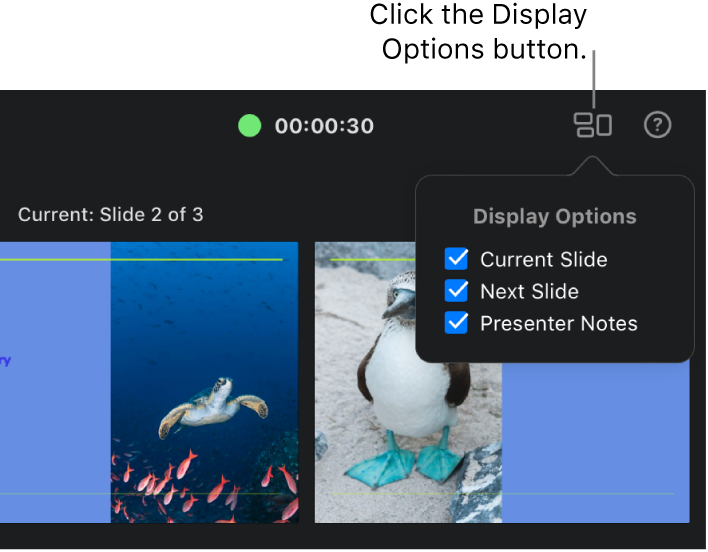
  4. The presenter display with the Display Options pop-up menu in the upper right open to show the display options. The Current Slide, Next Slide, and Presenter Notes checkboxes are all selected.
  5. To show or hide the slide navigator, click the Slide Navigator button  in the upper left.
  6. To change the presenter notes, move your pointer over the Notes field, then do any of the following:
    • Add or edit your notes: Click the Edit button, start typing or select and edit text you want to change, then click Done.
    • Change the text font size: Click a font size button.
    • Change the text color to black or white: Click Invert Colors. If your note text color is neither black nor white, the it doesn’t change when you click Invert Colors. (This setting affects only your notes; other text colors in your presentation remain unchanged.)"


Cheers!


Feb 8, 2023 7:55 AM in response to Sean_B1

Thanks very much for your reply.


I should have given a bit more information. My presentation will be printed to make posters, so I need to choose a specific size for the slide, so it can be printed to A3 paper.


On the Mac version of Keynote it was possible to choose the exact size of the slides.


I can't find that in the iCloud version of Keynote though.


Thanks

This thread has been closed by the system or the community team. You may vote for any posts you find helpful, or search the Community for additional answers.

Slide Size in iCloud Keynote

Welcome to Apple Support Community
A forum where Apple customers help each other with their products. Get started with your Apple Account.