
Trust certificate
How do I get rid of the trust certificate warning it keeps coming up but I cannot change any details about it on
my iPhone
iPhone 13
How do I get rid of the trust certificate warning it keeps coming up but I cannot change any details about it on
my iPhone
iPhone 13
Hey there and welcome to Apple Support Communities patricia from west palm beach,
We can certainly understand your concern and can help provide some insight.
We recommend checking out these steps for more information on how to trust certificates and see if that matches up with your procedures.
" Trust manually installed certificate profiles in iOS and iPadOS
If you manually install a profile that contains a certificate payload in iOS and iPadOS, that certificate isn't automatically trusted for SSL. Learn how to manually trust an installed certificate profile.

This article is intended for system administrators for a school, business, or other organization.
You must manually turn on trust for SSL/TLS when you install a profile that is sent to you via email or downloaded from a website.
If you want to turn on SSL/TLS trust for that certificate, go to Settings > General > About > Certificate Trust Settings. Under "Enable full trust for root certificates," turn on trust for the certificate.
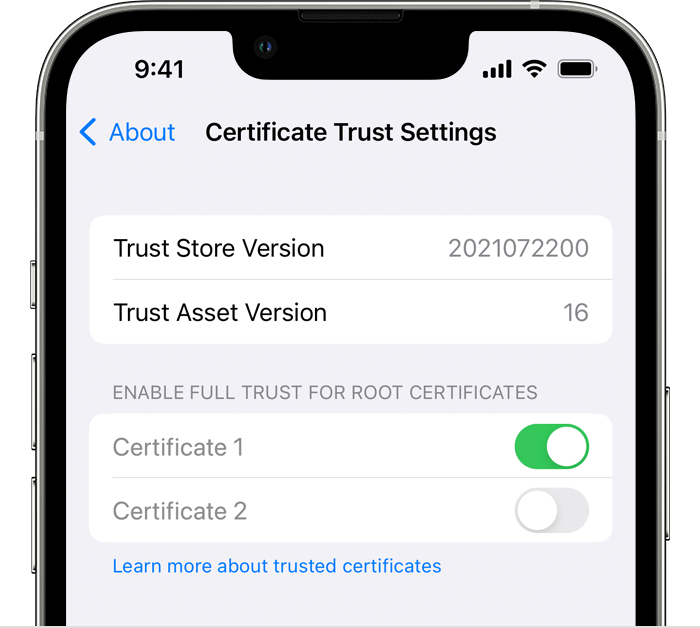
Apple recommends deploying certificates via Apple Configurator or Mobile Device Management (MDM). Certificate payloads are automatically trusted for SSL when installed with Configurator, MDM, or as part of an MDM enrollment profile. "
For additional information, check out this link: Trust manually installed certificate profiles in iOS and iPadOS - Apple Support
These steps will help ensure your device is working with ease and can fix common issues like the ones you’re experiencing.
Kindest regards!
Hey there and welcome to Apple Support Communities patricia from west palm beach,
We can certainly understand your concern and can help provide some insight.
We recommend checking out these steps for more information on how to trust certificates and see if that matches up with your procedures.
" Trust manually installed certificate profiles in iOS and iPadOS
If you manually install a profile that contains a certificate payload in iOS and iPadOS, that certificate isn't automatically trusted for SSL. Learn how to manually trust an installed certificate profile.
This article is intended for system administrators for a school, business, or other organization.
You must manually turn on trust for SSL/TLS when you install a profile that is sent to you via email or downloaded from a website.
If you want to turn on SSL/TLS trust for that certificate, go to Settings > General > About > Certificate Trust Settings. Under "Enable full trust for root certificates," turn on trust for the certificate.
Apple recommends deploying certificates via Apple Configurator or Mobile Device Management (MDM). Certificate payloads are automatically trusted for SSL when installed with Configurator, MDM, or as part of an MDM enrollment profile. "
For additional information, check out this link: Trust manually installed certificate profiles in iOS and iPadOS - Apple Support
These steps will help ensure your device is working with ease and can fix common issues like the ones you’re experiencing.
Kindest regards!
Trust certificate

