
I can't change between the mode using the press and hold gesture on both AirPods
how can I check out if there anything wrong with my airpods?
[Re-Titled by Moderator]
how can I check out if there anything wrong with my airpods?
[Re-Titled by Moderator]
Good afternoon lamanhlucia,
Welcome to the Apple Support Communities!
It sounds like you are having issues switching modes with your AirPods, and we'd like to help.
Can you provide a little more information about what you are experiencing?
Which AirPods do you have? Identify your AirPods
Which iPhone are they paired with and what version of iOS is showing in Settings > General > About?
Have you ever been able to switch between modes with these AirPods?
Your responses to these questions will help us understand the issue better and work towards a resolution with you.
It looks like you reviewed the Connect your AirPods and AirPods Pro to your iPhone article. If you need more help on how to use the AirPods, check out this resource:
Change the settings of your AirPods and AirPods Pro
"Change the press-and-hold action on AirPods Pro
AirPods Pro have three noise control modes: Active Noise Cancellation, Transparency mode, and Off. You can switch among all three noise control modes in Control Center or Settings.
By default, when you press and hold the force sensor on the stem of your left or right AirPod, your AirPods Pro switch between Active Noise Cancellation and Transparency mode. You can change which noise control modes the press-and-hold action uses:
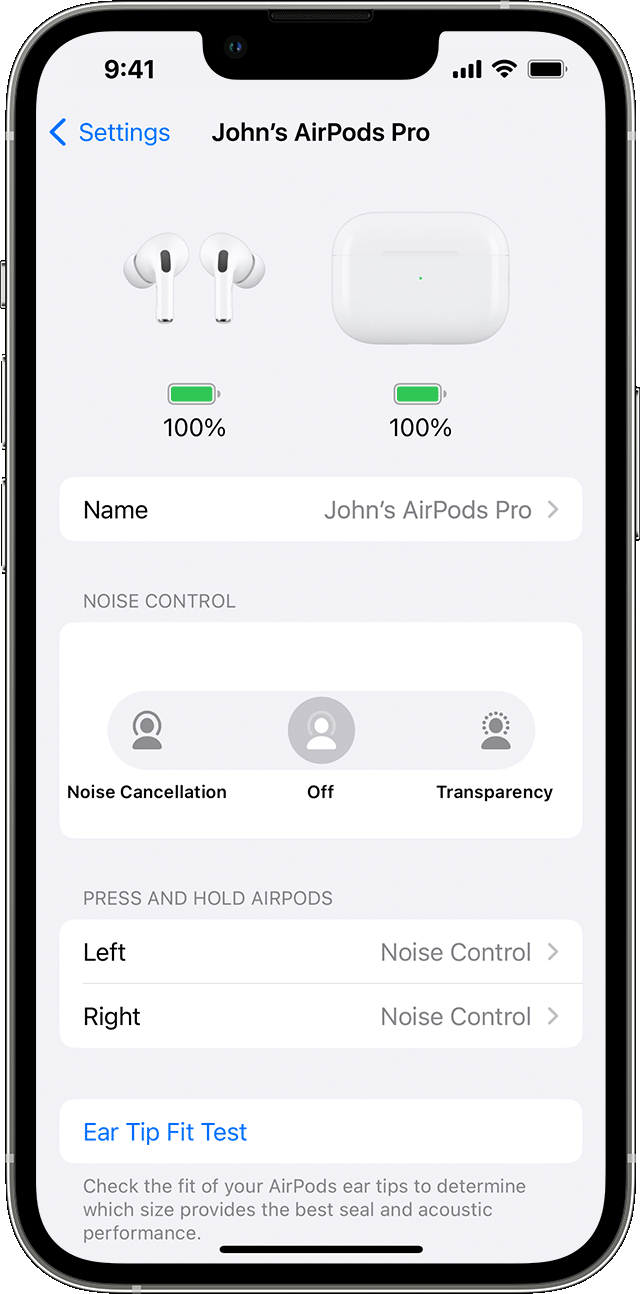
 next to your AirPods in the list of devices.
You can also set the press-and-hold action to allow you to use Siri. In the AirPods Pro settings screen, tap Left or Right, then select Siri. You can have one AirPod set for Siri and the other set to change noise control modes.
If the issue persists, please reply to this thread and we'll do our best to help you!
Take care.
Good afternoon lamanhlucia,
Welcome to the Apple Support Communities!
It sounds like you are having issues switching modes with your AirPods, and we'd like to help.
Can you provide a little more information about what you are experiencing?
Which AirPods do you have? Identify your AirPods
Which iPhone are they paired with and what version of iOS is showing in Settings > General > About?
Have you ever been able to switch between modes with these AirPods?
Your responses to these questions will help us understand the issue better and work towards a resolution with you.
It looks like you reviewed the Connect your AirPods and AirPods Pro to your iPhone article. If you need more help on how to use the AirPods, check out this resource:
Change the settings of your AirPods and AirPods Pro
"Change the press-and-hold action on AirPods Pro
AirPods Pro have three noise control modes: Active Noise Cancellation, Transparency mode, and Off. You can switch among all three noise control modes in Control Center or Settings.
By default, when you press and hold the force sensor on the stem of your left or right AirPod, your AirPods Pro switch between Active Noise Cancellation and Transparency mode. You can change which noise control modes the press-and-hold action uses:
next to your AirPods in the list of devices.You can also set the press-and-hold action to allow you to use Siri. In the AirPods Pro settings screen, tap Left or Right, then select Siri. You can have one AirPod set for Siri and the other set to change noise control modes.
If the issue persists, please reply to this thread and we'll do our best to help you!
Take care.
I can't change between the mode using the press and hold gesture on both AirPods

