Greetings Hytham289,
Thanks for connecting with Apple Support Communities.
We'd like to assist you with your Apple Watch and provide you with steps on how you can control the audio.
Control playback in the Music app:
"Turn the Digital Crown to adjust volume. Use these controls to play music on your Apple Watch and iPhone:

Play the current song.

Pause playback.

Skip to the next song.

Skip to the beginning of the song; double-tap to skip to the previous song."
More details here: Apple Watch User Guide - Play music on Apple Watch
At this time, there is not a way to fast forward or rewind a song in the Music app, on Apple Watch. You can follow this link to submit your feedback to Apple directly: Apple Watch - Feedback
When you use the Audiobooks app to play audiobooks from Apple Books on your Apple Watch, you can use these steps:
"Control playback
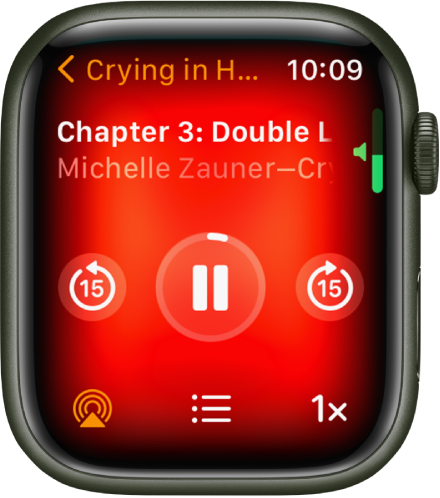
Turn the Digital Crown to adjust volume. Use these controls to play audiobooks:
Play the audiobook.
Pause playback.

Skip ahead 15 seconds.

Skip back 15 seconds.

Playback speed. Options include 1x, 1 1/4x, 1 1/2x, 1 3/4x, 2x, and 3/4x.

Choose a track or chapter."
Click here for more info: Apple Watch User Guide - Play audiobooks on Apple Watch
Let us know if this helps.
Take care.


