Hello dwttulsa,
Thank you for reaching out in Apple Support Communities. For the music to unexpectedly stop from a workout, are you noticing this behavior with any song that's playing? If you haven't tried yet, we recommend to restart both the Apple Watch and the paired iPhone. This is a step that can help resolve unexpected behavior. Here's how to restart each device:
"How to restart your Apple Watch if you have watchOS 9
- If your Apple Watch is charging, take it off the charger.
- Press and hold the side button until you see the power button
 in the upper-right corner of the display.
 - Tap the power button.
- Drag the Power Off slider.
- After your watch turns off, press and hold the side button again until you see the Apple logo.

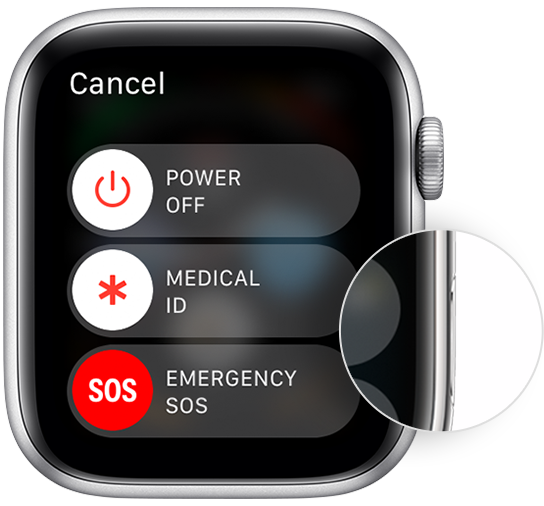
How to restart your Apple Watch if you have watchOS 8 or earlier
- If your Apple Watch is charging, take it off the charger.
- Press and hold the side button until you see the Power Off slider.
- Drag the Power Off slider.
- After your watch turns off, press and hold the side button again until you see the Apple logo."
These step are outlined here: Restart your Apple Watch - Apple Support
To restart an iPhone SE, you can follow these steps:
"How to restart your iPhone 6, 7, 8, or SE (2nd or 3rd generation)
- Press and hold the side button until the power-off slider appears.

2. Drag the slider, then wait 30 seconds for your device to turn off. If your device is frozen or unresponsive, force restart your device.
3. To turn your device back on, press and hold the side button until you see the Apple logo.
These steps are outlined in this article: Restart your iPhone - Apple Support
We look forward to hearing back from you with an update.
Kind regards.


